Direct answer: Hermes AgentAI agentAn AI program that performs work steps by itself, for example reading a message, drafting a reply, and recording the result.Open the glossary connects to WhatsApp through 2 paths. The first, the hermes whatsapp command, uses the Baileys bridge: you scan a QR code from a dedicated bot number, with no Meta Business account and no public URL. The second, hermes whatsapp-cloud, uses the official WhatsApp Business Cloud APIAPIThe official door 2 systems use to exchange data, without anybody copying it by hand.Open the glossary from Meta: it needs a Meta Business account, a Phone Number ID, a System User token, and a public HTTPS webhookWebhookAn automatic message one system sends to another the moment something happens, for example an incoming WhatsApp message.Open the glossary. For internal tests and a small team, start with Baileys. For a bot that serves customers, use the Cloud API.
Main condition: both paths answer only numbers on the allowlist or numbers that have paired. Without an allowlist the gateway denies every inbound message. Limit: Baileys is not official from Meta and carries an account restriction risk, so never use your personal number. The Cloud API follows Meta's 24-hour window: free-form replies are allowed only within 24 hours of the customer's last message, and Hermes did not support message templates for sends outside that window as of 19 September 2026.
We read the WhatsApp and WhatsApp Business Cloud API pages of the Hermes Agent documentation on 19 September 2026. On the same day we ran the hermes whatsapp wizard on Hermes Agent v0.21.3 in an Ubuntu 24.04 container: we picked the mode, filled the allowlist with a dummy number, let the wizard install the bridge, and captured the QR screen. We did not scan that QR. The number in the images is masked.
The problem: your team lives in WhatsApp, your bot does not
In Indonesia, small-business decisions happen in WhatsApp: an admin asks about stock, the owner asks for a report, a supplier sends a price. An AI chat in the browser is not part of that conversation. Hermes Agent can be, but WhatsApp is not Telegram. Telegram hands a bot an official token in 1 minute. WhatsApp gives you 2 choices with a price each: an unofficial path that is fast, or an official path that needs a business account and a public server.
This article closes the query "hermes agent whatsapp", which appeared in our Search Console without a page that answers it step by step. We describe the gateway for every platform in our article on Hermes Agent for Telegram, Discord, Slack, and WhatsApp (Indonesian). When Hermes is not installed yet, read our explanation of what Hermes Agent is first.
How the 2 WhatsApp paths work
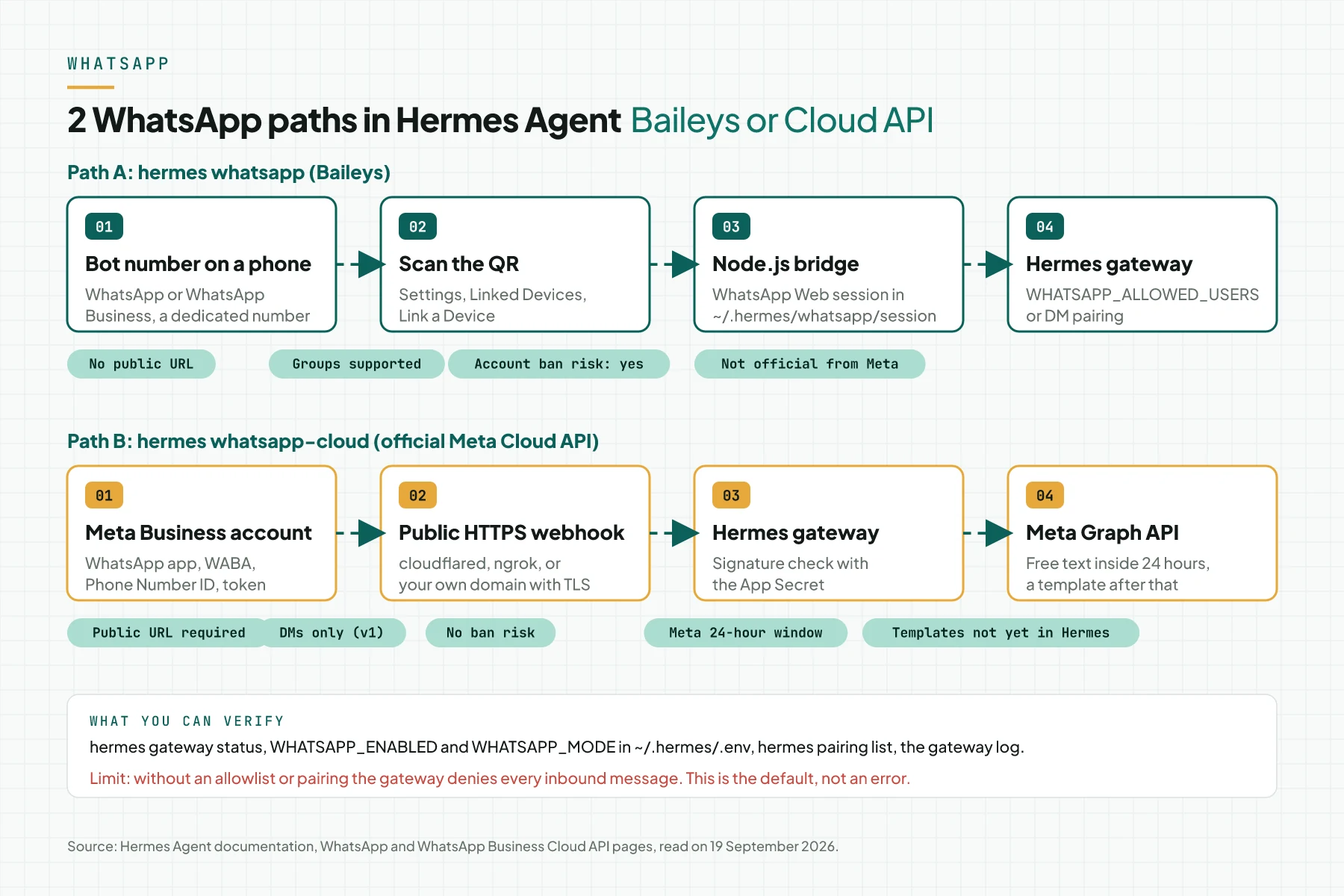
Path A: the Baileys bridge emulates WhatsApp Web
The bridge emulates a WhatsApp Web session; it does not use the WhatsApp Business APIWABAAn official WhatsApp account for a business. It sends messages through a program, not through a phone app.Open the glossary. It runs as a Node.js process managed by the Hermes gateway. The session lives in ~/.hermes/platforms/whatsapp/session and survives restarts, so you scan the QR once until the session breaks. The documentation gives 3 warnings: use a dedicated number, do not send bulk messages, and do not automate outbound messages to people who have not messaged first. WhatsApp updates the Web protocol from time to time, so update Hermes and re-pair when the bot stops. Source: the WhatsApp Setup documentation, 19 September 2026.
Path B: the official Cloud API through a webhook
The whatsapp_cloud adapter receives inbound messages as HTTPS POSTs from Meta and replies through the Graph API. The hermes whatsapp-cloud wizard asks for the Phone Number ID, the Access Token, and the App Secret, and validates each value. The number 1 mistake according to the documentation: pasting the phone number into the Phone Number ID field, while that ID is a 15 to 17 digit number below the From dropdown on the API Setup page. Temporary tokens expire after 24 hours; production uses a System User token that never expires. Source: the WhatsApp Business Cloud API documentation.
Access control: allowlist, pairing, and silence
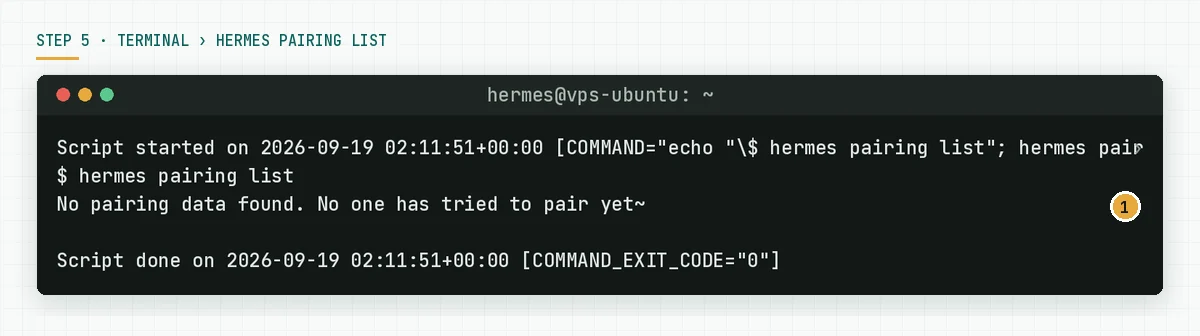
The gateway denies every user who is not allowlisted. The WHATSAPP_ALLOWED_USERS variable holds numbers with the country code and no plus sign, separated by commas. The value * allows everyone, and the documentation advises against it for a bot with terminal access. The alternative is DM pairing: a stranger receives a one-time code, and you approve it with hermes pairing approve whatsapp CODE. Codes expire after 1 hour. When the bot number must stay silent to strangers, set whatsapp.unauthorized_dm_behavior: ignore. Source: the Messaging Gateway documentation.
Message shape: 4,096-character chunks and markdown
Long answers are split automatically at 4,096 characters. Markdown **bold** becomes WhatsApp *bold*, headings become bold text, and links become text plus URL. Inbound voice messages are transcribed when an STT provider is configured; TTS replies are sent as MP3. In bot mode the agent can also send native WhatsApp polls for multiple-choice questions. Source: the same WhatsApp Setup page.
Table: Baileys compared with the Cloud API
This table condenses the comparison table in the Hermes Agent documentation on 19 September 2026.
| Item | Baileys (hermes whatsapp) | Cloud API (hermes whatsapp-cloud) |
|---|---|---|
| Account type | Personal or the WhatsApp Business app | Meta Business with a WABA |
| How it connects | Scan a QR code | Meta app, WABA, token, webhook |
| Public URL | Not needed | Required, HTTPS |
| Account ban risk | Yes, unofficial API | No, official path |
| Groups | Full support | DMs only in v1 |
| 24-hour window | None | Applies, templates required after it |
| Read receipts and typing | No | Yes |
| Interactive buttons | Text fallback | Native for clarify and approval |
| Production use | Risky | Designed for it |
Prerequisites
- Hermes Agent installed on a server that stays up 24 hours. The install order is in our guide to installing Hermes Agent on an Ubuntu VPS.
- Node.js 18 or newer and npm. The Hermes installer provides them.
- 1 dedicated number for the bot: a prepaid SIM, a second SIM slot, or a WhatsApp Business number. Not your personal number.
- 1 phone with WhatsApp or WhatsApp Business to scan the QR code.
- The list of numbers that may chat with the bot, with country codes.
- For the Cloud API path: a Meta Business account, a WhatsApp app, and a way to expose a port to the internet, for example Cloudflare Tunnel.
Step 1: Prepare the bot number and pick the mode
Pick the Separate bot number mode. People message that number, and the account risk stays away from your personal number. The Personal self-chat mode is for a 1-person test only: you message yourself. The documentation lists 3 number sources: Google Voice (US only), a prepaid SIM at $5 to $15 once, and VoIP services. In Indonesia, a prepaid SIM in the second SIM slot is the path we use for tests. The number must stay active under the carrier's rules.
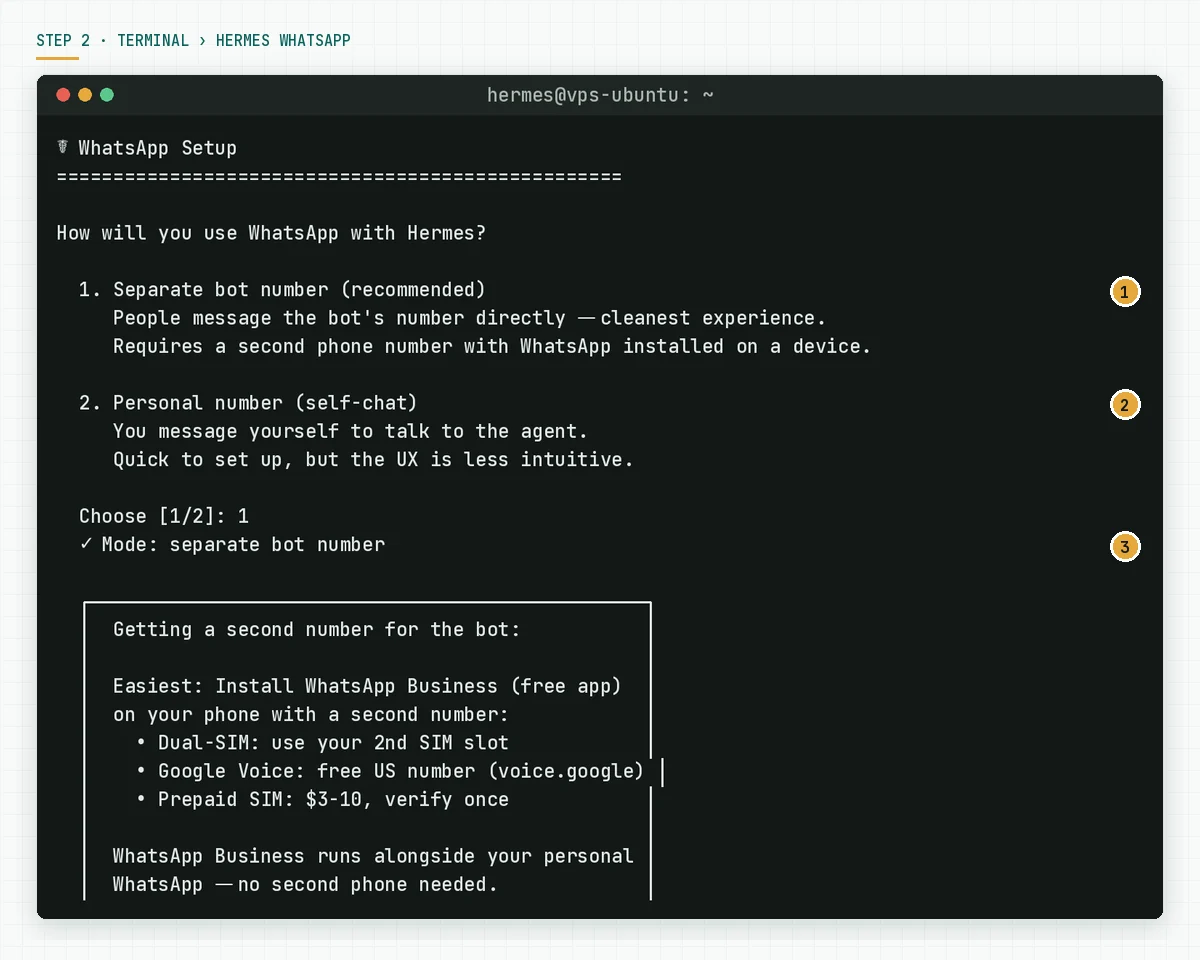
Verify: the bot number is registered in WhatsApp on the phone that will scan. That number has never been used for bulk messages.
Step 2: Run the wizard and fill the allowlist
On the server, run:
hermes whatsappThe wizard asks for the mode, then asks who may message the bot. Enter numbers with the country code and no plus sign, separated by commas. Do not enter *. The wizard saves the answers to ~/.hermes/.env, installs the bridge dependencies, and shows the QR code. In our test the allowlist prompt uses prompt_toolkit and needs a real interactive terminal; a piped stdin made it exit with EOFError. Run the wizard from a normal SSH session, not from a script.
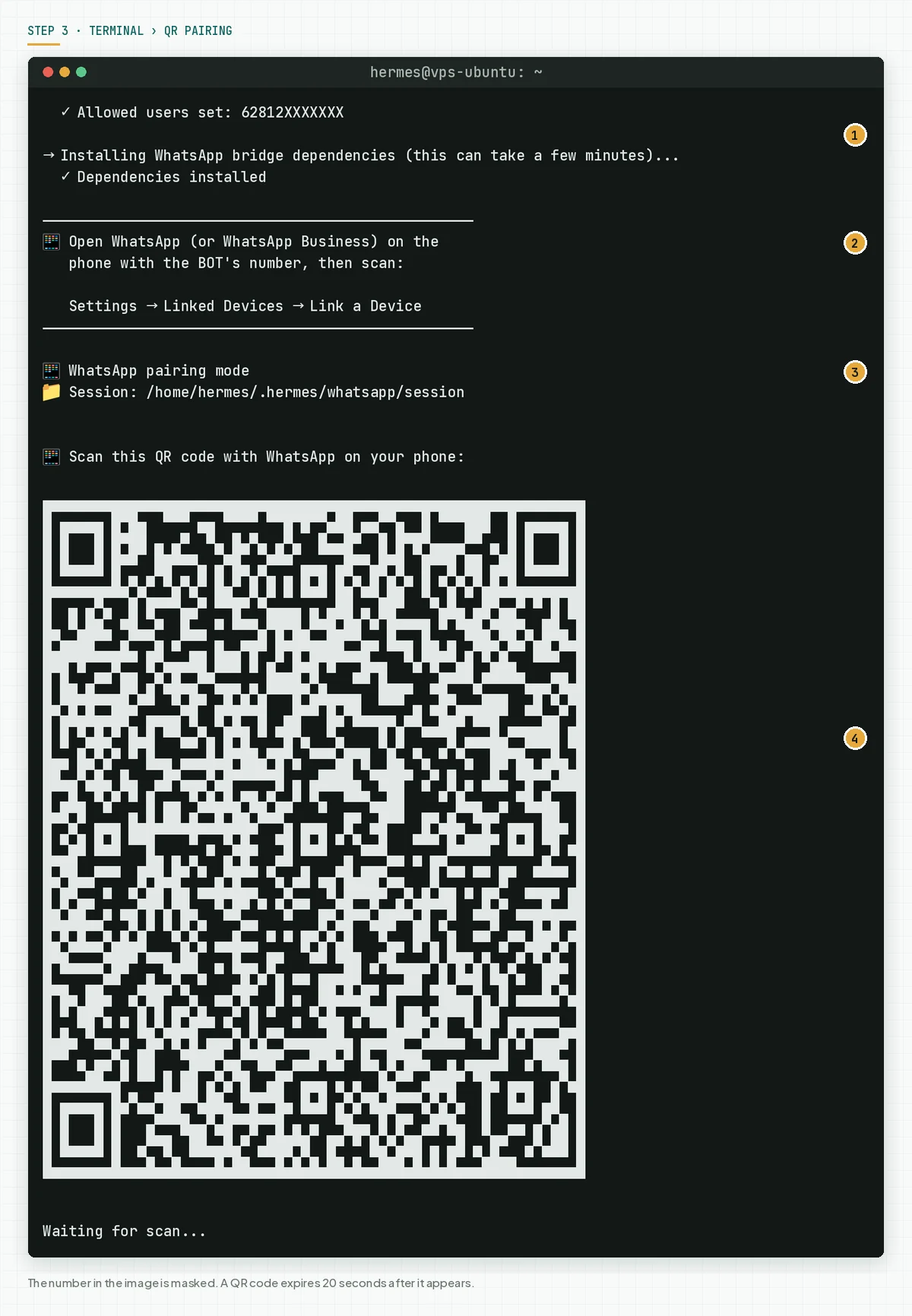
Verify: the Allowed users set line shows your number and the Dependencies installed line appears before the QR code.
Step 3: Scan the QR from the bot phone
Open WhatsApp on the phone with the bot number. Open Settings › Linked Devices › Link a Device and point the camera at the QR code in the terminal. The QR rotates about every 20 seconds; when it expires, run hermes whatsapp again. The terminal must be 60 columns wide or more so the QR is not garbled. Once connected, the wizard saves the session and exits. The documentation names the path ~/.hermes/platforms/whatsapp/session; in our test with v0.21.3 the wizard printed ~/.hermes/whatsapp/session. Use the path your wizard prints. Source: the WhatsApp Setup documentation, Step 1.
Verify: run chmod 700 on the session folder the wizard printed. This folder holds encryption keys and device credentials. Never copy it into a repository or a chat.
Step 4: Check .env and config.yaml
Open ~/.hermes/.env and make sure these 3 lines exist. The wizard writes them, but check before the gateway goes live.
# ~/.hermes/.env
WHATSAPP_ENABLED=true
WHATSAPP_MODE=bot                    # "bot" or "self-chat"
WHATSAPP_ALLOWED_USERS=628XXXXXXXXX  # number with country code, no +
Add the optional settings in ~/.hermes/config.yaml when the bot number must stay silent to strangers and skip the "Hermes Agent" header on every reply.
# ~/.hermes/config.yaml
whatsapp:
  unauthorized_dm_behavior: ignore   # stay silent to numbers outside the allowlist
  reply_prefix: ""                   # remove the "Hermes Agent" header
  send_read_receipts: false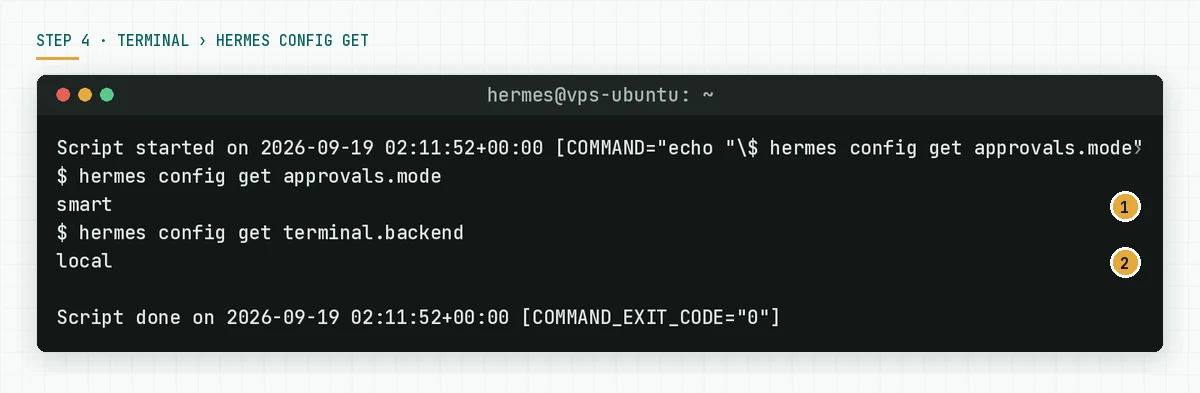
Verify: hermes config get whatsapp.unauthorized_dm_behavior returns ignore when you set it. Source: the Security section of the WhatsApp Setup documentation.
Step 5: Run the gateway
For a test, run it in the foreground: hermes gateway. For a service, use hermes gateway install on a laptop or sudo hermes gateway install --system on a VPS. The gateway starts the WhatsApp bridge with the saved session. The documentation says the gateway handles temporary disconnects automatically; a broken session needs a new scan.
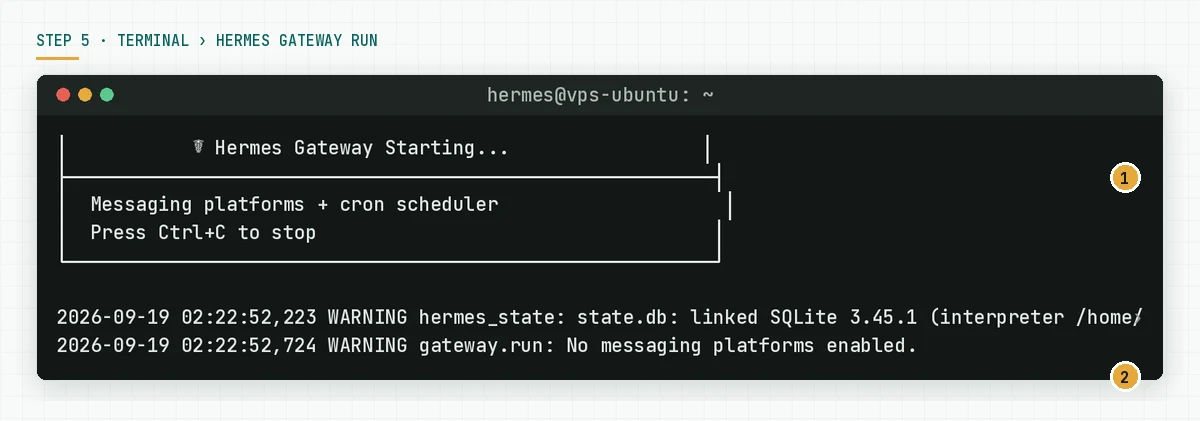
Verify: the gateway log shows the WhatsApp platform active, not the No messaging platforms enabled warning.
Step 6: Test from 2 numbers
Send 1 message from an allowlisted number, for example "List the 3 newest files in the reports folder". The bot must reply with a tool progress indicator, then the answer. Send 1 message from a number outside the allowlist. The bot must stay silent (ignore mode) or send a pairing code (pair mode), never a content answer.
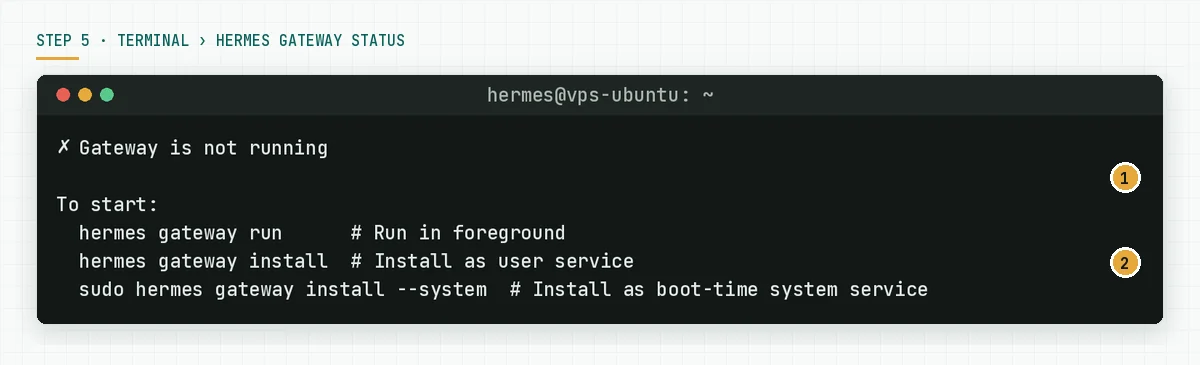
Verify: hermes gateway status shows running, and hermes pairing list shows the stranger as pending when pair mode is on. A message that never arrives usually means the allowlist number still contains a plus sign or a space. Set WHATSAPP_DEBUG=true and read bridge.log when needed.
A simulated day of a WhatsApp bot at a fictional hardware store
This table is a simulation with dummy data. Toko Bangun Jaya uses the Baileys path with a dedicated bot number, an allowlist of 3 admins, and unauthorized_dm_behavior: ignore.
| Time | Event | What Hermes records | Reply |
|---|---|---|---|
| 08:05 | Admin A: "today's cement price from 3 suppliers?" | The web tool and the price file are read | 1 table with 3 rows |
| 08:06 | A 5,100-character answer | Split into 2 messages | Message 1 and message 2 in order |
| 10:30 | A stranger sends "hello" | Denied, ignore mode | No reply |
| 13:15 | Admin B sends a 40-second voice note | Transcribed by the STT provider | A text answer |
| 15:00 | Admin A: "delete the 2024 archive folder" | Smart approvals escalate to a manual prompt | The bot waits for the server owner |
| 17:45 | The bot phone battery dies for 30 minutes | The bridge retries the connection | Messages delayed, session kept |
The numbers in this table are an illustration. The pattern to copy: 1 dedicated number, 1 allowlist, 1 silent mode, and 1 person who answers the approval prompts.
Checklist before the bot accepts messages
- The bot number is not a personal number. Owner: the business owner. Evidence: a separate SIM or WhatsApp Business account.
WHATSAPP_ALLOWED_USERSholds numbers with country codes and no*. Owner: the server owner. Evidence: the.envcontent without other secrets.- The session folder has permission 700. Owner: the server owner. Evidence: the
ls -ldoutput. unauthorized_dm_behavioris decided: ignore for a private number, pair for a growing team. Owner: the process owner. Evidence:hermes config get.- The gateway is installed as a service and survives a reboot. Owner: the server owner. Evidence:
hermes gateway status. - The 2-number test passed: the allowlisted number gets answers, the stranger gets silence. Owner: the process owner. Evidence: 2 chat screenshots.
- A monthly update plan exists, because the WhatsApp Web protocol changes. Owner: the server owner. Evidence: 1 line in the calendar.
- Stop criterion: when the bot serves outside customers instead of the internal team, stop Baileys and move to the Cloud API.
Positioning: Hermes Baileys, Hermes Cloud API, and OpenClaw
This table uses each product's official pages on 19 September 2026. Rama Digital runs its own customer-facing WhatsApp assistant on the official Cloud API path, so we know the administrative cost is real.
| Item you can verify | Hermes Agent Baileys | Hermes Agent Cloud API | OpenClaw WhatsApp |
|---|---|---|---|
| Technical basis | Baileys, emulates WhatsApp Web | The official Meta Cloud API | Baileys through the @openclaw/whatsapp plugin |
| How it connects | A QR code from the wizard | The wizard asks for the Phone Number ID, token, App Secret | A QR code from openclaw channels login |
| Meta Business account | No | Required | No |
| Default DM policy | Deny all without an allowlist, pairing optional | Same | Pairing for unknown senders |
| Groups | Yes | Not in v1 | Yes, with a groupPolicy allowlist |
| Ban risk | Yes | No | Yes |
Sources: the Hermes WhatsApp documentation, the Hermes Cloud API documentation, and the OpenClaw WhatsApp documentation. Rama Digital recommendation: use Baileys when only the internal team uses the bot on a dedicated number and you accept the re-pairing risk. Use the Cloud API when outside customers message the bot, because the reputation of a business number costs more than Meta's paperwork.
Frequently asked questions
Can my WhatsApp number be banned because of Hermes Agent? The Hermes documentation names an account restriction risk on the Baileys path, because WhatsApp does not support third-party bots outside the Business API. Use a dedicated number, do not send bulk messages, and do not send outbound messages to people who have not messaged the bot first.
Do I have to scan the QR code every time the server restarts? No. The session lives in ~/.hermes/platforms/whatsapp/session and survives restarts. Scan again only when the session breaks: a phone reset, the device removed from Linked Devices, or a WhatsApp protocol change.
Can 1 WhatsApp number serve several Hermes agents? Not on the Baileys bridge. The official FAQ says 1 authenticated session per number, so each profile needs its own number. Alternatives: 1 profile with a different personality per chat, or Telegram, which supports several bot tokens.
Why does the bot not answer my message? The most common cause in the documentation: the number in WHATSAPP_ALLOWED_USERS still contains a plus sign or a space. Fix the format, restart the gateway, and read bridge.log with WHATSAPP_DEBUG=true.
Can the Cloud API send cron reminders to customers? Only within 24 hours of the customer's last message. Outside that window Meta rejects the send with error 131047 and accepts templates only. Hermes did not support templates as of 19 September 2026.
Are voice messages supported? Yes. Inbound voice notes are transcribed through local faster-whisper, Groq Whisper, or OpenAI Whisper, as configured. TTS replies are sent as MP3 attachments on Baileys and as voice notes on the Cloud API when ffmpeg is available.
Next step
After these 6 steps the bot answers your team and stays silent to strangers. The limits that stay: Baileys depends on a WhatsApp Web protocol that can change, and the Cloud API depends on Meta's template rules. When you want us to install Hermes Agent with the WhatsApp gateway, allowlist, approvals, and SOP on your VPS, the Hermes Agent Installation Service finishes it in 2 to 5 working days. When you are not sure which path fits your business number, book a 60-minute Technical Scoping Session and bring the list of people who will chat with the bot.