
Direct answer: The Meta Ads creative breakdown is in Ads Manager: click Breakdown, click Creative, and then select Media. This report splits the ad results by each image and video that you uploaded. For text variations, use Dynamic creative element. For removed assets, use Ad delivery. Use this data to replace weak concepts, not to punish an asset with a small spend share.
Main condition: the Media breakdown is useful when 1 ad holds several images or videos, for example a multi-media ad or the flexible ad format. A decision makes sense only after the ad set leaves the learning phase. Limit: The Meta help page states that this feature may not be available to you. The Media report also excludes Show as collection, Show as carousel, and custom conversionsConversionThe action you count as a result, for example a paid order, a sign-up, or a chat that becomes a qualified buyer.Open the glossary.
We read the Meta help page on media asset performance, the pages it links to, Social Media Today of 27 October 2026, and Social Samosa of 28 October 2026 on 4 November 2026. 3 multi-media pages did not open without a login, so we read their text through the Meta Help Center search. This article has no account screenshots. The simulation numbers are dummy data.
Why performance per asset matters after Andromeda
Performance per asset matters because the Meta ad system picks assets itself, and the Media breakdown shows those picks as numbers. According to the Engineering at Meta post of 28 October 2026, the new generation of Meta Ads Andromeda gives a score to every eligible ad and reads the ad content. A Meta spokesperson told Marketing Brew on 28 September 2026 that Meta does not discuss how its ranking models read each creative asset. So you do not see the model score, only the result: the asset that the system picks and its result cost. The engine is explained in the article about the Meta Ads Andromeda algorithm.
What the Meta Ads creative breakdown shows
The Meta Ads creative breakdown has 3 menu paths, and each path answers 1 question about your ad assets. The labels come from the Meta help page on media asset performance.
| Breakdown | Menu path | What it shows | Limit |
|---|---|---|---|
| Media | Breakdown, Creative, Media | Results per uploaded image and video, delivered as single media | Excludes Show as collection and Show as carousel |
| Text variations | Breakdown, Dynamic creative element, then a text option | Results for each text variation in your ad | Only the text options in your account menu |
| Removed assets | Breakdown, Ad delivery | Results for assets that you removed from the ad | Meta gives only the menu path |
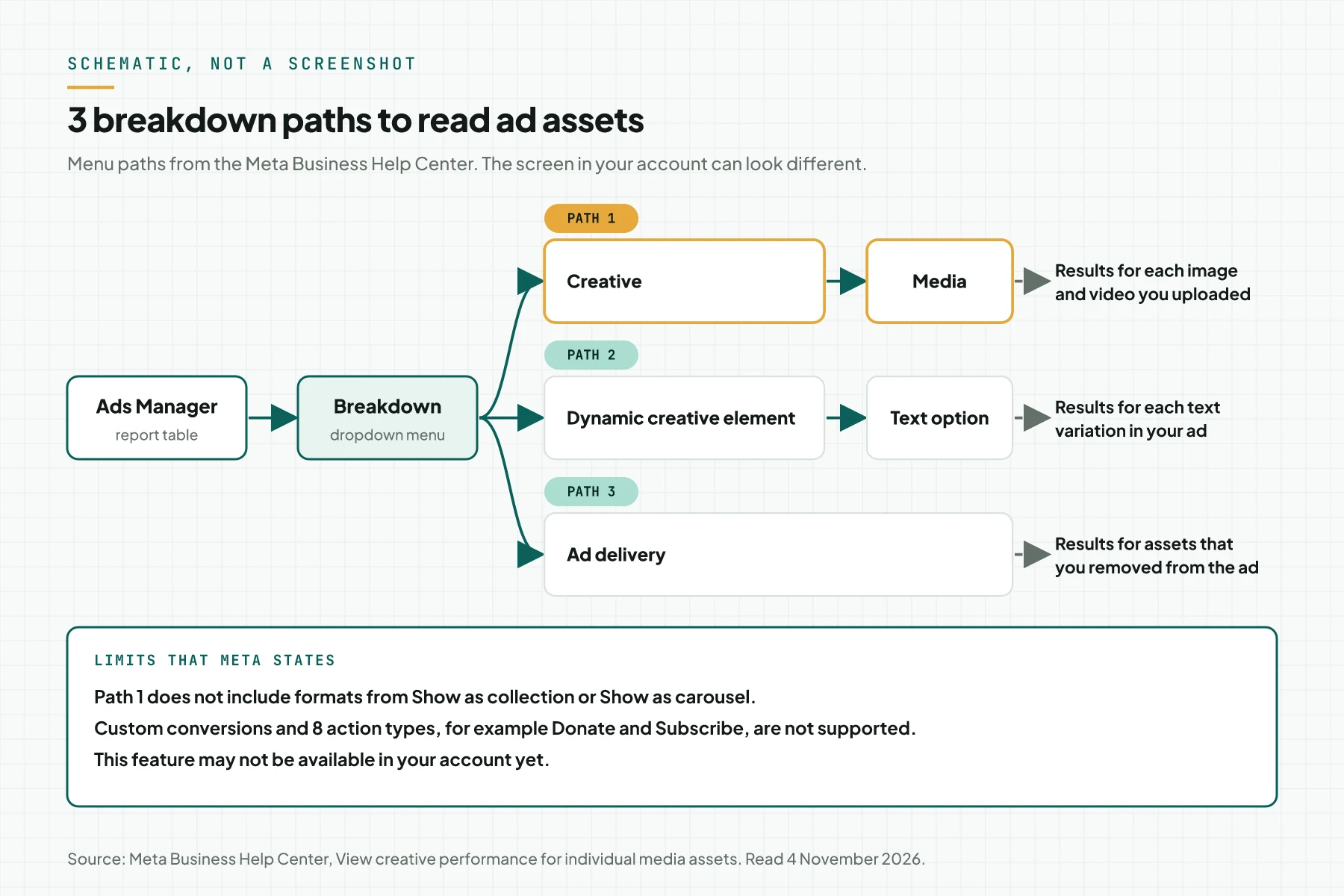
The diagram above is a schematic, not a screenshot. 3 details change how you read the lines of path 1.
- Ratio variants are combined. 1 image in several aspect ratios becomes 1 variant group. According to the Meta creative upload guide, the breakdown shows the combined result of that group.
- The lines can add up to less than the ad total. The Meta media troubleshooting page states that delivery through format display options is not in the per-media breakdown.
- Numbers can use a model. According to the Meta help page about breakdowns, breakdowns can use statistical modeling when conversion data is partial.
Prerequisites before you read the Media breakdown
The Media breakdown is useful only when 1 ad has more than 1 asset and stable delivery data. Prepare 5 items.
- Access to the ad account in Ads Manager.
- 1 ad with several assets. According to the Meta multi-media ads guide, 1 multi-media ad accepts up to 10 images and videos. The page on the flexible ad format gives the same limit.
- Clean conversion events from the PixelPixelA piece of code on a web page that tells the ad platform somebody opened the page or took an action.What is the Meta Pixel? and the Conversions API. Cost per result means something only when the event records correctly.
- An ad set that left the learning phase. According to the Meta learning phase page, an ad set usually exits after about 50 results in the week after its last significant edit.
- A cost per result target that you write before you read the data.
Step 1: Open Ads Manager at the ad level
Open Ads Manager, then click the Ads tab, because each asset lives inside 1 ad and the breakdown splits that ad line.
The Meta help page about breakdowns gives the sequence: select the campaign, ad set, or ad, and then click Breakdown. Rama Digital recommendation: start at the ad level, because a campaign-level asset line can mix several ads. Select a date range of at least 7 days after the last significant edit.
Evidence: 1 line per ad, 7 days or more.
Step 2: Select Breakdown, Creative, and then Media
Click Breakdown to open the dropdown menu, click Creative, and then select Media to split the results by asset.
Each new line under the ad stands for 1 asset or 1 variant group. Add up the spend of all lines, and then compare it with the total ad spend. A large gap usually comes from format display options.
Evidence: 1 Media line per asset or variant group.
Step 3: Add columns for spend, results, and cost per result
Click Columns, select Customize columns, and then add the cost and result columns for each asset.
According to the Meta help page about columns, you select the columns, check Save as a column preset, and then click Apply. The Meta list of column presets names these standard metrics: amount spent, results, cost per result, and link clickthrough rate.
Calculate the spend share in a spreadsheet: asset amount spent divided by ad amount spent, times 100. Rama Digital recommendation: save 1 preset named "Assets" for the whole team.
Evidence: a saved column preset with the 4 metrics above.
Step 4: Read text variations with Dynamic creative element
Click Breakdown, click Dynamic creative element, and then select an available text option to see the result of each text variation.
According to the Meta multi-media ads guide, each media asset can have its own primary text, headline, description, and destination URL. The first media asset always uses the text and URL from the ad level. Rama Digital recommendation: read text apart from media.
Evidence: a text variation table with cost per result.
Step 5: Check removed assets with Ad delivery
Click Breakdown, and then click Ad delivery to see the results of assets that you removed from the ad.
This data keeps the history, so the team does not upload a failed concept again. According to the Meta learning phase page, an edit to an ad during the learning phase resets learning. So group asset removals and additions into 1 batch.
Evidence: removed assets with removal date and last result.
Step 6: Export the data each week
Click Export in the top right of the reporting table, or select Export as .csv or Export as .xlsx from its menu.
According to the Meta help page about export, the same menu has Schedule export for a regular email. The Body and Title columns do not export. So record the name, text, and reason to buy of each asset in your own spreadsheet tab.
Evidence: 1 export file per week, on the same weekday.
How to decide on each asset
Decide on each asset from its spend share and cost per result, and replace weak concepts with new concepts.
Spend share is a system signal, not a verdict
According to the Meta multi-media ads guide, the Meta delivery system picks the media and placement combination for each impressionImpressionThe number of times your ad or page appeared on a screen. An impression is not a person and not a search.Open the glossary, from what is likely to drive results. From this, we draw an inference: a small spend share means that the system predicts fewer results from that asset. A small share does not prove that the asset is weak.
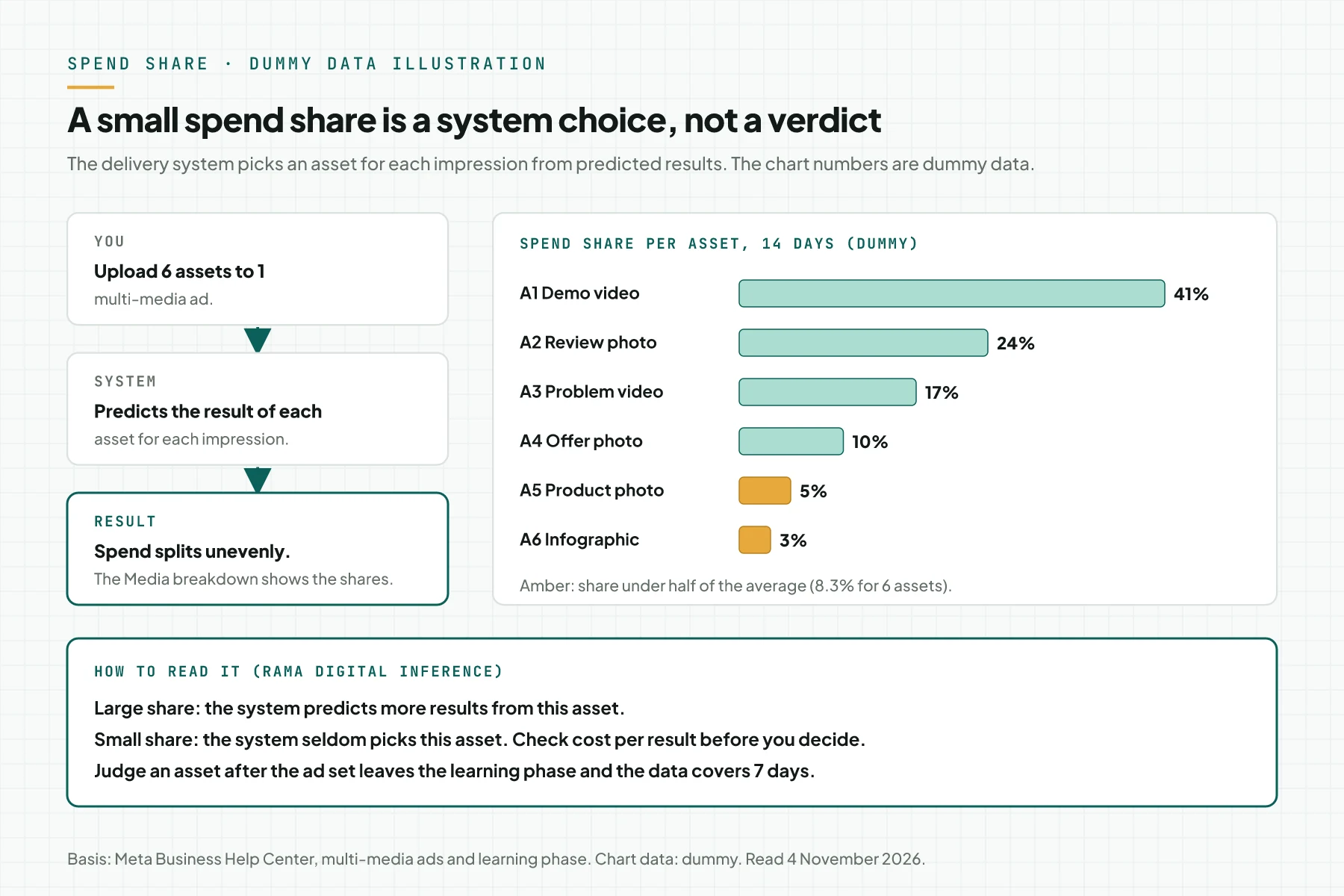
In the dummy chart above, A5 and A6 are under half of the average share. With 6 assets, that limit is about 8.3%.
Decision table per asset
Rama Digital recommendation: this table is our working rule, not a Meta rule.
| Condition | Decision |
|---|---|
| The ad set is still in Learning, or the data covers less than 7 days | Wait. According to the Meta learning phase page, results during learning do not necessarily show future performance. |
| Spend share under half of the average | Let it run, because its cost is small. Remove it first when the 10 slots are full. |
| Normal or large share, cost per result under the target | Keep it. Use its reason to buy for the next concept. |
| Normal or large share, cost per result over the target | Check the landing pageLanding pageThe page an ad points to. It carries 1 offer and 1 action, with no menu pulling the visitor elsewhere.What is a landing page? and the event. Then replace it with a new concept, not a new headline. |
| A text variation wins by a small margin | Keep the text, but do not count it as a new concept. |
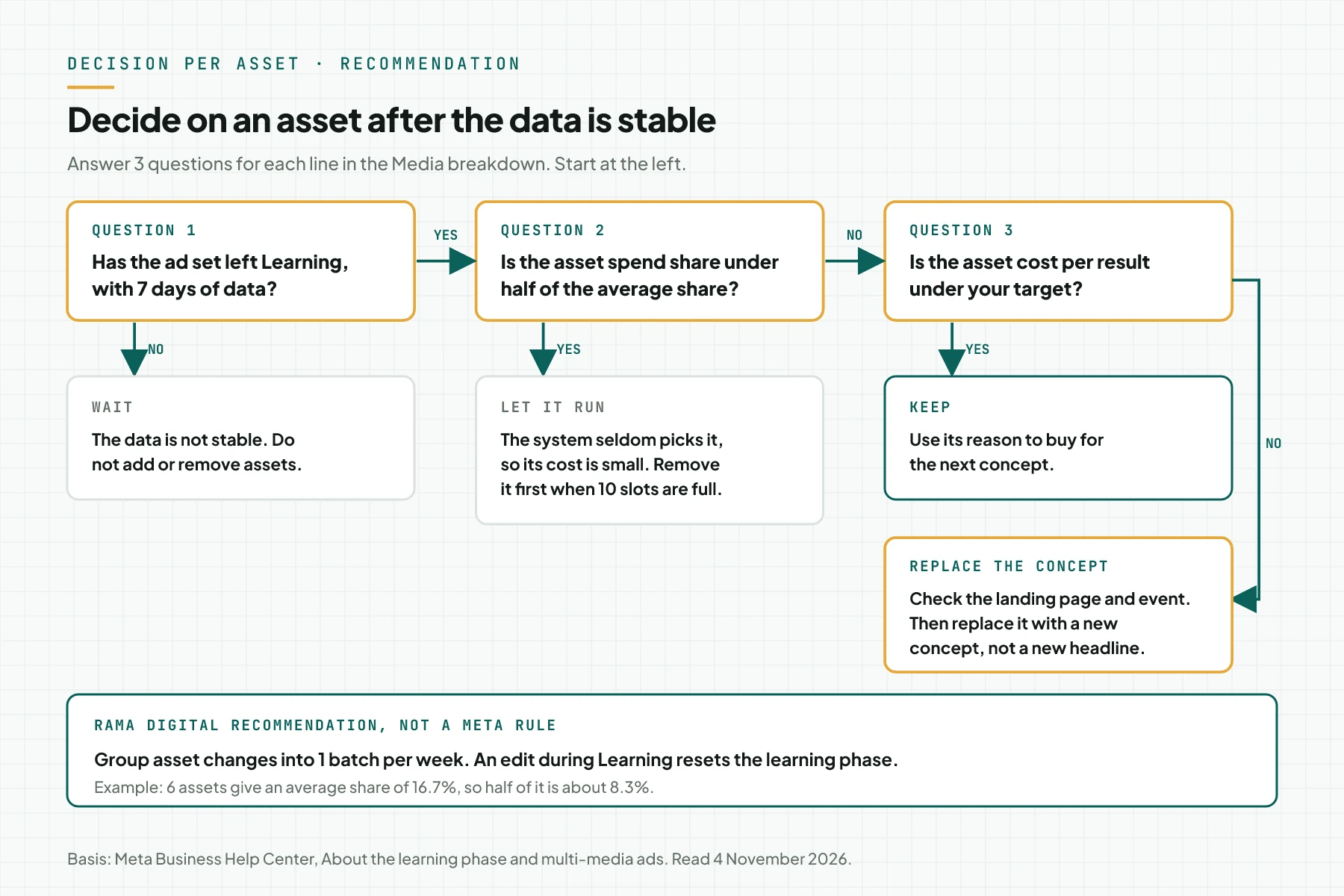
A new concept differs on 1 of 4 items: reason to buy, format, persona, or the hook in the first 3 seconds. For a test flow that keeps data clean, read how to test AI creative variants without breaking measurement. For a team that produces many assets, read a creative production cadence for Meta Ads.
Simulation: 6 assets in 1 ad with dummy data
This simulation uses dummy data for 1 fictional multi-media ad with 6 assets and a spend of IDR 10,000,000 over 14 days. The cost per result target is IDR 70,000. The ad set left learning on day 6.
| Asset | Spend share | Spend | Results | Cost per result | Decision |
|---|---|---|---|---|---|
| A1 Demo video 9:16 | 41% | IDR 4,100,000 | 82 | IDR 50,000 | Keep. Record the "demo" reason to buy. |
| A2 Review photo 1:1 | 24% | IDR 2,400,000 | 40 | IDR 60,000 | Keep. |
| A3 Problem video 4:5 | 17% | IDR 1,700,000 | 25 | IDR 68,000 | Keep. Watch it, because it is close to the target. |
| A4 Offer photo 1:1 | 10% | IDR 1,000,000 | 10 | IDR 100,000 | Check the landing page, then replace the concept. |
| A5 Product photo 1:1 | 5% | IDR 500,000 | 10 | IDR 50,000 | Let it run. 10 results are too few. |
| A6 Infographic 4:5 | 3% | IDR 300,000 | 2 | IDR 150,000 | Let it run. Remove it first when slots are full. |
The ad total is IDR 10,000,000 for 169 results, or about IDR 59,172 per result. On day 15, the team replaces A4 and adds 1 new concept in 1 batch.
Look at A5. Its cost per result equals A1, but it comes from only 10 results, so do not move it to a new ad. These numbers are not client data and not a result promise.
An audience option for each creative
The Choose an audience for each ad creative option sets the age and gender for each media asset in 1 ad set.
According to the Meta audience per creative guide, you turn on this option under Audience in the ad set. The Age and Gender settings of the ad set are then hidden. At the ad level, click Edit on a media asset to select Age, Gender, or both. Meta states that the ad may also reach other people likely to respond.
Social Samosa reports that the new breakdown follows this option. Meta does not state how this option shows in the Media breakdown. Rama Digital recommendation: use it only for a clear business reason, such as a product for 1 gender.
Limits of the Meta Ads creative breakdown
The creative breakdown has 5 limits that you must write in each report.
- This feature may not be available in your account.
- The Media breakdown excludes delivery from Show as collection or Show as carousel.
- The Meta help page states that custom conversions are not supported. The Donate, Contact, Start trial, Submit application, Subscribe, Schedule, Customize product, and Find location actions are also not supported.
- According to the Meta multi-media ads guide, this flow does not support reservation buying, Advantage+ catalog ads, carousel, collection, or existing posts.
- Spend share and cost per result per asset show a correlation, not a cause. To test a cause, run a Meta A/B test with a stop rule that you write first.
Checklist for the ad team
Use this checklist each week before you change assets. Each item has an owner and evidence.
- Check the Breakdown, Creative, Media path in the account. Owner: media buyer. Evidence: the check date.
- Write the cost per result target. Owner: account owner. Evidence: the target document.
- Save the "Assets" column preset. Owner: media buyer. Evidence: the preset name.
- Export the Media breakdown on the same weekday each week. Owner: media buyer. Evidence: the export file.
- Record the name, text, and reason to buy of each asset. Owner: creative team. Evidence: the assets tab.
- Group asset changes into 1 batch per week. Owner: media buyer. Evidence: the change log.
- Stop all asset changes when the ad set is still in Learning or the data covers less than 7 days. Owner: account owner. Evidence: the decision log.
Questions and answers
Where is the creative breakdown menu in Meta Ads Manager?
Click Breakdown in the reporting table, click Creative, and then select Media. The results split by each image and video.
Why does the Creative or Media menu not show in my account?
Meta states that this feature may not be available to you. The menu is also useful only for an ad with more than 1 asset.
Must I turn off an asset with a small spend share at once?
No. The system seldom picks that asset, so its cost is small. Remove it first only when the 10 asset slots are full.
Why do the Media lines add up to less than the ad total?
Delivery through format display options, such as collection or carousel, is not in the Media breakdown.
How long must I wait before I judge an asset?
Rama Digital recommendation: wait until the ad set leaves the learning phase and the data covers 7 days.
Next step
A limit still applies: the Media breakdown shows system picks and their result cost, not a cause. If your team wants us to read the breakdown per asset and plan the next concepts, see the Meta Ads Performance Management service. To discuss your account first, book a 30-minute session.
Sources
We read all Meta Business Help Center pages below on 4 November 2026.
- View creative performance for individual media assets in your ad.
- About multi-media ads and customizing your ad creative.
- Upload and customize your ad creative for different placements.
- Troubleshoot media customization for different placements.
- About format display options in Meta Ads Manager.
- About the flexible ad format.
- How to choose an audience for each ad creative.
- Customize columns in Meta Ads Manager.
- About columns presets in Meta Ads Manager.
- How to export performance data in Meta Ads Manager.
- Navigate to breakdowns in Meta Ads Manager.
- About the learning phase.
- Engineering at Meta: Meta Andromeda ads retrieval. 28 October 2026.
- Marketing Brew: how advertisers approach creative diversification. 28 September 2026.
- Social Media Today: Meta adds individual performance data for ad creative. 27 October 2026.
- Social Samosa: Meta Ads Manager adds breakdown tool. 28 October 2026.


