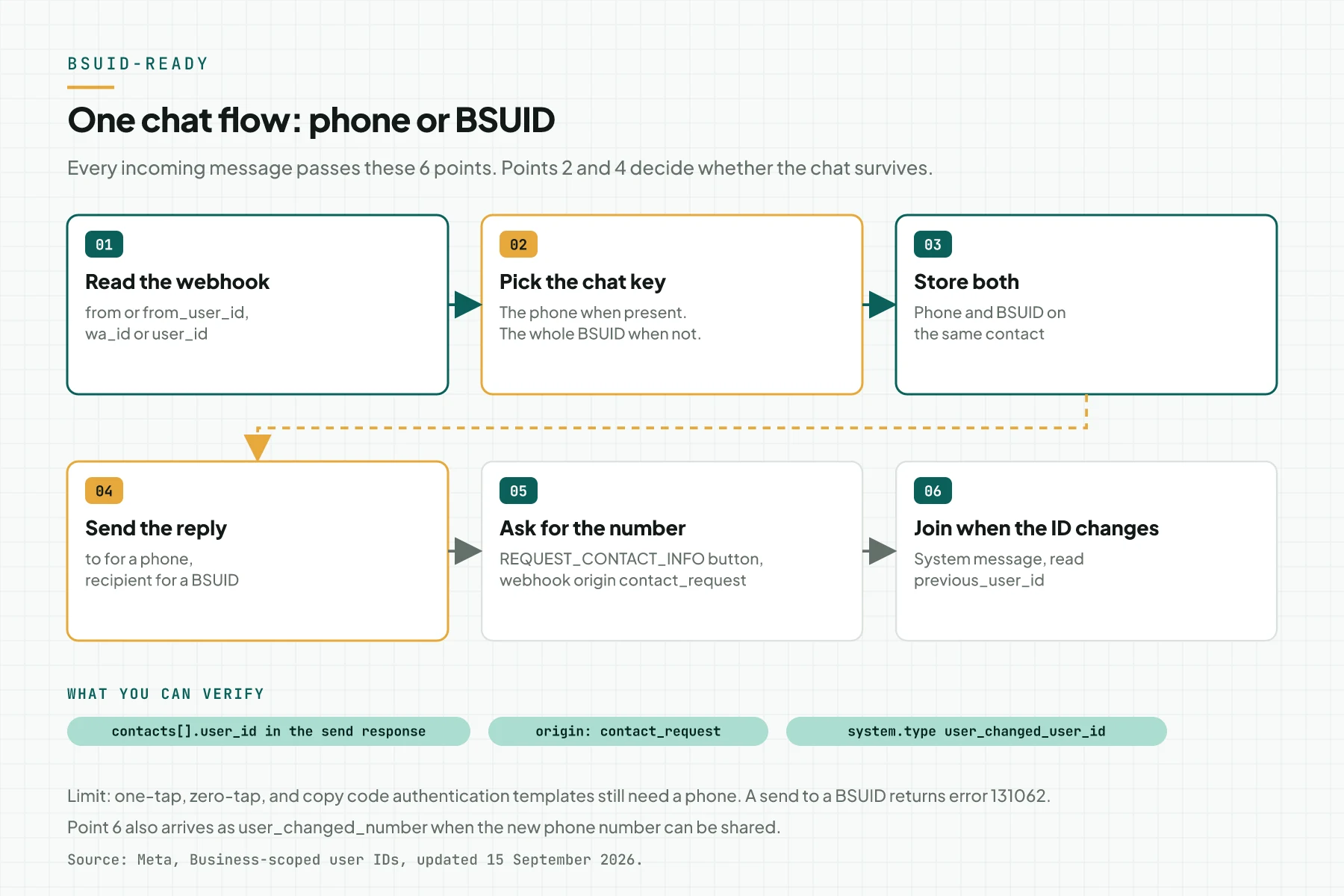
Direct answer: WhatsApp started to give users usernames in 2026, and their chats can arrive without a phone number in the webhookWebhookAn automatic message one system sends to another the moment something happens, for example an incoming WhatsApp message.Open the glossary. Your system still receives a BSUID (business-scoped user ID) in from_user_id and user_id. So read the BSUID, store it on the contact, and reply with the recipient field.
Main condition: this guide applies to businesses on the WhatsApp Business Platform, that is the Cloud APIAPIThe official door 2 systems use to exchange data, without anybody copying it by hand.Open the glossary directly, a BSP, or Click to WhatsApp ads. Limit: a BSUID does not replace the phone number for everything. One-tap, zero-tap, and copy code authentication templates still need a phone number, and an invoice or lead that uses the number still needs it.
We wrote this guide on 2 October 2026. Sources: the Meta Business-scoped user IDs document (updated 15 September 2026), our App Dashboard and WhatsApp Manager, and our WhatsApp assistant. Phone numbers, IDs, and tokens in the images are masked, and all payloads use dummy data.
What breaks when a user adopts a username
Old integrations use the phone number as the key. The parser reads messages[].from, the CRM finds the contact by number, and the chatbot replies to that number. When a user adopts a username, Meta can omit from and wa_id from the webhook.
This causes 3 common failures:
- The parser drops the message because the
fromfield is empty. - The CRM creates a new contact without a name, or fails to store the chat.
- The chatbot cannot reply because it does not know the destination.
Meta writes that BSUID support is required for partners, directly integrated businesses, and CTWACTWAA Click-to-WhatsApp ad. It sends people from Facebook or Instagram straight into your WhatsApp conversation.How to track CTWA ads advertisers. The Meta FAQ also writes that a business that is not ready has no recourse for messages it fails to process. If you run CTWA ads, also read how to track Click to WhatsApp ads, because that attributionAttributionHow a system decides which ad or channel receives the credit for 1 sale.High clicks, low sales: the tracking gap flow also reads the sender identity.
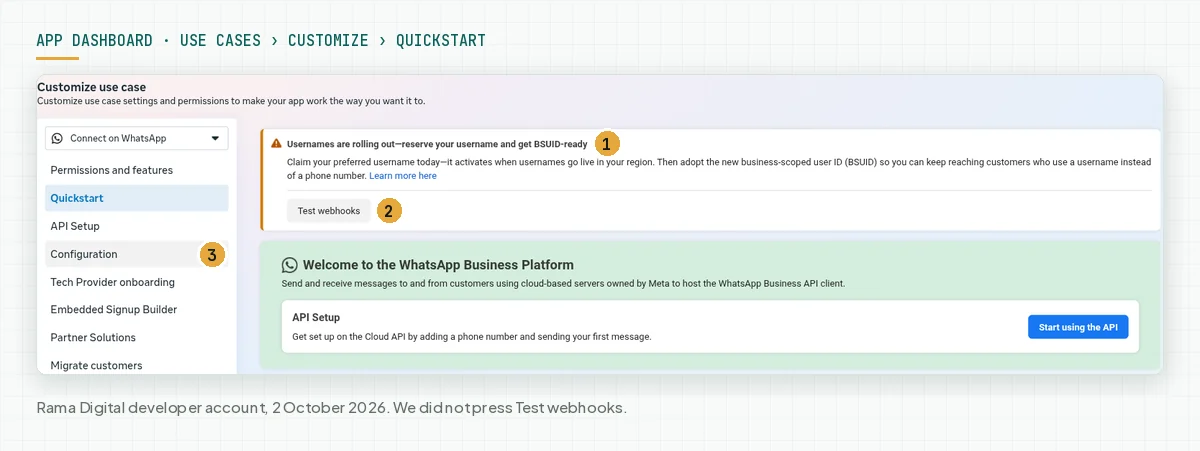
Meta shows this warning in the App Dashboard itself. So BSUID preparation is now routine work for every WhatsApp app, not a long-term plan.
How usernames, BSUIDs, and phone numbers work
A user username is optional
A user can adopt a username or not. A user with a username sees the username, not the number, in the app. The business cannot control this choice, so your integration must accept both shapes (source: Meta, User usernames).
A BSUID is a user ID per business portfolio
A BSUID starts with the ISO 3166 alpha-2 country code, then a period, then up to 128 letters or digits. The Meta example is US.13491208655302741918. A BSUID belongs to 1 business portfolio, so a business number from another portfolio fails to message it.
Since early April 2026, the BSUID is in every messages webhook, even when the user has no username. Use the whole BSUID when you send. A request fails when you change the country code, the period, or any other character.
When the phone number still arrives in the webhook
Meta still sends the phone number when 1 of these 3 conditions applies:
- Your business number messaged or called the user's number in the last 30 days.
- Your business number received a message or call from the user's number in the last 30 days.
- The user is in the Meta-hosted contact book of your business.
The 30 day rule counts per business number. The contact book works per portfolio, but it records only interactions after it launched. Source: Meta, Phone numbers and Contact book.
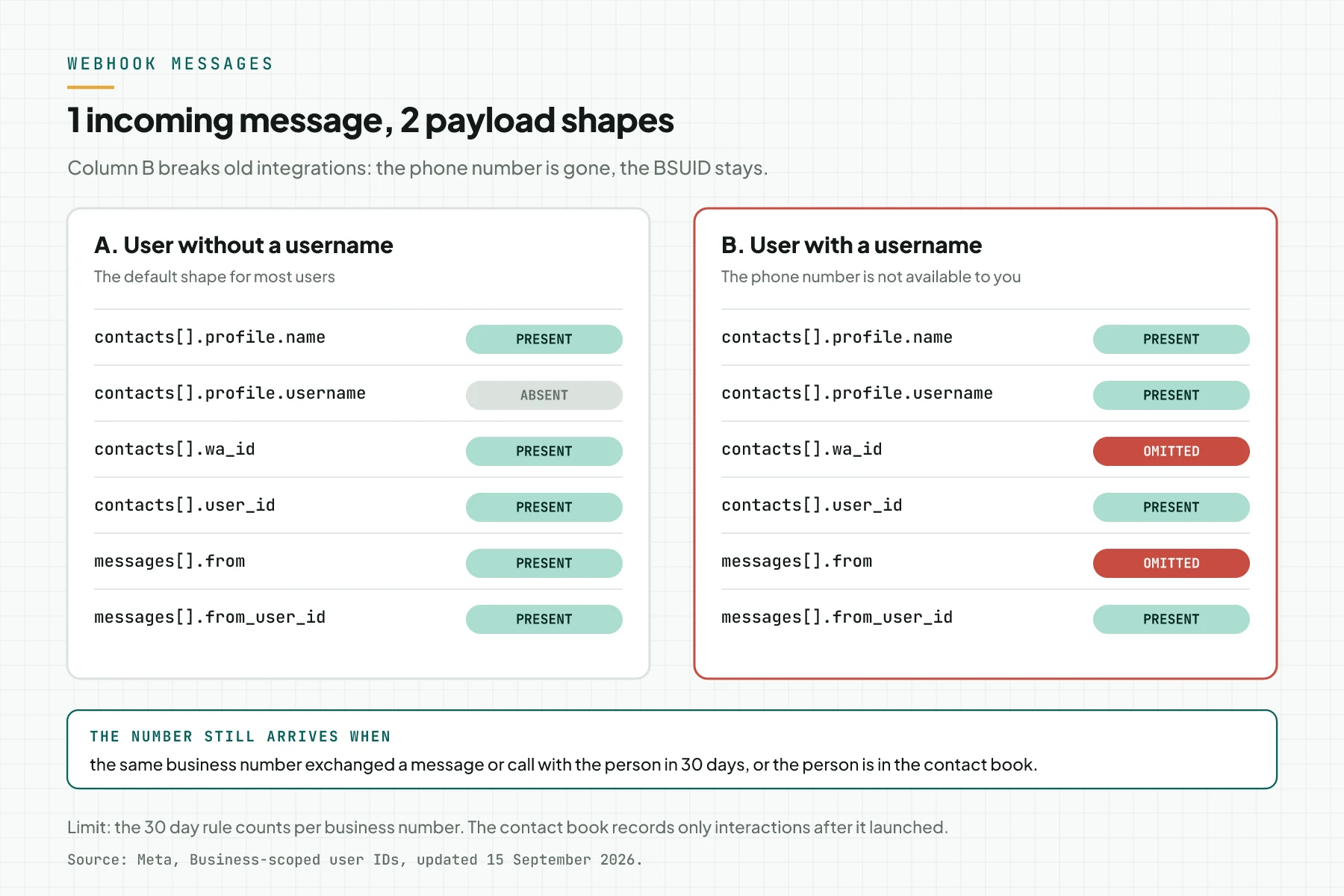
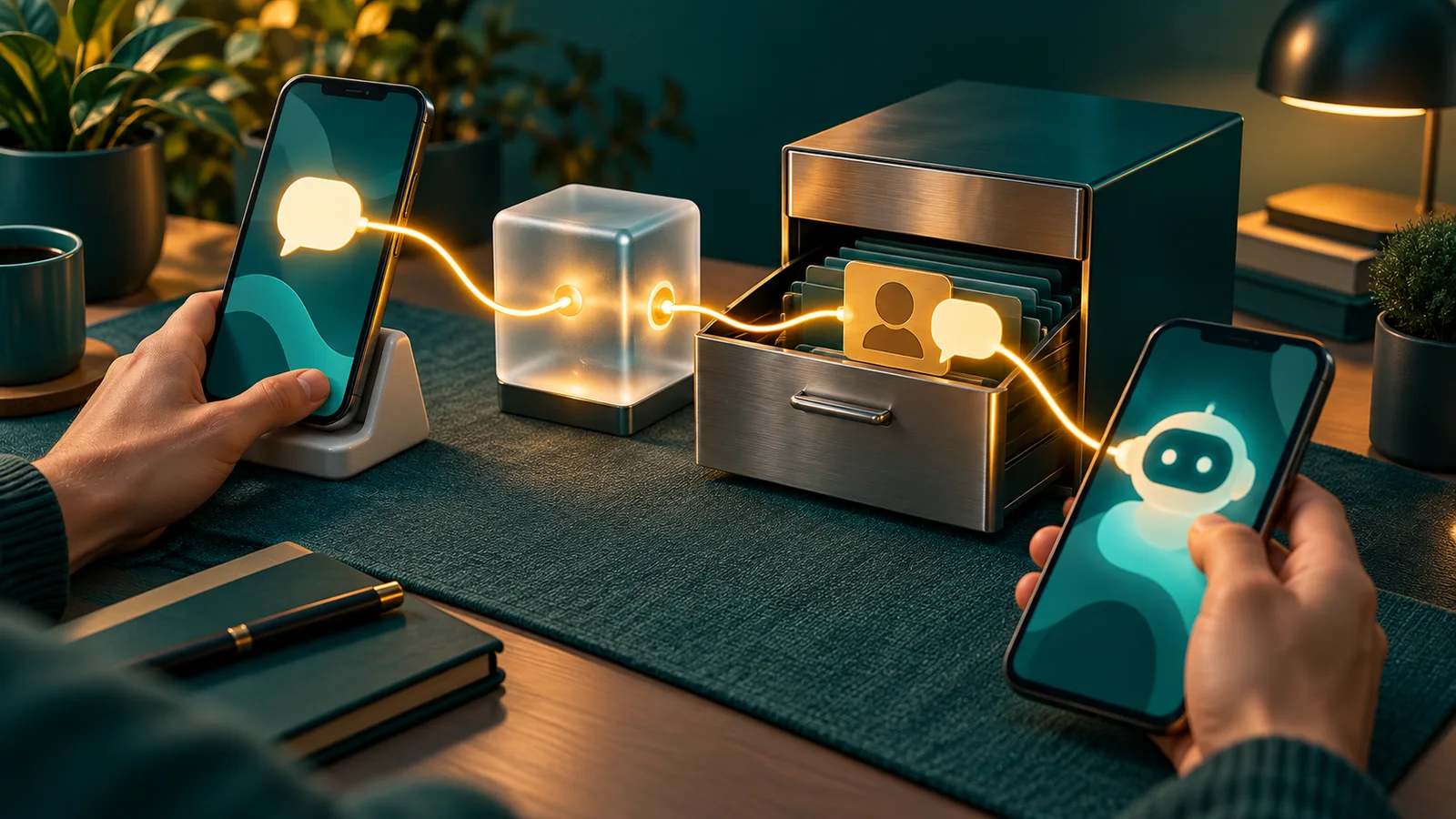
The key point of the diagram: user_id and from_user_id are always present. So treat the BSUID as a fallback identity that you must read, not as an extra field.
Parent BSUID for businesses with many portfolios
A managed business with many portfolios can ask its Meta contact for parent BSUIDs. The format adds ENT, for example US.ENT.11815799212886844830, and arrives in the parent_user_id field. Every business number in the enrolled portfolios can use a parent BSUID.
The BSUID changes when the user changes the phone number
When a user changes the phone number, Meta makes a new BSUID. The change arrives as a messages webhook of type system.
The system.type value is user_changed_number when the new number can be shared, or user_changed_user_id when only the BSUID change can be reported. Both carry previous_user_id. Source: Meta, System messages webhooks.
Phone number, BSUID, parent BSUID, and username compared
| Identity | Webhook field | Scope | Usable to send | Can change |
|---|---|---|---|---|
| Phone number | wa_id, from | Global | Yes, the to field | When the user changes the number |
| BSUID | user_id, from_user_id | 1 business portfolio | Yes, the recipient field, since July 2026 | When the user changes the number |
| Parent BSUID | parent_user_id | All enrolled portfolios | Yes, the recipient field | When the user changes the number |
| Username | profile.username | Display in the app | No | Yes, the user can change it |
Rama Digital recommendation: store the phone number and the BSUID on the same contact. Use the username only as a display label, because the user can change it at any time without a change to the BSUID.
Prerequisites
- Admin or developer access to the Meta app that holds the WhatsApp webhook.
- Access to WhatsApp Manager for your business number.
- 1 staging webhook endpoint that is separate from production.
- Access to the webhook parser code and the CRM or inbox data schemaSchemaExtra description inside page code that tells a search engine what the page is, for example an article, a service, or a question and answer.Open the glossary.
- 1 personal test number to test the phone number request button.
Step 1: Test the 4 webhook scenarios from the App Dashboard
Open App Dashboard > Use cases > Connect with customers through WhatsApp > Customize > Configuration. Apps created before December 2025 use App Dashboard > WhatsApp > Configuration. Find the messages row under Webhook fields, then use the Test link on that row.
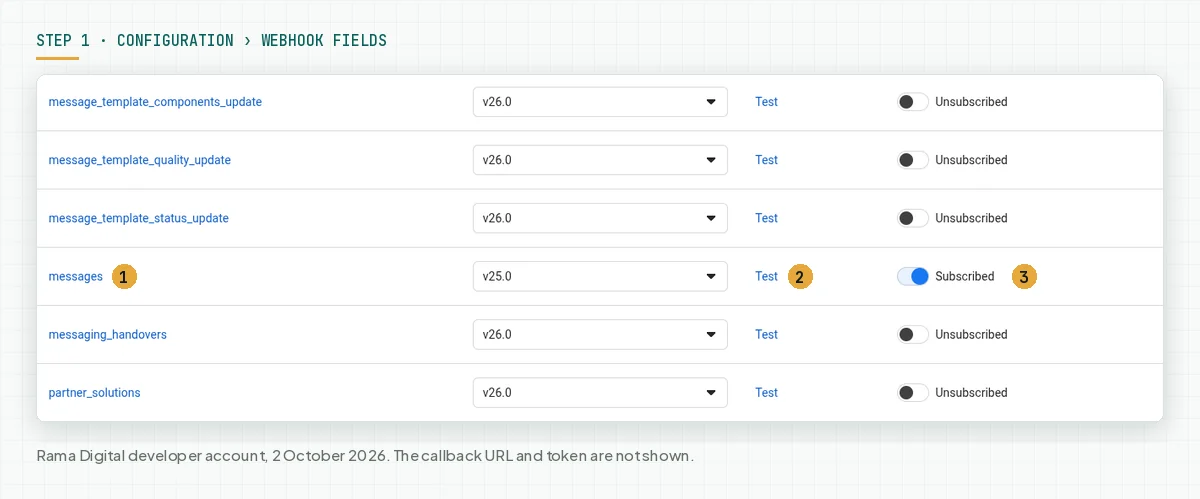
The Test link sends a test payload to the webhook endpoint of that app. So point the Callback URL to staging first, or use a separate test app. In our test, we did not press this link, because our app connects to a production chatbot.
Meta gives 4 test scenarios:
- The user has no username: the payload has the phone number and the BSUID.
- The user has a username and the number is unavailable: the payload has only the username and the BSUID.
- The user has a username and the number is available: the payload has all fields.
- A parent BSUID is present: the payload has the parent BSUID next to the normal BSUID.
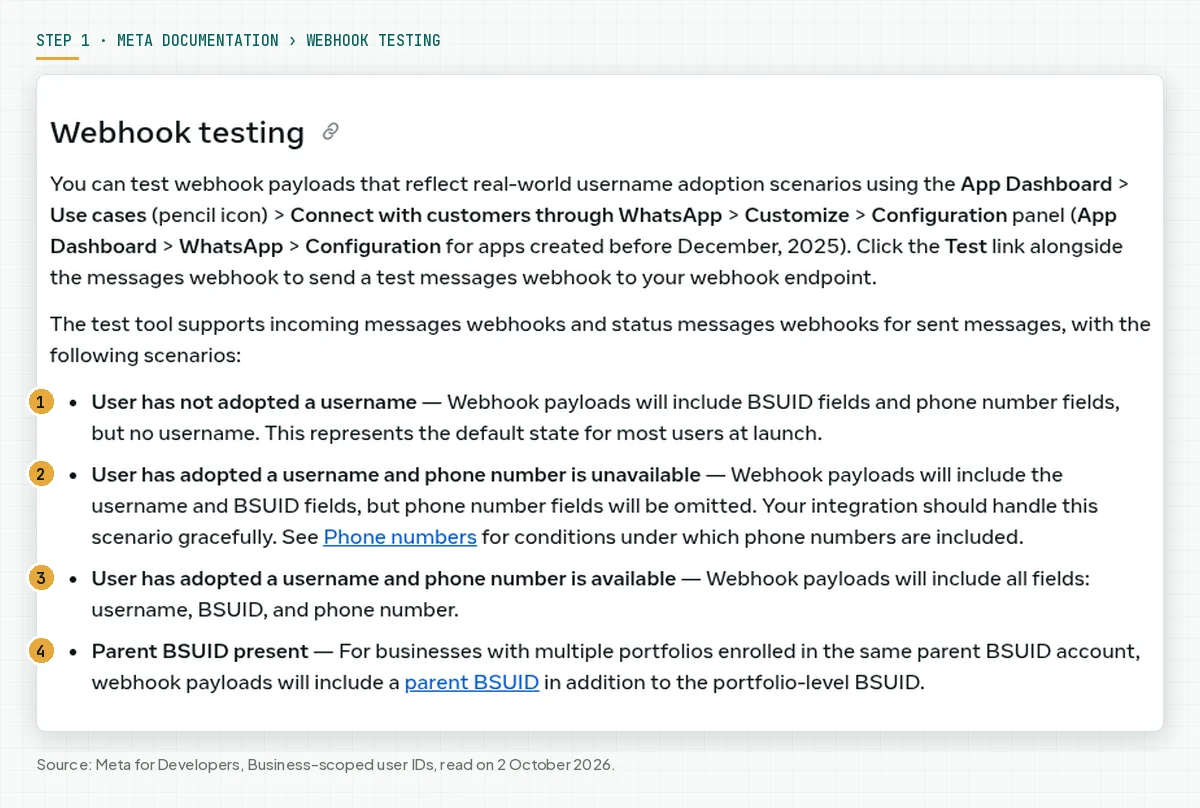
Verify: the staging endpoint receives 4 payloads, and your log records 4 messages without an error. Source: Meta, Webhook testing.
Step 2: Accept from_user_id in the webhook parser
Change the parser so it processes a message when from is empty. This is a scenario 2 payload with dummy data:
{
  "contacts": [{
    "profile": { "name": "Sinta", "username": "sinta.contoh" },
    "user_id": "ID.1234567890123456789"
  }],
  "messages": [{
    "from_user_id": "ID.1234567890123456789",
    "id": "wamid.CONTOH001",
    "timestamp": "1790900000",
    "type": "text",
    "text": { "body": "Halo, masih buka?" }
  }]
}
Read the phone number when present, then read the BSUID as the fallback. Drop the event only when both identifiers are missing.
const msg = value.messages?.[0];
const contact = value.contacts?.[0] ?? {};
const phone = msg?.from ?? contact.wa_id ?? null;
const bsuid = msg?.from_user_id ?? contact.user_id ?? null;
// Drop the event only when both identifiers are missing.
if (!msg || (!phone && !bsuid)) return logAndSkip(value);
const username = contact.profile?.username ?? null;
Verify: 1 automated test uses the payload above, and the message enters the reply queue. The username field is also stored for the contact label.
Step 3: Store the chat with a phone or BSUID key
Find the contact by phone number OR BSUID. If you search by number only, 1 person can become 2 contacts when the number arrives later. Store the whole BSUID, with the country code and the period.
// Find the contact by phone OR BSUID, never by phone only.
let person = await findContact({ phone, bsuid });
if (!person) person = await createContact({ phone, bsuid, username });
else await updateContact(person.id, {
  phone: phone ?? person.phone,
  bsuid: bsuid ?? person.bsuid,
  username: username ?? person.username,
});

// The BSUID changes when the user changes the phone number.
if (msg.type === 'system' && ['user_changed_number', 'user_changed_user_id'].includes(msg.system?.type)) {
  await moveBsuid(msg.system.previous_user_id, msg.system.user_id, msg.system.wa_id ?? null);
}
Verify: send a scenario 2 payload, then a scenario 3 payload for the same BSUID. The correct result is 1 contact with a phone number and a BSUID, not 2 contacts.
Step 4: Send the reply with the recipient field
Since July 2026, the Messages API accepts a BSUID. Put the BSUID or parent BSUID in recipient, and remove to. When a request has both to and recipient, Meta uses to.
{
  "messaging_product": "whatsapp",
  "recipient_type": "individual",
  "recipient": "ID.1234567890123456789",
  "type": "text",
  "text": { "body": "Hi Sinta, we are open until 21:00." }
}
A successful response contains contacts[].user_id. The wa_id field is absent when you send to a BSUID.
{
  "messaging_product": "whatsapp",
  "contacts": [{ "input": "ID.1234567890123456789", "user_id": "ID.1234567890123456789" }],
  "messages": [{ "id": "wamid.CONTOH002" }]
}
The 24 hour window rule does not change, so a free-form message still goes out only inside that window. Message costs are in the answer on paid WhatsApp API replies.
Error 131062 means a BSUID is not supported for that message type, for example a one-tap authentication template. Source: Meta, Send message requests and Error codes.
Step 5: Ask for the number with the REQUEST_CONTACT_INFO button
Use this button when a flow needs a phone number, for example an invoice, a delivery, or an OTP. The button is available since early July 2026 in utility and marketing templates, or as an interactive request_contact_info message. You cannot change the button label.
{
  "messaging_product": "whatsapp",
  "recipient_type": "individual",
  "recipient": "ID.1234567890123456789",
  "type": "interactive",
  "interactive": {
    "type": "request_contact_info",
    "body": { "text": "Share your number so we can send the invoice." },
    "action": { "name": "request_contact_info" }
  }
}
When the user taps the button, the number shows in the chat and Meta sends a contacts webhook. That webhook has origin: contact_request, from_user_id, and the number in phones[].wa_id. Store that number on the contact that already has the BSUID (source: Meta, Requesting phone numbers from users).
Verify: tap the button from your personal test number. The CRM contact now has a phone number and a BSUID, and the chat history stays as 1 thread.
Step 6 (optional): Claim the business username in WhatsApp Manager
Open WhatsApp Manager > Phone numbers, select the settings icon on the business number, then open the Profile tab. The Username section shows the current username and its status. Since 29 June 2026, Meta also accepts a claim from Meta Business SuiteBusiness ManagerThe place where Meta holds your business ad assets: ad accounts, Pages, pixels, and people access.Open the glossary, the WhatsApp Business app, or the Username API.
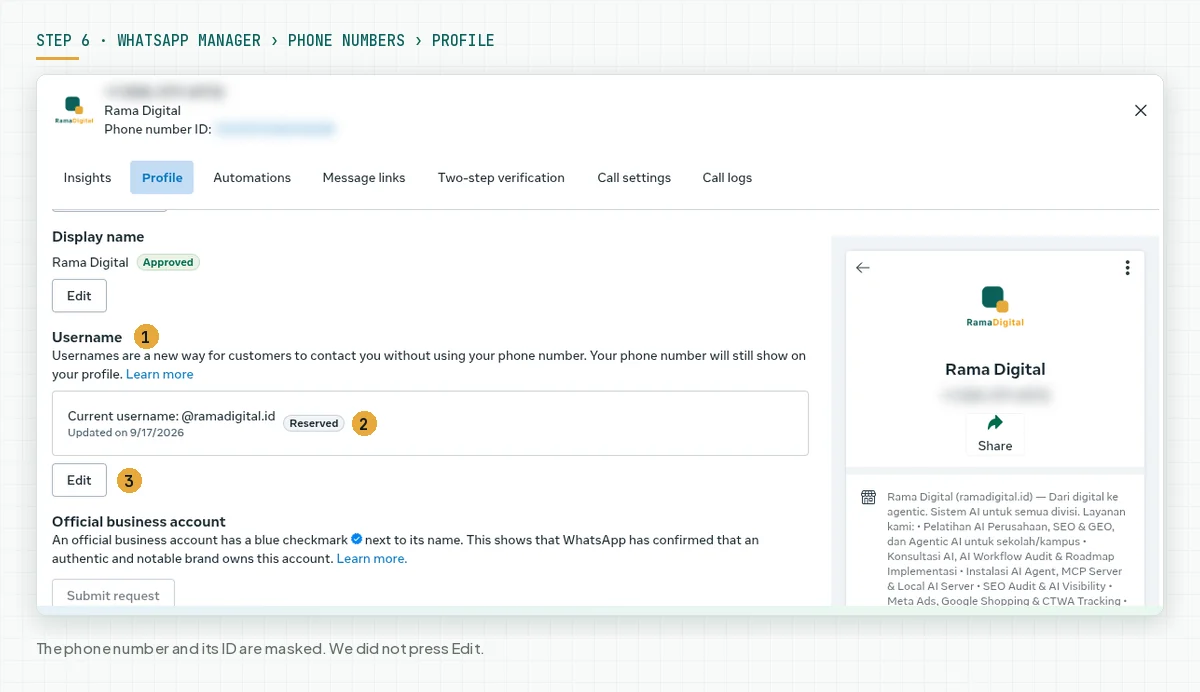
In our test on 2 October 2026, the username @ramadigital.id had the Reserved status with an update date of 17 September 2026. This status means the username is approved, but users do not see it until the username feature is available to everyone.
Business username format rules from Meta:
- Use only the letters a-z, the digits 0-9, the period, and the underscore.
- Use 3 to 35 characters, with at least 1 letter.
- Do not start or end with a period, and do not use 2 periods in a row.
- Do not start with
www, and do not end with a domain such as.com.
A business username does not hide your business phone number. In the chat window, WhatsApp uses this order: saved contact name, verified business name, username, then phone number.
Error 147002 means the messaging limit of your portfolio is too low. Source: Meta, Business usernames.
Step 7: Check the team inbox
Make sure the CS team sees a chat without a number as a normal chat. In Konektor, a product that Rama Digital builds and runs itself, open Conversations > Inbox. A contact from a username user shows the profile name, or the @username when there is no profile name.
According to the Konektor guide for chats from WhatsApp username users, 3 things do not happen before the number is known:
- No automatic lead is created.
- No conversionConversionThe action you count as a result, for example a paid order, a sign-up, or a chat that becomes a qualified buyer.Open the glossary is sent to ad platforms.
- One-tap, zero-tap, and copy code authentication templates cannot be sent.
For now, Konektor shows a chat without a number only through the official WhatsApp Business connection. The full term is in the Konektor BSUID glossary entry. On 2 October 2026, our inbox had no chat from a username user yet, so this article has no screenshot of such a contact.
Verify: send a scenario 2 payload to staging. The CS team can open that chat and reply to it from the inbox.
Worked example: 1 chat without a number until the number is known
In our test on 2 October 2026, the Rama Digital WhatsApp assistant (Wulan) dropped messages that had no from field. On the same day, we changed it: the parser reads from_user_id, the chat is stored by the whole BSUID, and replies use recipient. We tested the change with a dummy scenario 2 payload.
We also found 2 limits. An invoice or order from the chat needs a phone number, so a chat from a BSUID-only sender moves to the team. The handover note to the team also has no wa.me link, because that link needs a phone number.
The table below is a simulation with dummy data. It uses the same flow.
| Time | Input | What the system records | Output |
|---|---|---|---|
| 2 Oct, 09:00 | Sinta (@sinta.contoh) sends a first message. There is no interaction in 30 days. | from_user_id = ID.1234567890123456789, no from | New contact with a BSUID key and the label @sinta.contoh |
| 2 Oct, 09:01 | The chatbot replies with the opening hours. | Request with recipient | The response contains contacts[].user_id |
| 2 Oct, 09:05 | Sinta asks for an invoice. | The invoice flow needs a phone number | The chatbot sends the request_contact_info button |
| 2 Oct, 09:06 | Sinta taps the button. | contacts webhook, origin: contact_request, number 62812XXXXXXX | The number goes to the same contact |
| 2 Oct, 09:08 | The team issues the invoice. | The contact has a phone number and a BSUID | Invoice sent, chat history stays as 1 thread |
| 30 Oct, 10:00 | Sinta changes the phone number. | system message, previous_user_id = old BSUID | The new BSUID ID.9876543210987654321 moves to the same contact |
7 day checklist
- The developer sends the 4 test scenarios to the staging endpoint. Evidence: 4 payloads stored in the log.
- The developer adds a test for a message without
from. Evidence: the scenario 2 test passes. - The CRM admin adds BSUID and username columns to the contact. Evidence: the new data schema.
- The developer sends replies with
recipientto contacts without a number. Evidence: a response withcontacts[].user_id. - The process owner lists the flows that need a phone number, for example invoices, OTPs, and ad conversions. Evidence: the list of flows and their fallback path.
- The CS team prepares the
request_contact_infomessage. Evidence: 1 test from a personal number withorigin: contact_request. - The developer handles the
systemmessage for an ID change. Evidence: a test withprevious_user_idpasses. - Stop criterion: stop this work when the 4 scenarios pass and the log records 0 dropped messages for 7 days.
Frequently asked questions
Must I support BSUIDs when no customer uses a username yet? Yes. Meta writes that BSUID support is required for partners, directly integrated businesses, and CTWA advertisers. A business cannot control when its customers adopt a username.
What happens when my system is not ready and a customer adopts a username? The webhook still arrives, but without a phone number when the number conditions do not apply. The Meta FAQ writes that there is no recourse for messages that fail because the system does not support BSUIDs.
Does a business username hide my business phone number? No. Meta writes that business usernames are not intended for privacy. The business number still shows on your business profile.
Can I send a marketing template to a BSUID? Yes. The Marketing Messages API accepts phone numbers, BSUIDs, and parent BSUIDs. Meta still recommends phone numbers, because a send to a number keeps the number in later webhooks.
Is the BSUID the same for all my business numbers? The BSUID is the same for every number in 1 business portfolio. A number from another portfolio fails to message that BSUID, unless you use a parent BSUID.
How long does the customer number keep arriving in the webhook? The number arrives when the same business number interacted with the customer number in the last 30 days. The Meta contact book can also add the number, but only for interactions after that feature launched.
Next step
The limit that still applies: a BSUID keeps the chat alive, but a flow that needs a phone number still needs it. Automatic leads, ad conversions, invoices, and authentication templates wait until the customer shares the number.
If your WhatsApp chatbot already runs and must get ready for BSUIDs, see WhatsApp AI Chatbot Optimization. To map the parser, the CRM, and the phone number flows with our team, book a 60 minute Technical Scoping Session.
Sources
- Meta for Developers: Business-scoped user IDs, updated 15 September 2026, read on 2 October 2026.
- Meta for Developers: Webhook testing, read on 2 October 2026.
- Meta for Developers: BSUID FAQs, read on 2 October 2026.
- Konektor: Chats from WhatsApp Username Users, read on 2 October 2026.
- Konektor: BSUID glossary entry, updated 2 October 2026.