Direct answer: 7 Hermes AgentAI agentAn AI program that performs work steps by itself, for example reading a message, drafting a reply, and recording the result.Open the glossary uses you can copy in a business are a scheduled morning briefing, ticket and email triage, a team assistant in Telegram or WhatsApp, a weekly ads report, server and deploy monitoring, reading legacy systems through an MCPMCPA standard that lets an AI program use your tools and data under clear permissions.Open the glossary server, and weekly content drafts. All of them use 3 built-in features: cron for schedules, webhooks for events, and the gateway for delivery to chat. None of them needs extra code.
Main condition: every example needs 1 gateway alive on a VPS, 1 user allowlist, and 1 person who reads the output every week. Limit: every example spends model tokens, so start with 1 example and measure 1 week of cost. Regulated data, such as patient records or customer financial data, may pass only through a local model or a provider whose policy you have reviewed.
We read the Automation Blueprints, Scheduled Tasks, Daily Briefing Bot, Team Telegram Assistant, and MCP pages of the Hermes Agent documentation on 19 September 2026. On the same day we ran hermes cron create and hermes cron status on Hermes Agent v0.21.3 in an Ubuntu 24.04 container. The terminal screenshots in this article come from that test. The business names in the examples are fictional.
The problem: "AI agent" sounds big, the examples are rarely concrete
A business owner hears "AI agent" and pictures a robot that handles everything. What happens on the ground is smaller and more useful: 1 repeated task that took 20 minutes every morning is now done by the server before you wake up. Without examples that name the trigger, the tools, and the limit, a team does not know where to start. The query "contoh penggunaan hermes agent" appeared in our Search Console without a page that answers it. This article is that page.
When you do not know what Hermes Agent is yet, read our explanation of Hermes Agent functions and pricing first. When you want to understand the memory and skills the examples below use, read our article on Hermes Agent memory and skills for business operations (Indonesian).
How 1 automation works in Hermes Agent
Triggers: a schedule, an event, or an API call
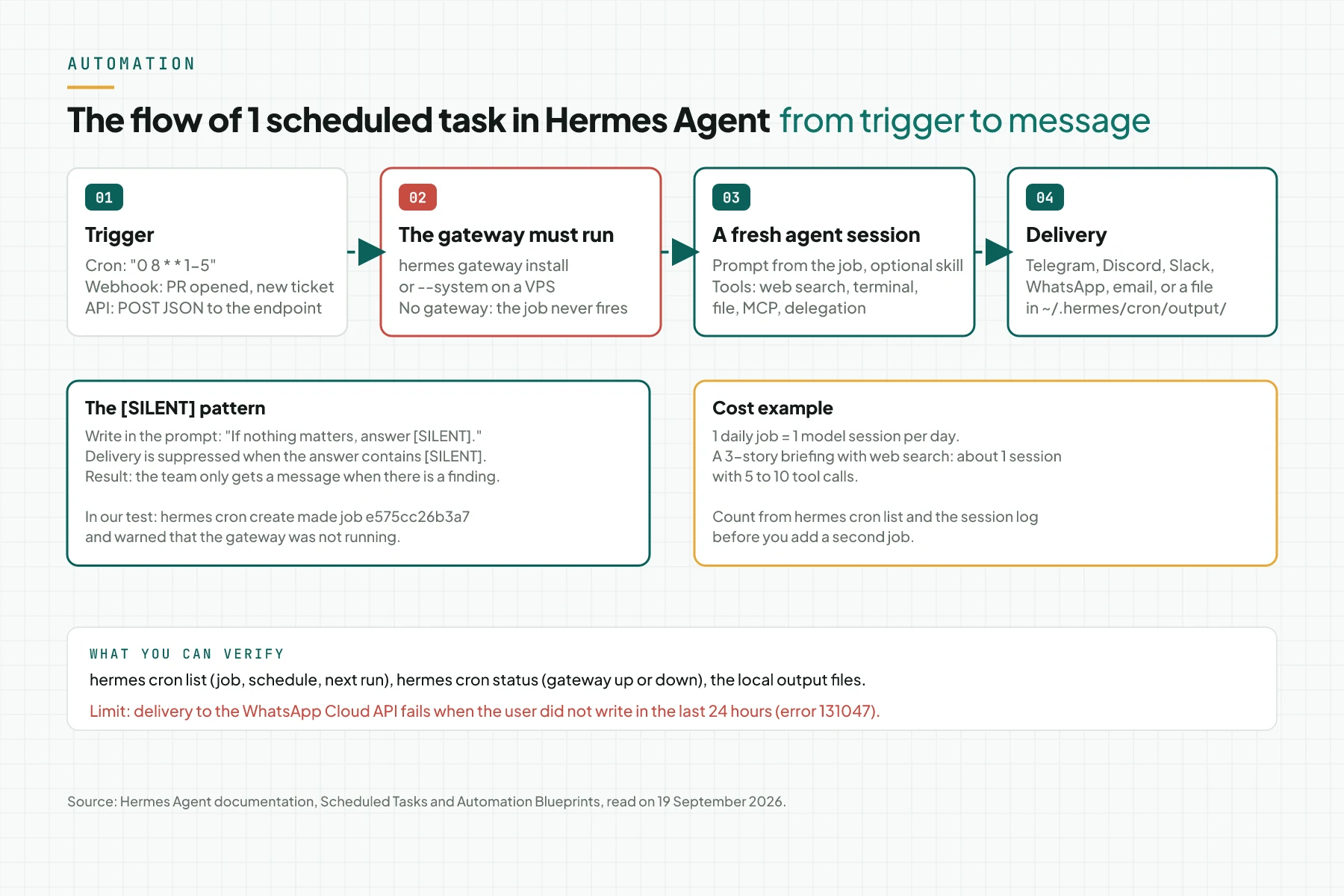
The Automation Blueprints page names 3 trigger types. A schedule uses the cronjob tool or the /cron command in chat, with a normal cron expression or plain language. A GitHub event uses hermes webhook subscribe. An API call receives a JSON POST on the gateway endpoint. All 3 can deliver to Telegram, Discord, Slack, SMS, email, GitHub comments, or local files. Source: Automation Blueprints, 19 September 2026.
The agent session: prompt, skill, and tools
Every job opens a fresh agent session with the prompt you wrote. A job can carry 1 skill with the --skill option. Inside the session, the agent uses the tools it is allowed: web search, terminal, files, browser, delegation to sub-agents, and MCP servers. Source: Scheduled Tasks and Features Overview.
Delivery and the [SILENT] pattern
When the job's answer contains the text [SILENT], delivery is suppressed. Write in the prompt: "If nothing matters, answer [SILENT]." With this pattern the team gets a message only when there is a finding. Without a gateway, jobs never run; in our test, hermes cron create warned "Scheduler is not ready" at once because the gateway was not installed.
The security limits that travel with every job
A job runs with the same approvals as a normal session. The Security documentation names the defaults cron_mode: deny for cron jobs and unattended_mode: deny for webhooks: a command that needs approval is blocked at once because no human can answer the prompt, and the agent must find another path. The deny list in approvals.deny still applies. Source: the Security documentation.
7 examples with trigger, tools, output, and limit
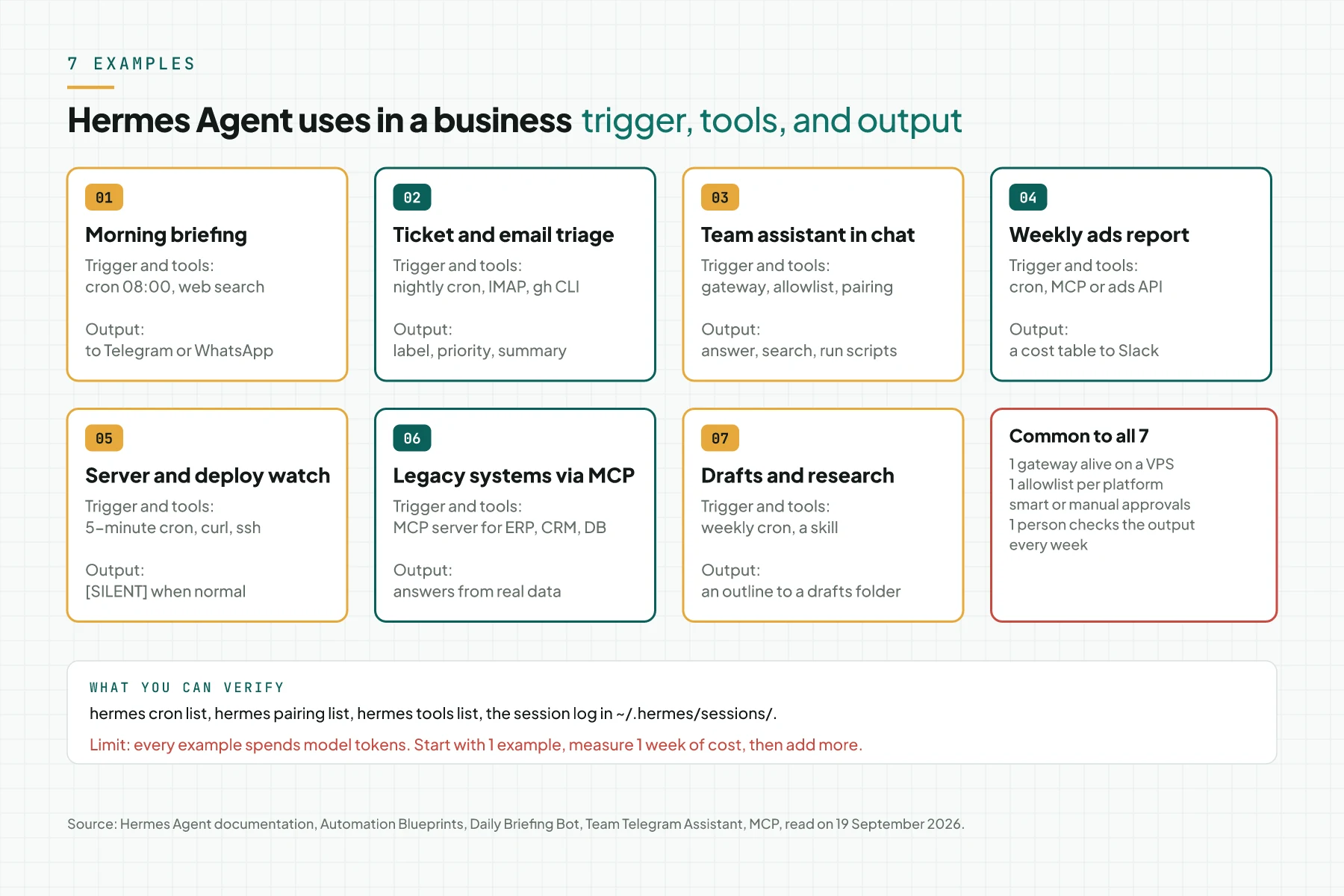
| # | Example | Trigger | Tools | Output | Limit |
|---|---|---|---|---|---|
| 1 | Morning briefing | Cron 08:00 on weekdays | Web search, summary | A Telegram or WhatsApp message | Quality follows the web sources |
| 2 | Ticket and email triage | Nightly cron or webhook | gh CLI, email adapter, labels | A summary with priorities | A human still checks the labels |
| 3 | Team assistant in chat | A message from the allowlist | Terminal, files, web | Answers and small actions | Approvals on risky commands |
| 4 | Weekly ads report | Cron Monday 07:00 | MCP server or ads API | A cost table to Slack | Needs legitimate API access |
| 5 | Server and deploy watch | Cron every 5 minutes | curl, ssh, logs | A message only on failure | Not a full monitoring system |
| 6 | Legacy systems via MCP | A question from an admin | MCP server for ERP, CRM, database | Answers from real data | Write tools need human approval |
| 7 | Content drafts and research | Cron Wednesday 10:00 | Web search, a skill, files | An outline in the drafts folder | A draft, not a publication |
Example 1: a morning briefing for the business owner
The Daily Briefing Bot tutorial in the documentation builds a job that wakes up every morning, searches news on your topics, summarises it, and delivers it to Telegram or Discord. For an online shop, replace the topics with "marketplace policy, shipping rates, and competitors". In our test this job was created with 1 command and received the ID e575cc26b3a7 with the schedule 0 8 * * 1-5. Source: the Daily Briefing Bot tutorial.
Example 2: overnight ticket and email triage
The Nightly Backlog Triage blueprint runs gh issue list at 2 in the morning, assigns priority labels P0 to P3, and delivers a digest to the team channel. For a non-technical business the source can be an inbox through the Hermes email adapter: the agent reads inbound email, groups complaints, orders, and invoices, and writes 1 morning summary. A human still replies. Source: Automation Blueprints, Development Workflow section.
Example 3: a team assistant in Telegram or WhatsApp
The Team Telegram Assistant tutorial builds a bot that several team members can use with a separate session per person, a per-user allowlist, and scheduled tasks to a team channel. The documentation says a $5 per month VPS is enough for the gateway, because the real cost sits in the model calls. We wrote the WhatsApp guide in our Hermes Agent for WhatsApp article. Source: the Team Telegram Assistant tutorial.
Example 4: a weekly ads report
A Monday morning cron job calls an MCP server or the ads platform API, builds a cost table per campaign, and sends it to Slack. Hermes reads MCP servers over the stdio or HTTP transport with per-server tool filtering. The limit: the API access must be legitimate, and only read tools should be open to an automatic job. We described the Meta Ads system we run with this pattern in our article on a Meta Ads system with Hermes Agent (Indonesian). Source: MCP Integration.
Example 5: watch the server and verify deploys
The Uptime Monitor and Deploy Verification blueprints use a short cron, curl against a health endpoint, and the [SILENT] pattern so the team hears only about failures. This is not a replacement for a full monitoring system; it is a second checker that can explain a log in human language.
Example 6: read legacy systems through an MCP server
A business with an old ERP, CRM, or database can give Hermes 1 MCP server with read tools. An admin asks in chat, the agent calls the tool, and the answer comes from real data, not a guess. Write tools, such as creating an order, still go through human approval. Our Hermes Agent installation service article (Indonesian) is often paired with an MCP server build for this case.
Example 7: weekly content drafts and research
The Content Pipeline blueprint researches topics every Wednesday, picks 1, and saves a 300-word outline to a drafts folder. The output is a draft, not a finished article. A human writes, checks the facts, and publishes. A skill that stores the team's writing style makes the week-4 draft closer to your voice than the week-1 draft.
Prerequisites
- Hermes Agent installed and
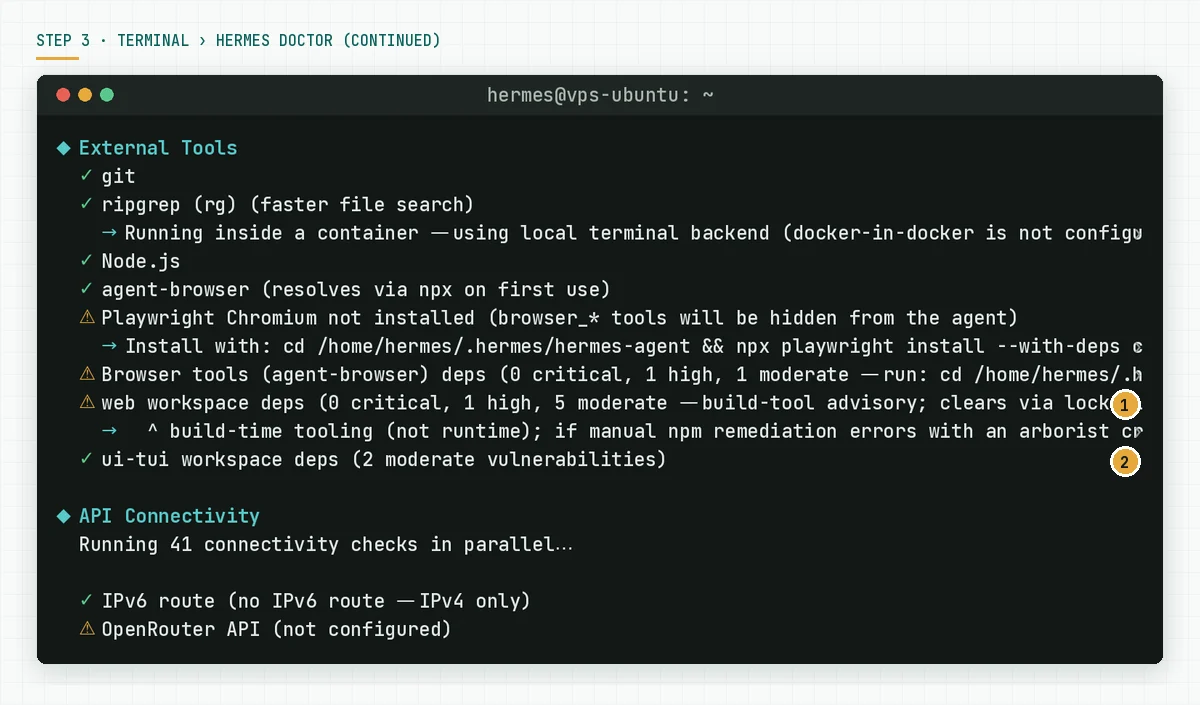
hermes doctorwithout red lines. The guide is in our Hermes Agent on Ubuntu VPS install guide. - 1 model provider connected. The Nous Portal Tool Gateway or a Firecrawl key for web search.
- The gateway installed as a service:
hermes gateway installorsudo hermes gateway install --system. - 1 delivery platform with an allowlist: Telegram is fastest, WhatsApp for Indonesian teams.
- 1 real task with a clear input and output to test first.
Step 1: Test the task manually in chat
Open hermes and send the prompt you plan to schedule, for example "Find 3 AI agent news items from today and summarise them in 5 sentences with links". Watch which tools are called and how long it takes. When the answer does not use web search, fix the prompt before you schedule it. The Daily Briefing Bot documentation starts with the same step.
Verify: the manual answer uses the right tools 3 times in a row with the same prompt.
Step 2: Schedule it with hermes cron create
Run this command on the server. Replace the schedule and the prompt with yours. The --deliver local option saves the output to ~/.hermes/cron/output/ until a messaging platform is ready.
hermes cron create "0 8 * * 1-5" \
  "Summarise the 3 newest AI agent news items.
   If nothing matters, answer [SILENT]." \
  --name "Morning briefing" --deliver local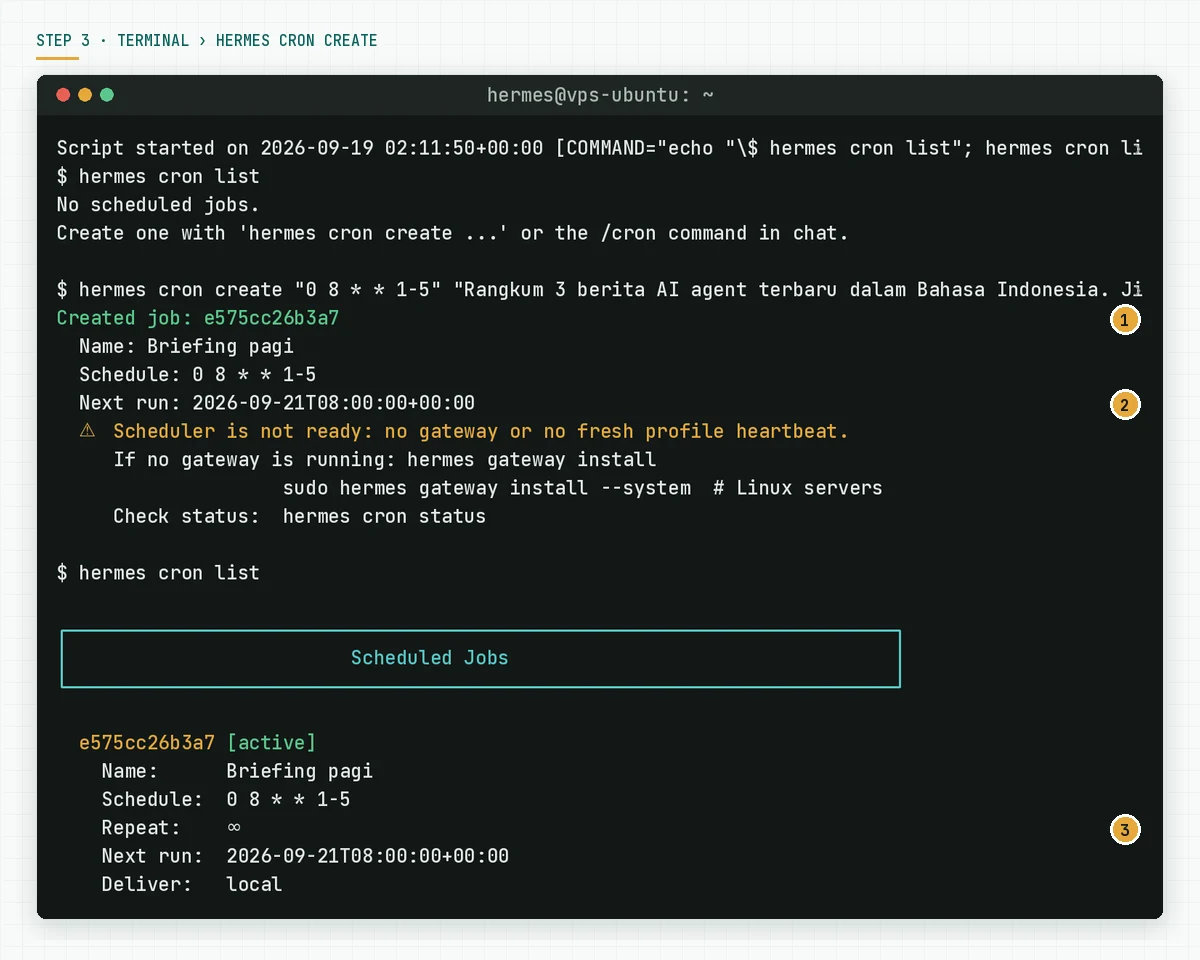
Verify: hermes cron list shows the job as active with the correct next run for the server time zone. Source: the Scheduled Tasks documentation.
Step 3: Make sure the gateway is alive
A job runs only when the gateway is alive. Run hermes cron status. When the result is "Gateway is not running", install the gateway as a service and check again.
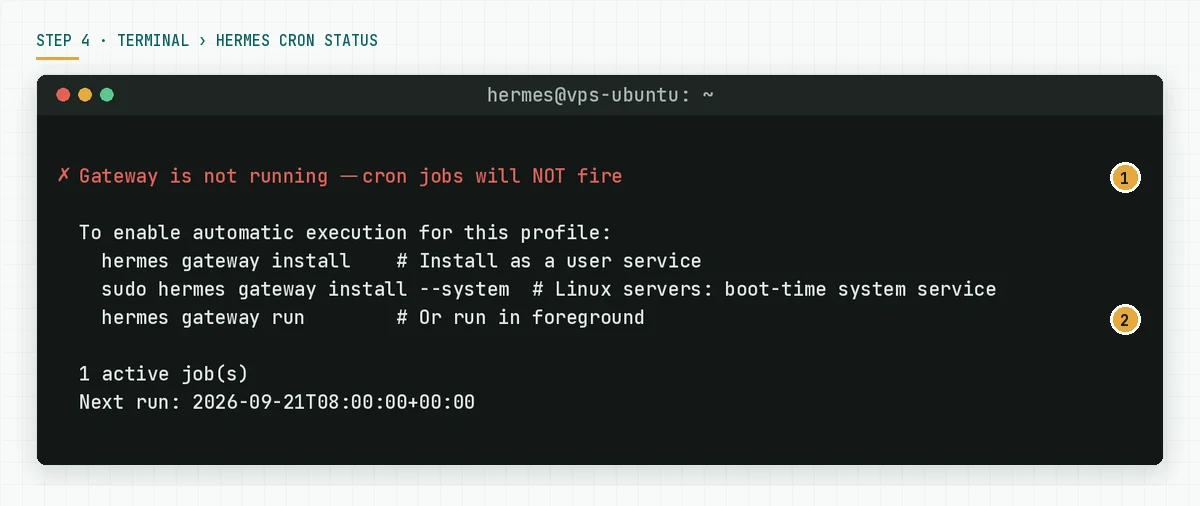
Verify: after the first schedule passes, a new file appears in ~/.hermes/cron/output/ or a message arrives in the team channel.
Step 4: Connect events through a webhook (optional)
For examples 2 and 5 the trigger is an event, not a clock. The hermes webhook subscribe command registers an endpoint that receives the payload and fills the prompt from its content.
hermes webhook subscribe new-ticket \
  --events "issues" \
  --prompt "New ticket: {issue.title}. Give a priority label P0 to P3
   and write a 1-sentence triage note." \
  --deliver telegram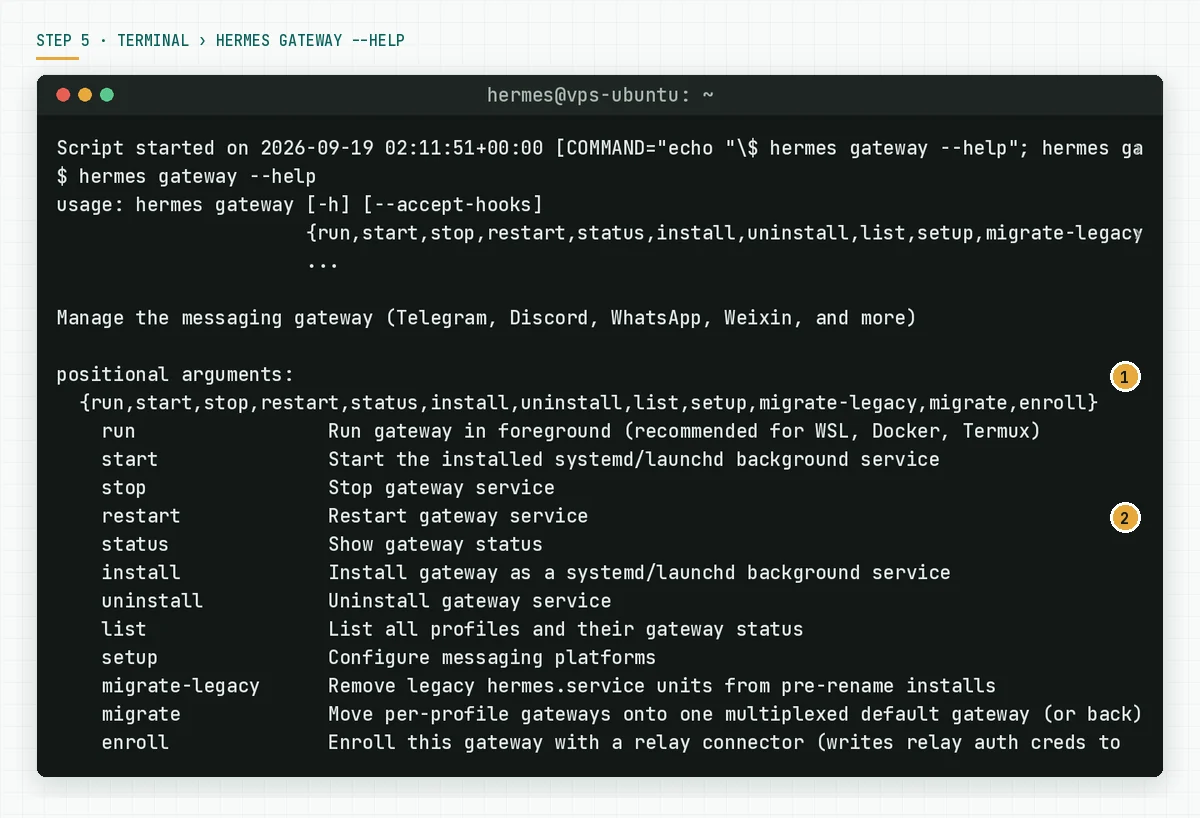
Verify: send 1 test event from the source, for example open 1 test issue, and confirm 1 message arrives. Source: Automation Blueprints, GitHub Event Automations section.
Step 5: Name the person who checks the output
Write 1 name for every job: who reads its output every week and decides to continue, change, or delete it. Without this name the job keeps running and burns tokens on reports nobody reads.
Verify: 1 line in the team calendar that names the checker and the check day.
A simulated week of the morning briefing job at a fictional distributor
This table is a simulation with dummy data. PT Sinar Logistik Nusantara runs example 1 with Nous Portal Plus and delivery to a 4-person Telegram group.
| Day | What the job did | What Hermes recorded | What the team received |
|---|---|---|---|
| Monday | 4 web searches, 3 stories summarised | 1 session, 9 tool calls | 1 message, 8 lines |
| Tuesday | 4 web searches, no relevant news | The answer contained [SILENT] | No message |
| Wednesday | 5 web searches, 3 stories summarised | 1 session, 11 tool calls | 1 message, 9 lines |
| Thursday | Gateway restarted during an update | Job delayed, then re-run | 1 message 12 minutes late |
| Friday | 4 web searches, 2 stories summarised | 1 session, 8 tool calls | 1 message, 6 lines |
| Saturday | No schedule | No session | No message |
The checker read 4 messages, removed 1 inaccurate source from the prompt, and recorded 1 week of credit usage. The numbers in this table are an illustration, not a customer result.
Checklist before you add a second job
- The manual prompt gave a usable result 3 times in a row. Owner: the process owner. Evidence: 3 saved answers.
- The job has a clear name, schedule, and delivery. Owner: the server owner. Evidence:
hermes cron list. hermes cron statusis green and the gateway is installed as a service. Owner: the server owner. Evidence: a screenshot.- The [SILENT] pattern is in the prompt of every monitoring job. Owner: the process owner. Evidence: the prompt text.
- The allowlist holds only people who may give commands. Owner: the server owner. Evidence: the
.envcontent without*. - 1 week of credit usage is recorded and compared with the working hours saved. Owner: the business owner. Evidence: 1 line of numbers.
- 1 checker name per job is in the calendar. Owner: the business owner. Evidence: the team calendar.
- Stop criterion: when a job's output goes unread for 2 weeks in a row, pause it with
hermes cron pauseand review.
When Linux cron and a script are enough, and when Hermes Agent is
Every example above can be written as a script that Linux cron runs. This table compares the 2 on things you can verify.
| Item | Linux cron and a script | Hermes Agent |
|---|---|---|
| Fixed-shape input | Fits, cheap, no tokens | Overkill |
| Free text input: email, tickets, chat | Needs fragile parsing code | Fits, the model reads the text |
| Summarising and writing | Needs a model API and your own code | Built in |
| Sending to Telegram or WhatsApp | Needs your own integration | Built in through the gateway |
| Human approval for risky commands | None | Built in through approvals |
| Cost per run | Close to zero | Model tokens per session |
Rama Digital recommendation: use Linux cron when the input and output have a fixed shape and need no language. Use Hermes Agent when free text must be read, written, or sent to chat, and someone owns the approvals.
Frequently asked questions
Does a Hermes cron job run when the server is down? No. Jobs run inside the gateway. Install the gateway as a systemd service so it comes back after a reboot, and check with hermes cron status.
What does 1 daily job cost? The software is free. Every run opens 1 model session, so the cost is tokens per session. In our simulation, 1 morning briefing used 8 to 11 tool calls. Measure 1 week in your model provider dashboard before you add jobs.
Can job output go to WhatsApp? Yes, through the WhatsApp gateway. On the Baileys path there is no window limit. On the official Cloud API, delivery fails when the user has not written in the last 24 hours.
Can a job delete files or change the system? A job uses the same approvals as a normal session, and the default cron_mode is deny for commands that need approval. The deny list in approvals.deny still applies. Open write tools only when a human approves.
What is the difference between cron and a webhook in Hermes? Cron runs on a schedule. A webhook runs when an event arrives, for example a new ticket or a JSON POST from another system. Both open an agent session and deliver to the same platforms.
Next step
Start with 1 example, run it for 1 week, and read the numbers. The limits that stay: quality follows the model and the sources, and every job spends tokens. When you want us to install Hermes Agent with the first 2 examples, the gateway, the allowlist, and a review SOP on your VPS, the Hermes Agent Installation Service finishes it in 2 to 5 working days. When you want to map which process deserves automation first, book a 90-minute AI Diagnostic session and bring your team's list of repeated tasks.