The best Hermes Agent use cases for business are repeated tasks with clear inputs, verifiable outputs, and a human who keeps control of decisions. Start with a morning briefing, ticket triage, an ads report, server monitoring, or read-only access to data through MCPMCPA standard that lets an AI program use your tools and data under clear permissions.Open the glossary. Do not start with automation that can change production data without review.
Hermes Agent is an AI agentAI agentAn AI program that performs work steps by itself, for example reading a message, drafting a reply, and recording the result.Open the glossary that can use tools, work from chat, run scheduled tasks, and accept event triggers. Its value is not a long chat. Its value is a small workflow that converts an input into a consistent operational output.
This guide updates our earlier article about seven Hermes Agent use cases. The official Hermes Agent documentation checked on 17 October 2026 describes cron, the gateway, toolset limits, webhooks, and Automation Blueprints. Those documentation pages do not show publication dates. The official event-read plugin, dated 13 October 2026, gives an hourly job example that returns [SILENT] when there is no notification.
Which Hermes Agent use cases should you test first?
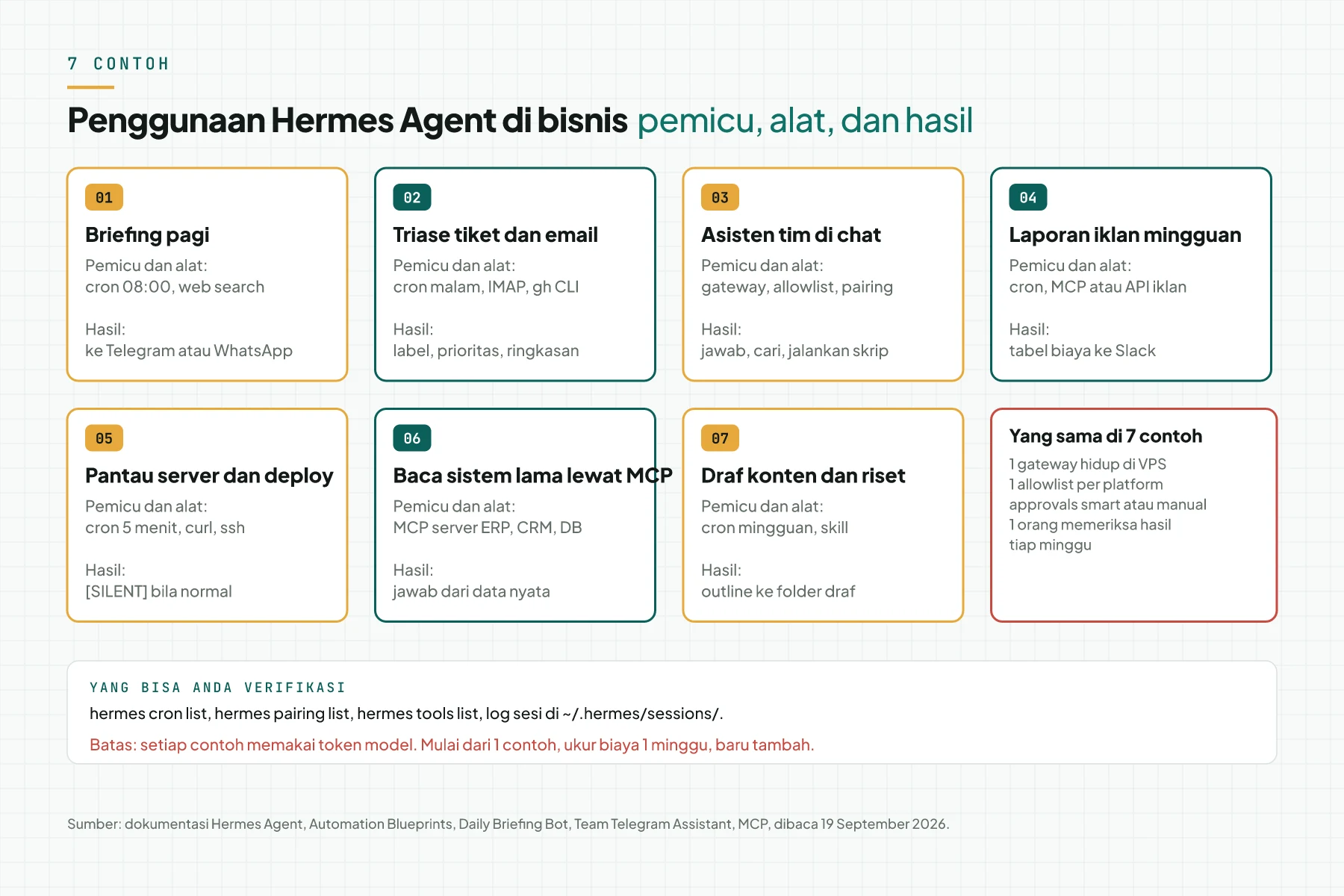
Use this table to select your first workflow. Give priority to work that repeats often, is easy to verify, and is safe when the result is late or wrong.
| Workflow | Trigger | Output | Main limit |
|---|---|---|---|
| Morning briefing | Daily schedule | Summary with source links | Sources require review |
| Ticket triage | New ticket or schedule | Priority and summary | A human makes the final decision |
| Ads report | Weekly schedule | Cost and change table | Use read-only access |
| Server monitoring | Short schedule | Alert on failure | Not a monitoring-system replacement |
| Read CRM or ERP | Admin question | Answer from current data | Keep write tools restricted |
| Content draft | Editorial schedule | Outline and source list | Do not publish automatically |
| Team assistant | Message from an allowlist | Answer or small action | Restrict user access |
How do cron and the gateway run a workflow?
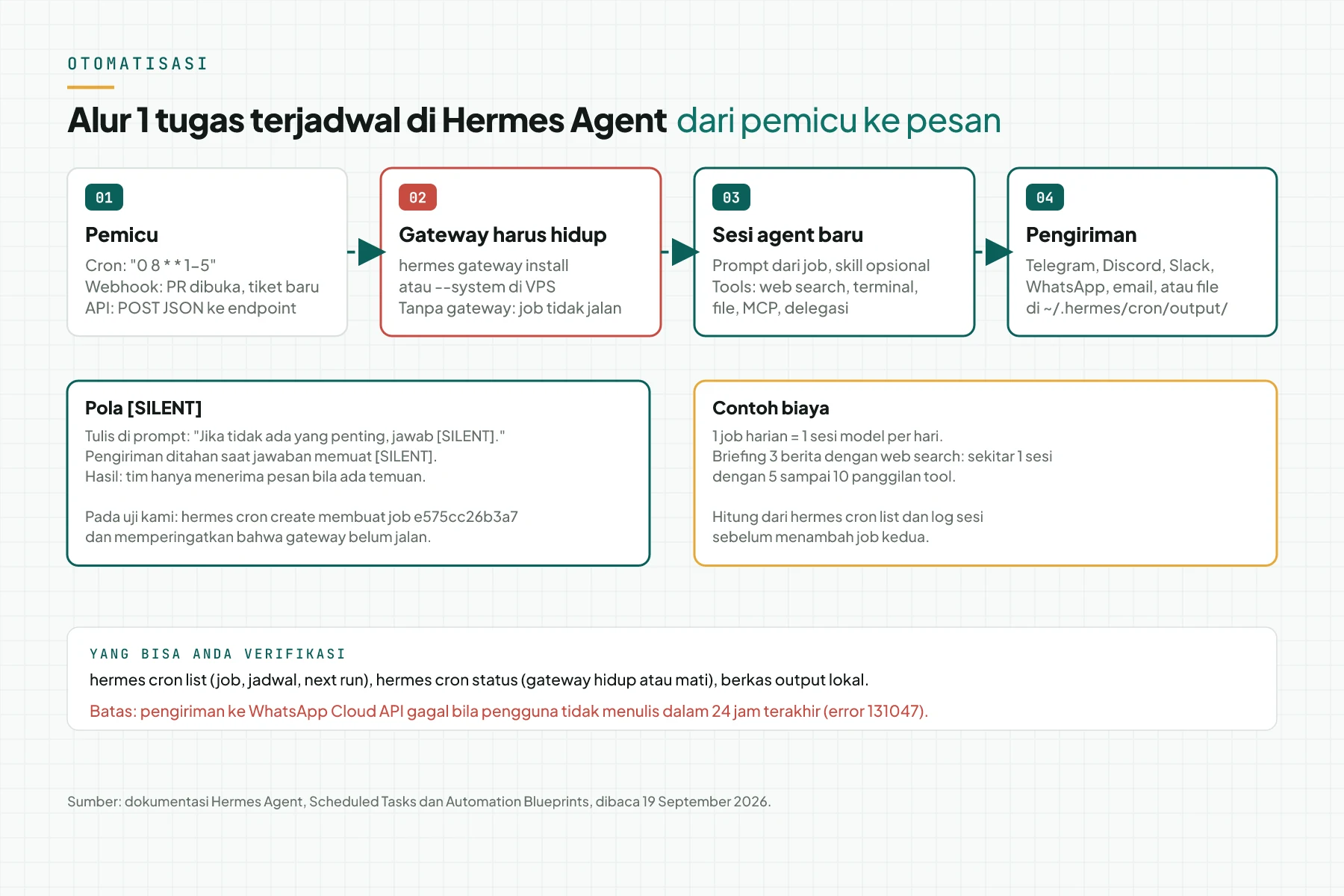
The official Scheduled Tasks documentation says that tasks can run once or repeatedly through cron expressions and natural-language schedules. Each job can use a skill and a restricted toolset. The per-job enabled_toolsets setting can limit a news job to web and file tools, without terminal access or other tools that it does not need.
The gateway runs the scheduler and starts a new agent session when a job is due. In the local configuration described by the documentation, the scheduler checks due work every 60 seconds. The gateway must be active before the schedule can run. Check it with hermes cron status, then confirm that the result arrives at the correct destination.
How do you select a safe Hermes Agent use case?
- Select one read task. Start by reading status, tickets, or reports. Do not enable write tools in the first test.
- Define completion evidence. For example, a summary has three links, a report names its period, or a server check returns an endpoint status.
- Restrict tools. Enable only the toolsets that the job needs. The official documentation gives
enabled_toolsets=["web", "file"]as an example for a weekly news summary. - Assign a reviewer. One person must read the output and record bad classification, weak sources, or irrelevant actions.
- Test for seven days. Measure useful results, failures, saved time, and model use.
For event-driven work, the Hermes Agent webhook documentation explains that a payload can become temporary context for an existing cron job. This pattern fits a new ticket, a status change, or an application event. Do not put credentials or sensitive data in a webhookWebhookAn automatic message one system sends to another the moment something happens, for example an incoming WhatsApp message.Open the glossary prompt.
When is Hermes Agent better than a normal script?
| Condition | Normal script | Hermes Agent |
|---|---|---|
| Fixed structured input | Simpler | Often unnecessary |
| Email, ticket, or chat input | Needs parsing rules | Can read natural language |
| Output needs a summary | Needs a model integration | Can use a model and tools |
| Data-change risk | Restricted through code and permissions | Must be restricted through tools and approval |
Select a normal script when the input and output are fixed. Select Hermes Agent when the task needs language interpretation, several tools, or delivery to chat. If the team does not have a gateway and a review procedure, read our Hermes Agent upgrade and test guide before you add automation.
Common questions about Hermes Agent use cases
Can Hermes Agent make an automated briefing? Yes. Schedule a job, restrict its toolset to web and file, and require source links in the result.
Can Hermes Agent monitor a server? Yes, as an additional check. Use a dedicated monitoring system for primary metrics, uptime, and escalation.
Can it send a result only when there is a problem? Yes. The event-read plugin example uses [SILENT] when there is no notification.
Must every workflow use cron? No. A webhook can trigger a job when an event arrives, and an admin can start a workflow from chat.
Can Hermes Agent change a CRM or database? It can when the tool exists. For the first stage, use read-only tools and keep human approval for changes.
Operational conclusion
Select one Hermes Agent use case that produces information, not a change. Run it for seven days with the minimum toolset, completion evidence, and one reviewer. If the output is consistent, add a webhook trigger or a second workflow. For gateway setup and access restrictions, see our Hermes Agent installation service.
Primary sources
- Hermes Agent Scheduled Tasks, checked 17 October 2026; publication date not shown.
- Hermes Agent Gateway Internals, checked 17 October 2026; publication date not shown.
- Automation Blueprints Catalog, checked 17 October 2026; publication date not shown.
- Hermes Agent Webhooks, checked 17 October 2026; publication date not shown.
- event-read plugin, 13 October 2026.