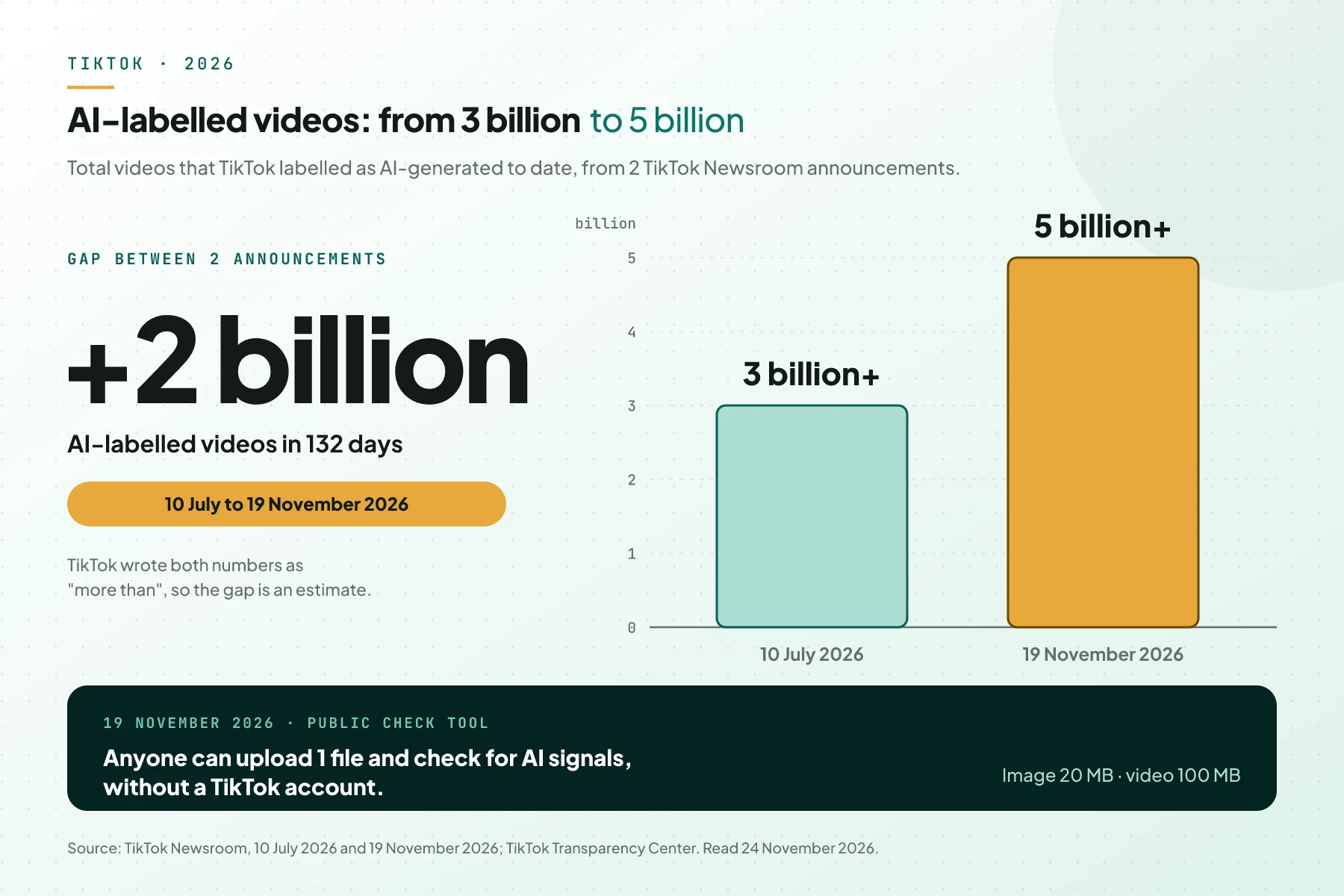
On 10 July 2026, TikTok wrote that it had labelled more than 3 billion videos as AI-generated. On 19 November 2026, that number was more than 5 billion.
In the 19 November announcement, TikTok also opened a public check tool. Anyone can upload 1 image or video, without a TikTok account, and see if the file was made with AI.
The tool page names 4 apps: CapCut, Dreamina, Pippit, and Hypic. If you made a sales video with the AI features of one of these apps, buyers and competitors can now check it themselves.
TikTok labelled about 2 billion new AI videos in 132 days
The number of AI-labelled videos on TikTok increased from more than 3 billion to more than 5 billion between 10 July and 19 November 2026.
The first number is in the TikTok Newsroom announcement of 10 July 2026. The second number is in the TikTok Newsroom announcement of 19 November 2026. TikTok wrote both as "more than", so the gap of 2 billion is an estimate.
TikTok labels content in 3 ways: creator labels, Content Credentials metadata, and an invisible watermark. The 19 November announcement also added 2 other controls. Viewers can set how much AI content they see in For You with Manage Topics. Eligible creators can use Likeness Detection to find videos that copy their face.
For sellers, the public check tool is the change that matters most. The other controls work only inside the TikTok app. The check tool works on the file, wherever that file goes.
The check tool reads 2 signals inside the file, not the label in the app
The check tool looks for Content Credentials and the VeraDura watermark, 2 signals that are stored inside the image or video.
TikTok uses 3 layers, according to the Identifying content made with TikTok AI page in its Transparency Center. Layer 1 is the label that shows in the app. Layer 2 is Content Credentials, metadata to the C2PA standard, and layer 3 is VeraDura, the invisible TikTok watermark.
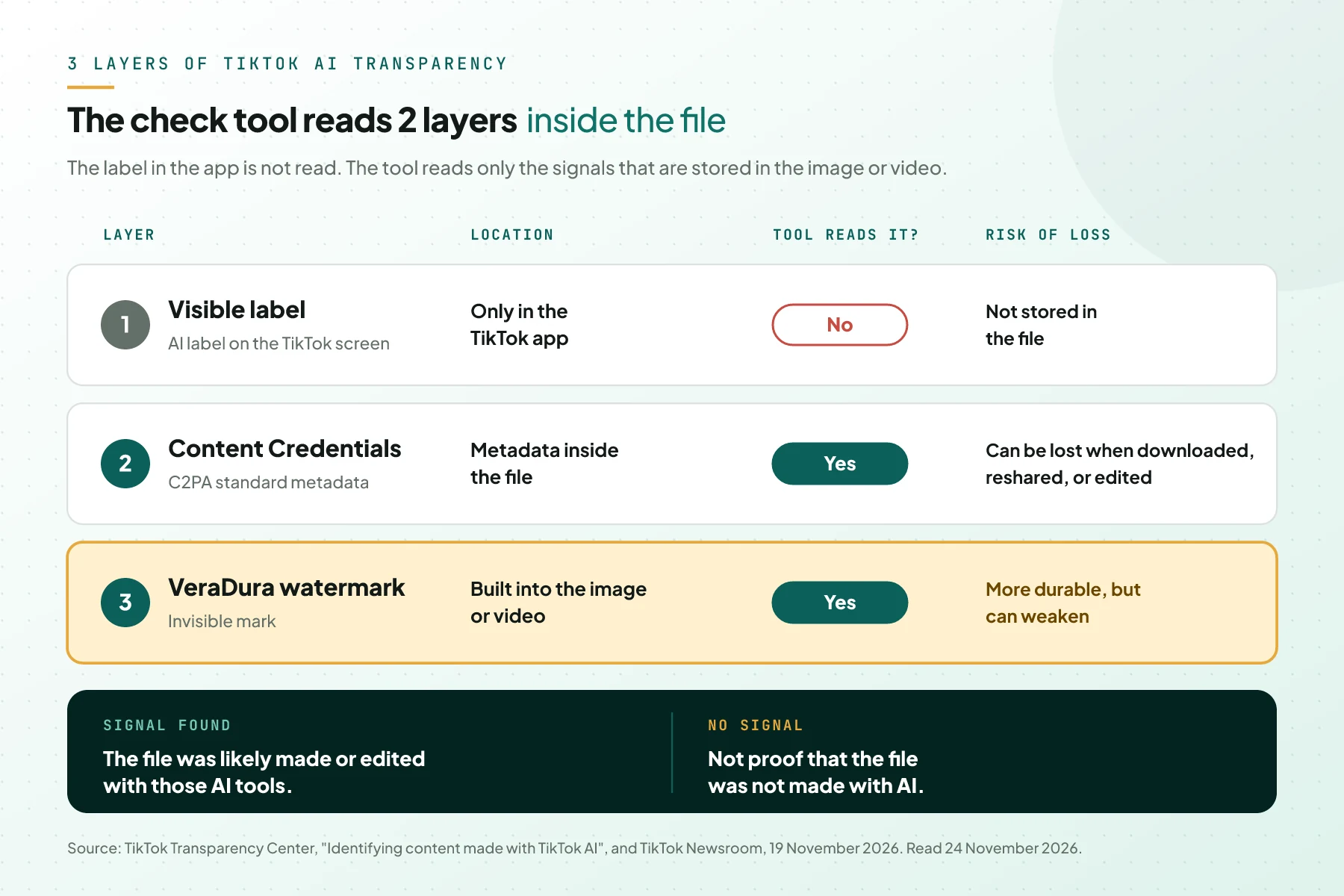
Content Credentials are easy to read, but they are also easy to lose. TikTok writes that this metadata can be lost when a file is downloaded, reshared, and edited. VeraDura is built into the image or video itself, and TikTok calls it more durable and harder to remove.
CapCut uses the same pattern. On 31 July 2026, CapCut wrote that the Dreamina Seedance 2.5 video model and the Dola Seedream 5.0 Pro image model carry invisible watermarks, C2PA Content Credentials, and visible AI labels. Europe also starts to regulate marks on AI output, as we explain in our article on the Claude watermark and the EU AI Act.
Test 1 sales video in 4 steps
You can check 1 file in a few seconds, without a login, with the tool that TikTok links from its Transparency Center.
- Open the TikTok AI content check tool.
- Upload 1 file. The limit is 20 MB for JPEG, PNG, or WebP images, and 100 MB for MP4, MOV, WebM, or AVI videos.
- Read the result. If the signal is intact, the result also names the AI tool that was used.
- Do the test again with 3 versions of the same video: the original export, a version edited in another app, and a version downloaded from your account.
Step 4 gives the most useful answer. It shows which versions still carry the signal, and which versions lost it.
| Result | Meaning according to TikTok | What you do |
|---|---|---|
| Signal found | The file was likely made or edited with an AI tool that the check tool knows | Add an AI label if the video shows realistic people or scenes |
| No signal | The file may not come from those tools, may come from another AI, or its signal was removed or weakened | Do not think the video is free of AI. Follow your record of how you made the video |
| Error | The tool could not get or read the origin data of the file | Try again with the original export file |
For videos from other apps, use Verify from the Content Authenticity Initiative. The TikTok tool reads only Content Credentials that TikTok added. TikTok writes that it deletes the file immediately after it shows the result, and does not use the file to train models.
An empty result does not prove that your video is not AI
The tool knows only the AI tools of TikTok and the named apps, and TikTok writes that its detection is not 100% accurate.
A signal can be weak or missing for 3 reasons: the C2PA metadata was removed, the watermark weakened, or the file is older than the signal. The tool also cannot read changes made on other platforms.
TikTok also limits what the result means. The Transparency Center page writes that results are for general information only, not legal or compliance advice.
So the tool is useful in 1 direction only. A "signal found" result gives strong evidence, but a "no signal" result proves nothing. You also cannot use the tool to judge competitor videos that were made with other AI tools.
TikTok guidelines already require a label for realistic AI people and scenes
The TikTok Community Guidelines, in effect since 24 September 2026, require a label on AI content that shows realistic-looking scenes or people.
TikTok released these guidelines on 25 August 2026. Unlabelled content can be removed, restricted, or labelled by the TikTok team, based on the harm it can cause. A label also does not make all content acceptable.
This rule applies directly to sales videos. The Indonesian-language Pippit page offers shopping videos from a TikTok Shop product link, with realistic AI avatars, lip sync, and TTS voice. Such an avatar is a realistic-looking person.
The decision rule is this. If AI made or greatly changed a realistic-looking person, face, or scene, add an AI label before you upload. For other cases, the guidelines give no detailed list, so record the tool that you used for each video.
In Indonesia, many facts are not announced yet
TikTok has not published AI-label numbers by country, and it has not said how an AI label affects the reach of a video.
What is certain: the check tool is open without an account, and the label rule has applied since 24 September 2026. Pippit already serves users in Indonesian, and CapCut rolled out Seedance 2.5 to paying subscribers over 16 in Asia.
What is not certain: the countries where Likeness Detection is available, and the conditions that make a creator eligible. We also found no data about Indonesian seller videos that were restricted because they had no AI label.
Check your last 3 AI sales videos before Harbolnas 12.12
Take your last 3 sales videos that used AI features, and check all 3 this week.
- Upload the original export file of each video to the TikTok check tool.
- Record the result: signal found, no signal, or error.
- Check that each video with an AI avatar or AI person already has an AI label on TikTok.
- Add an AI label to each video that has no label.
- Keep 1 record for each video: the tool, the date, and the label status.
That record helps when the TikTok team or a buyer asks a question. Sellers who already had a dispute with the platform know this, as our article on held TikTok Shop seller balances shows.
The 5 billion number will continue to increase. TikTok has not said if an AI label changes the reach of a sales video. Until it does, the clearly written risk is an unlabelled video that TikTok removes or restricts.
If your team wants to learn how to make product videos with AI tools, see the Rama Digital Motion x Claude Design class.
Questions and answers
Does the TikTok AI check tool need a TikTok account?
No. Anyone can upload 1 image up to 20 MB or 1 video up to 100 MB, and read the result without a login.
Which apps does the tool recognise?
The TikTok AI tools and, according to the tool page, the AI tools of CapCut, Dreamina, Pippit, and Hypic. AI videos from other apps can show no signal.
Does a no-signal result mean my video is safe without a label?
No. Metadata can be removed and the watermark can weaken. TikTok guidelines still require a label for realistic AI people or scenes.
Does a video with a Pippit AI avatar need an AI label?
A realistic AI avatar shows a realistic-looking person. The TikTok guidelines in effect since 24 September 2026 require a label for such content.