Direct answer: Businesses in ChatGPT is a beta feature from OpenAI for business owners. You claim your business in Business Hub, then you manage its information. You also see the number of mentions and website clicks. Ecommerce and online service businesses in the United States can add a Business AgentAI agentAn AI program that performs work steps by itself, for example reading a message, drafting a reply, and recording the result.Open the glossary.
Main condition: You own the business or you are its authorized representative, the business has a website, and OpenAI approves 2 reviews. Limit: The claim does not guarantee higher placement or sales. A local store or restaurant can claim only an existing US listing at this time. The Business Agent is not available in Indonesia.
We read 5 official OpenAI pages on 11 November 2026: the announcement, the product page, the help article, and 2 policies. We did not run a claim. Business Hub asks for a login, and the OpenAI reviews use real business documents. Thus each step in this article follows the OpenAI text, not a test of ours.
What OpenAI announced on 10 November 2026
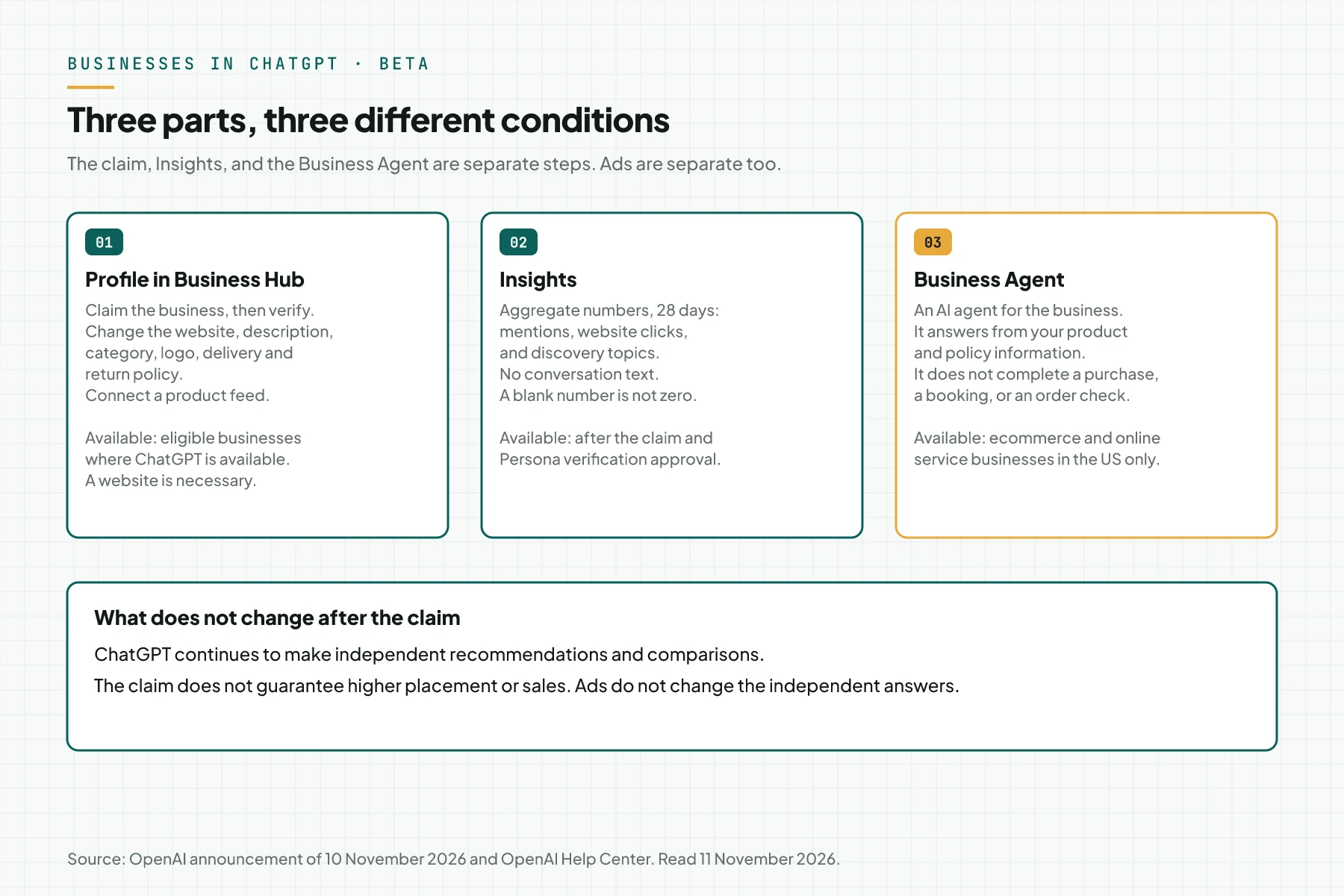
OpenAI released Businesses in ChatGPT as a beta on 10 November 2026. In the OpenAI announcement of 10 November 2026, OpenAI says that 1.2 billion people use ChatGPT each week. That number comes from OpenAI. The release has 3 parts:
- Profile in Business Hub. You claim the business, then you update its details and product feed.
- Insights. You see aggregate numbers for mentions, website clicks, and discovery topics.
- Business Agent. An AI agent answers customer questions for the business. This part is only for eligible businesses in the US.
OpenAI writes that this release is an early step. OpenAI plans to open the feature to more markets and business categories. The announcement gives no date.
Why a business owner must look at this release
Before this release, a business had no official method to correct its information in ChatGPT. ChatGPT builds an answer from the sources that it finds. An old price, old opening hours, or an old return policy can appear. The owner also could not see how often ChatGPT referenced the website.
Business Hub fills those 2 gaps: a correction path and a baseline number. This adds to the paid path that already exists. Read the ChatGPT Ads versus Google Search study for that paid path.
How Business Hub, Insights, and the Business Agent work
The 3 parts work in sequence, and each part has its own gate. The claim opens the profile. Identity verification opens Insights. Location and industry eligibility open the Business Agent.
Business Hub
Business Hub is where you manage the business profile in ChatGPT. After verification, you can change the website, description, product or service category, logo, delivery policy, and return policy. A retailer can add a product feed with prices and availability. Source: the OpenAI help article "Setting up your business on ChatGPT", read 11 November 2026.
OpenAI reviews each change before it publishes the change. A change needs time to appear in an answer. ChatGPT also continues to use other sources when it answers a question about your business.
Insights
Insights shows aggregate activity for the past 28 days. It has 3 numbers: mentions, website clicks, and discovery topics. Discovery topics are common themes in ChatGPT answers that referenced your business. These themes are not a list of user prompts.
OpenAI does not share user conversations with a business. Chats with a Business Agent are not shared too. A number shows only when the quantity of conversations passes a threshold. Source: the OpenAI announcement of 10 November 2026.
Business Agent
A Business Agent is an AI agent that answers for the business. When a business appears in a ChatGPT answer, a person can open the business profile. If an agent is available, the person can start a conversation with it. That conversation has a clear label and stays separate from the initial ChatGPT conversation.
The agent only explains products and policies, then it gives a link to your website. The agent does not complete a purchase, does not make a booking, and does not check an order. The customer completes those actions on the website. Source: the OpenAI help article "Setting up your business on ChatGPT".
The relation with ChatGPT Ads
A business can sponsor its Business Agent and use it as the destination for ChatGPT Ads. A sponsored placement has a clear label and stays separate from ChatGPT answers. OpenAI also writes that advertising does not influence the independent answers of ChatGPT. For the bid methods in ChatGPT Ads, read target CPA and target CPC in ChatGPT Ads.
A comparison of the 4 business paths in ChatGPT
The claim, Insights, the Business Agent, and ads are 4 separate items. You do not need an Ads account or a ChatGPT Enterprise agreement to claim. You also do not need to publish an agent. This table summarizes the OpenAI text read on 11 November 2026.
| Path | Function | Available to | Condition |
|---|---|---|---|
| Business Hub profile | Update the business details and product feed | Eligible businesses where ChatGPT is available | Claim approval, then Persona approval to publish changes |
| Insights | Mentions, website clicks, discovery topics, 28 days | Businesses with a claim | Persona approval and activity above the threshold |
| Business Agent | Answer product and policy questions | Ecommerce and online service businesses in the US with a website | Persona approval and an industry that the policy permits |
| ChatGPT Ads | Labeled sponsored placement | ChatGPT Ads advertisers | An Ads account. Separate from the claim |
Who can claim from Indonesia
An Indonesian online business with a website can try the claim, but OpenAI decides the eligibility. OpenAI writes that an eligible business can claim where ChatGPT is available and the verification is supported. Availability depends on the location and type of the business. Source: the OpenAI help article "Setting up your business on ChatGPT".
- Online stores and online services. If your business is not in the Business Hub search, you can possibly see an option to add it.
- Local stores and restaurants. At this time, only an existing US listing can be claimed. A local store in Indonesia does not have this path.
- Business Agent. Only for ecommerce and online service businesses in the US. An Indonesian business cannot create an agent.
- Shopify merchants. A Shopify store can connect from Business Hub or from the Shopify admin to make verification faster.
We did not test a claim from an Indonesian account. the Businesses in ChatGPT policy also states that not every business can claim. OpenAI can decline a category that has a safety or integrity risk, and the requirements can change.
What to prepare before the claim
Prepare these 6 items first, so the 2 OpenAI reviews do not stop midway. This list comes from the OpenAI help article "Setting up your business on ChatGPT".
- The ChatGPT account that will manage the business. Use the account of an authorized person, not a shared account.
- An active business website. The initial claim is only for a business with a website.
- Access to 1 verification method: the business phone, the business email, the domain DNS, or the Shopify store.
- A government-issued ID for the person who applies.
- Business registration data. The name, address, and tax number must agree with the official records.
- Proof that you are authorized to represent the business.
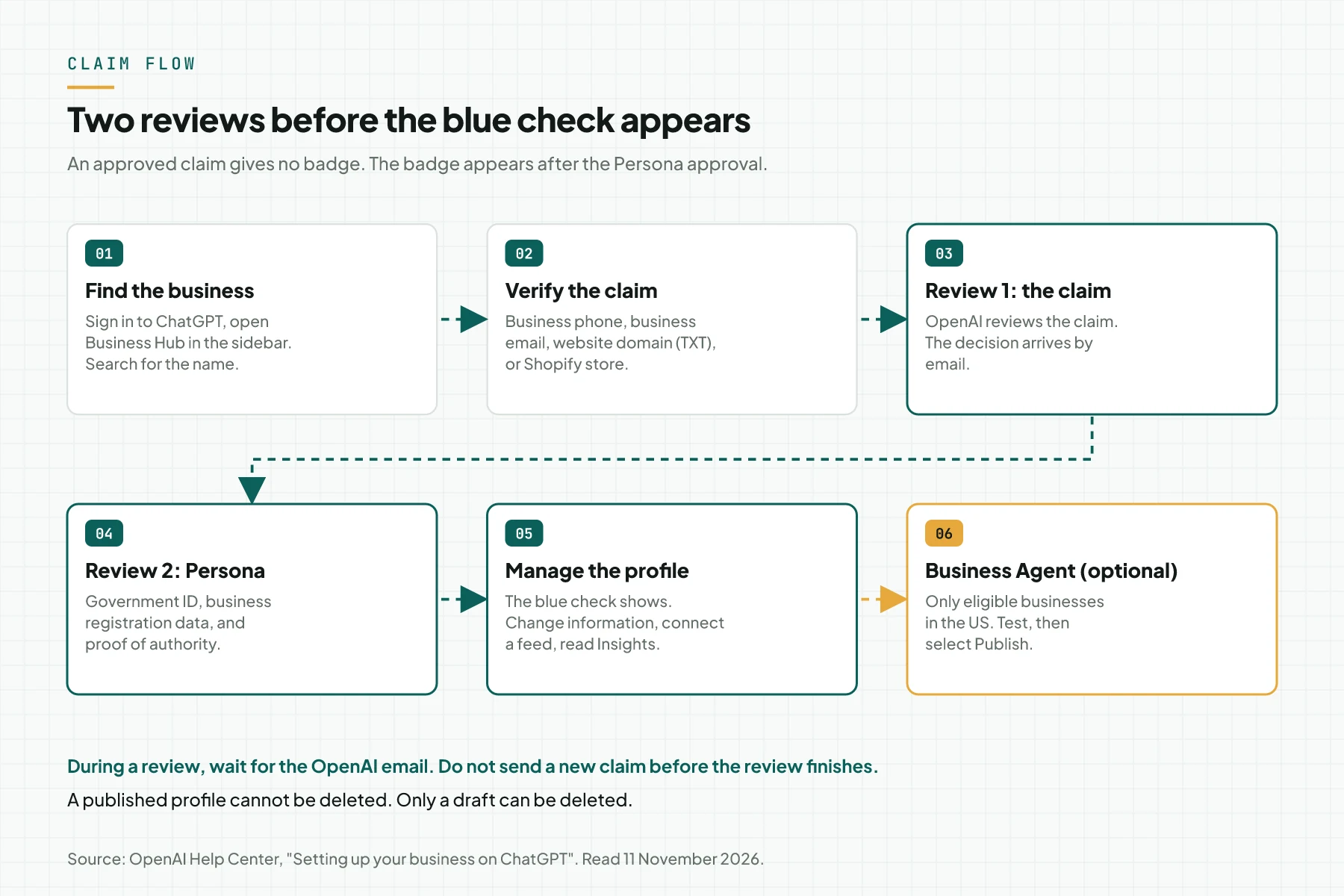
Step 1: Find your business in Business Hub
Sign in to ChatGPT, then open Business Hub from the sidebar. Search for your business by name. Select the listing that matches, then confirm the ChatGPT account that will manage it.
- You received a claim invitation. Open the personal link in the email, then sign in with the email address that received it.
- You see Contact support. That listing is locked. Select Contact support to request access.
- The business is not found. An eligible online business can possibly see an option to add the business.
Check the result: the screen shows the verification methods for the listing that you selected.
Step 2: Verify the claim with 1 of 4 methods
Select 1 verification method that ChatGPT offers for your business, then follow the prompts. OpenAI does not always offer all methods for each business.
| Method | What you do | What you must have |
|---|---|---|
| Business phone | Select a text message or an automated call, select Get code, then enter the code | Access to the business phone number that shows |
| Business email | Select Get code, then enter the code from the email | Access to the business email address |
| Website domain | Add the TXT record to the DNS, then select Verify domain | Access to the domain DNS settings |
| Shopify store | Select Connect Shopify, review the permissions, then log in to Shopify | The Shopify store account of that business |
For the domain method, copy the type, the name or host, and the value of the TXT record exactly as shown. A DNS change needs time to appear. If a different person manages the domain, ask that person to add the record.
Check the result: OpenAI reviews the claim, then sends its decision or a request for more information by email. During the review, the Cancel claim button is available. The help article does not give the review time.
Step 3: Complete the Persona identity verification
Select Verify with Persona, then Continue to Persona, and submit the requested information. Without the Persona approval, you cannot publish changes, connect a feed, view Insights, or create an agent.
- Persona can ask for a government-issued ID, business registration data, and proof of authority.
- The claim alone gives no verified badge. The blue check appears after the Persona approval.
- If you skipped this stage, open the Business tab, select the profile, then find Complete verification with Persona.
- If you use Persona to create a new profile, the OpenAI approval publishes that profile immediately. Continue only when you are ready.
Check the result: the approval email arrives, and the blue check shows on the profile. A submission to Persona is not an approval. If the Persona check fails or expires, follow the instructions in the email, then select Try again if it is available.
Step 4: Update the business information and connect a product feed
Open your profile in the Business tab, then update the details that customers ask about most. Start with the website, description, category, delivery policy, and return policy. Add a logo and a cover photo if you have them.
If you sell products, connect a product feed. You can use a Shopify feed, or upload a CSV file that follows the OpenAI product feed specification. If you give a URL, point that URL to the feed file. A feed connection does not publish an agent and does not guarantee a product recommendation.
All profile content must follow the Businesses in ChatGPT policy. That policy prohibits false claims about prices, availability, qualifications, or results. It also prohibits fabricated reviews and unsupported guarantees.
Check the result: the change is saved and waits for the OpenAI review. A saved change does not appear in each answer immediately.
Step 5: Read the 28-day Insights with the correct count rule
Open your business in Business Hub, then select Insights. Read the numbers with the OpenAI count rule, because the rule differs for an online business and a local business.
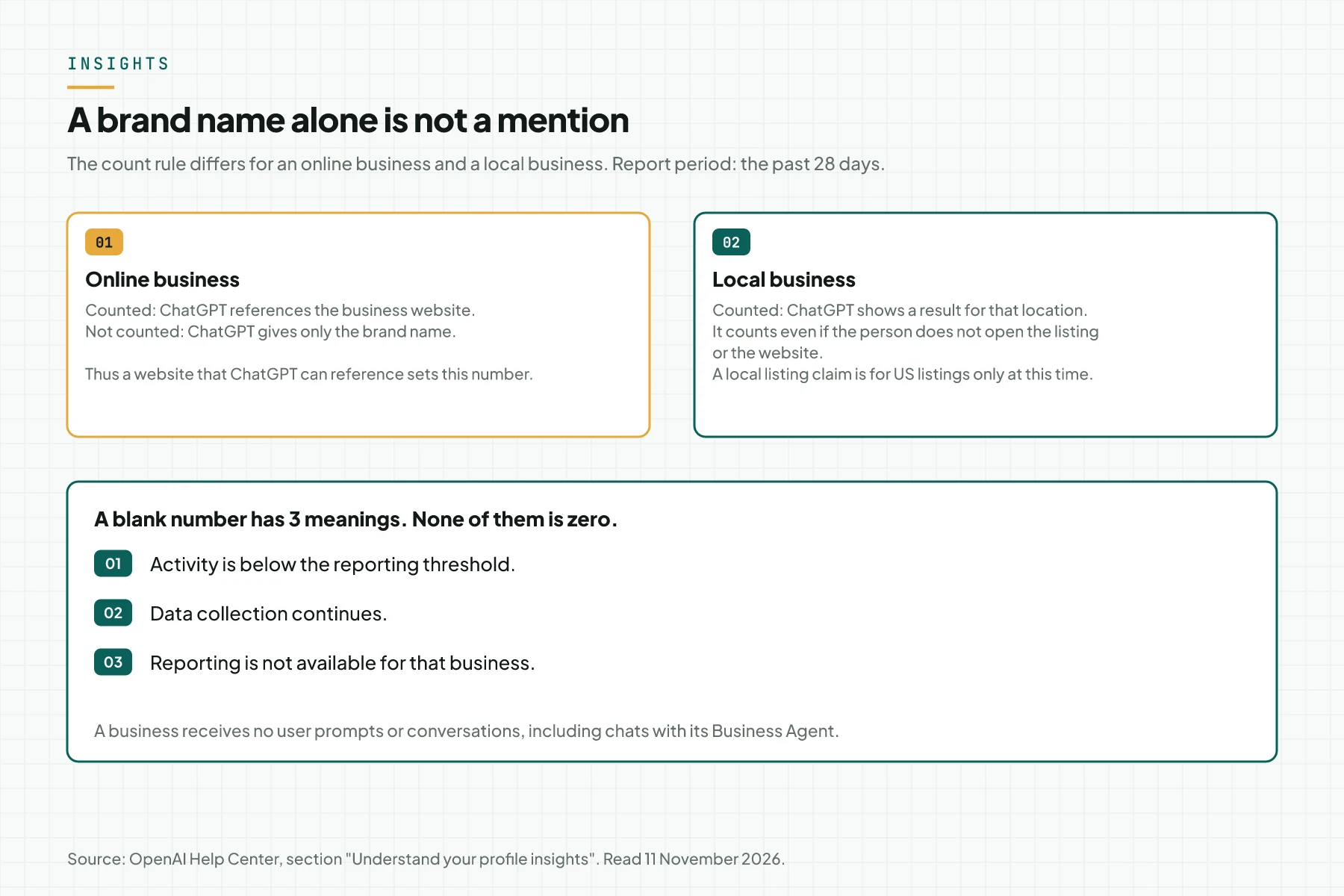
- Mentions. For an online business, 1 mention counts when ChatGPT references the business website.
- Website clicks. The number of clicks to your website.
- Discovery topics. Aggregate themes from answers that referenced your business. These themes do not measure customer intent directly.
This rule has a practical effect. ChatGPT can give your brand name without a website reference, so the mention number can be smaller than the number of brand references. This is our inference from the OpenAI count rule. For the rules of AI crawler access to a website, read the guide to AI training opt-out through robots.txt.
Check the result: record the 3 numbers with their date. If 1 number stays blank, contact OpenAI Support.
Step 6: Test and publish a Business Agent if your business is in the US
This step is only for ecommerce and online service businesses in the US, and it is optional. Open your business in the Business tab. Open the draft agent from Shopify if there is one, or create an agent if the option is available.
- Review the information that the agent uses, for example the product details and the return policy.
- Write answer instructions that follow the Business Agents Policy.
- Test the agent with a frequent question. OpenAI gives this example: "Can I return an item I bought on sale?"
- If the answer is wrong, correct the information or the instructions, then test again.
- Select Publish when you are ready. Customers can chat only with a published agent.
the Business Agents Policy gives firm limits. The agent must be clear that it is AI that represents the business. The agent must not pressure people, create false urgency, or continue to push a sale after a person declines. The agent also must not ask for health details, government IDs, or financial credentials.
A simulation: an online coffee store sends a claim
This example is a simulation with dummy data, not customer data. The dates show only the sequence. OpenAI does not give the review time, so the gaps between dates are an assumption.
| Date (dummy) | Action | What the system records | Result |
|---|---|---|---|
| 12 Nov | The owner searches for "Kopi Contoh" in Business Hub, then selects Website domain | The claim is received, the TXT record is pending | The IT team adds the TXT record |
| 13 Nov | The owner selects Verify domain | The domain is verified, the claim review continues | Wait for the OpenAI email |
| A later day | The claim approval email arrives. The owner submits data to Persona | The Persona review continues | The profile has no blue check |
| A later day | The Persona approval email arrives | The blue check is active | The owner updates the return policy and uploads a CSV feed |
| 28 days later | The owner opens Insights | Mentions and clicks show, discovery topics are blank | The blank is recorded as "no data at this time", not zero |
A checklist for the business claim in ChatGPT
Use these 7 items as the work sequence. Each item gives the action, the owner, and the evidence to keep.
- Assign 1 ChatGPT account as the manager. Owner: the business owner. Evidence: the account email address in an internal document.
- Make the name, address, and tax number on the website agree with the official records. Owner: the legal admin. Evidence: a copy of the records.
- Send the claim with 1 verification method. Owner: the business owner and the IT team. Evidence: a screenshot of the claim status.
- Complete Persona. Owner: the authorized person. Evidence: the OpenAI approval email.
- Update the description, delivery policy, and return policy. Owner: the marketing team. Evidence: a screenshot of the profile.
- Connect a product feed if you sell products. Owner: the catalog team. Evidence: the CSV file and the feed status.
- Record Insights each 28 days. Owner: the marketing team. Stop the wait and contact OpenAI Support if 1 number stays blank.
Limits and risks that you must know
These 5 limits can change your decision before the claim. All come from the OpenAI help article "Setting up your business on ChatGPT" and the Businesses in ChatGPT product page, read 11 November 2026.
- No placement guarantee. ChatGPT continues to make independent recommendations and comparisons.
- A published profile cannot be deleted. Only a draft can be deleted. OpenAI Support cannot delete or hide a published profile.
- Each brand is managed separately. Central management for many brands and locations is not available. A claim of the main brand does not claim its locations.
- Team access has conditions. The admin can add teammates and give access to an agency. Each person uses their own ChatGPT account. Do not forward a personal claim invitation.
- An ownership dispute has a path. If a different person claimed your business, open the profile, select the ••• menu, then Dispute ownership.
Rama Digital recommendation: send the claim if your business is online, has a website, and has clean business records. Wait if the website data and the official records do not agree, because Persona examines that agreement. For context on a different AI visibility tool, read the review of the Silktide AEO platform.
Questions and answers
Is there a fee for the business claim in ChatGPT?
The 5 OpenAI pages that we read on 11 November 2026 give no fee for the claim. OpenAI writes that you do not need an Ads account or a ChatGPT Enterprise agreement to claim.
Does the claim make ChatGPT recommend my business more often?
No. The claim gives you control of the information that you provide. It does not guarantee more visibility, and advertising does not influence the independent answers of ChatGPT.
Can a business in Indonesia create a Business Agent?
Not at this time. The Business Agent is available only to eligible ecommerce and online service businesses in the United States. OpenAI plans to add markets and categories, with no date.
Do I need Shopify to claim a business?
No. Shopify is only 1 of 4 verification methods. You can also use the business phone, the business email, or a TXT record on the website domain.
Can a business read the conversations of ChatGPT users?
No. A business receives no user prompts or conversations, including chats with its Business Agent. Insights has only aggregate numbers above a threshold.
Can a Business Agent accept an order?
No. The agent explains products and policies, then gives a link to your website. The purchase, the booking, and the order check occur on the website.
Next step
The claim corrects only the information that you provide. The mention number for an online business continues to depend on a website that ChatGPT can reference. To learn the condition of your website in Google and in AI assistants, see SEO Audit and AI Visibility Service. To discuss your case first, book a 30-minute session.
Sources
- OpenAI, "Introducing Businesses in ChatGPT". Published 10 November 2026. The beta status, 1.2 billion weekly users, the 3 parts, and Insights privacy.
- OpenAI, "Businesses in ChatGPT: Claim Your Business". Read 11 November 2026. The blue check, the website condition, the 3 Shopify steps, and the sentence about no placement guarantee.
- OpenAI Help Center, "Setting up your business on ChatGPT". Read 11 November 2026. Verification methods, Persona, 28-day Insights, the mention count rule, and the agent limits.
- OpenAI, "Businesses in ChatGPT" policy. Updated 10 November 2026. Profile content rules and eligibility.
- OpenAI, "Business Agents Policy". Updated 10 November 2026. Rules for agent instructions and user data.
- OpenAI Developers, product feed specification. The reference from the help article for the CSV file.