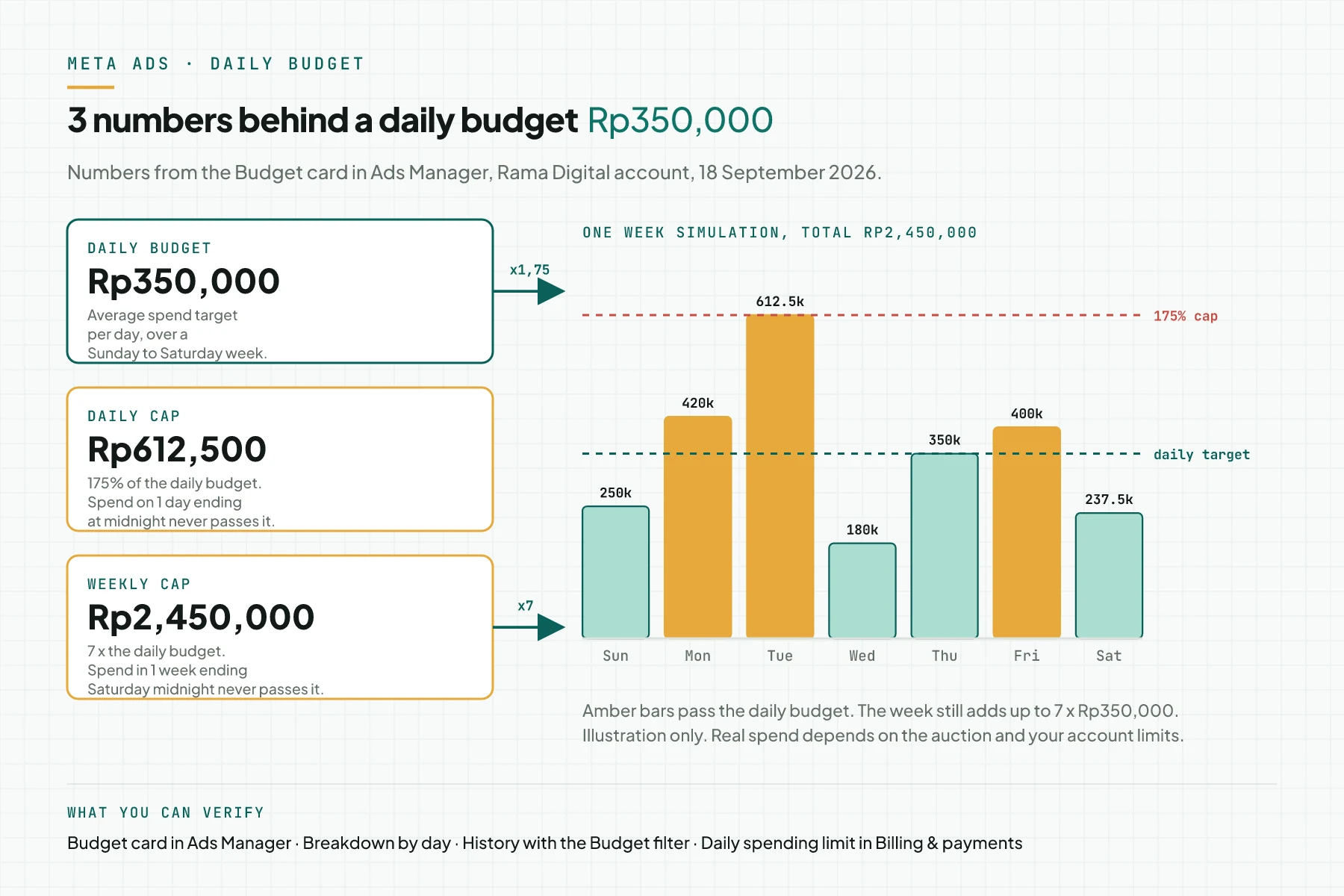
Direct answer: a daily budget in Meta Ads is an average target per day, not a cap per day. Meta may spend up to 175% of the daily budget on 1 day, and up to 7 times the daily budget per week. With a daily budget of Rp350,000, the daily cap is Rp612,500 and the weekly cap is Rp2,450,000.
Main condition: the rule applies to a daily budget on a campaign budget (Advantage+ campaign budget) or an ad set budget without budget sharing. Limit: the rule does not apply to a lifetime budget, and 3 spending limits can stop the ads earlier. This article does not promise ad results.
We wrote this article on 18 September 2026 from the Rama Digital ad account, the Meta Business Help Center, and the Meta Marketing APIAPIThe official door 2 systems use to exchange data, without anybody copying it by hand.Open the glossary pages. Every step carries a screenshot. The numbers in the images are our own account numbers, with no customer data.
Why the number in the Budget column is not the daily bill
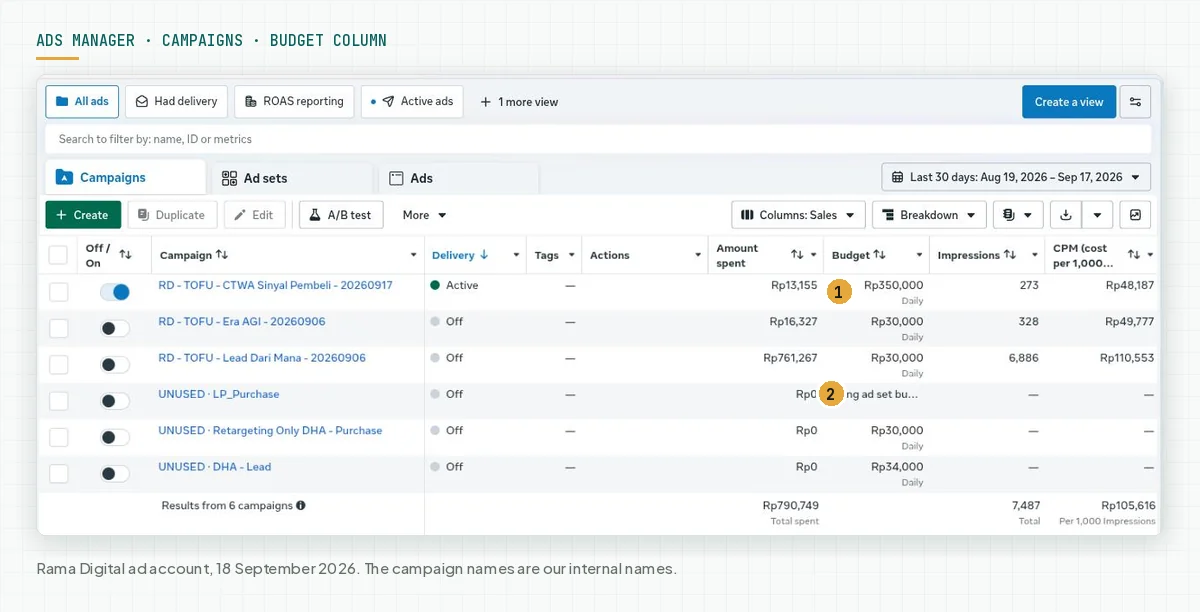
You enter a daily budget of Rp350,000, then you see Rp480,000 spent on Tuesday. On another day, the spend is only Rp1,373. Both numbers sit inside the Meta rules, and nothing is broken.
The problem starts when a business owner calculates the bill from the Budget column, because that number is a target, not a bill. In the first week, the learning phase makes spend more active. Our Meta Ads owner audit and access checklist lists the access you need before you read these numbers.
The next section explains the 3 numbers that govern that spend: the daily budget, the 175% daily cap, and the 7x weekly cap.
How a daily budget works in Meta Ads
A daily budget is a weekly target divided by 7
Meta calls a daily budget "the average amount you want to spend each day" and writes that daily budgets "are not a hard cap". Charges average out over a calendar week from Sunday to Saturday. Source: the About budgets page in the Meta Business Help Center, read on 18 September 2026.
A lifetime budget works the other way. Meta calls a lifetime budget "a hard cap, not an average", and paces the spend over the schedule of the campaign or ad set. Source: the About lifetime budgets page.
The daily cap: 175% of the daily budget
On days with better auction opportunities, Meta may spend up to 75% over the daily budget. Meta writes: for every day ending at midnight, spend is not more than 175% of the daily budget. Source: the About daily budgets page.
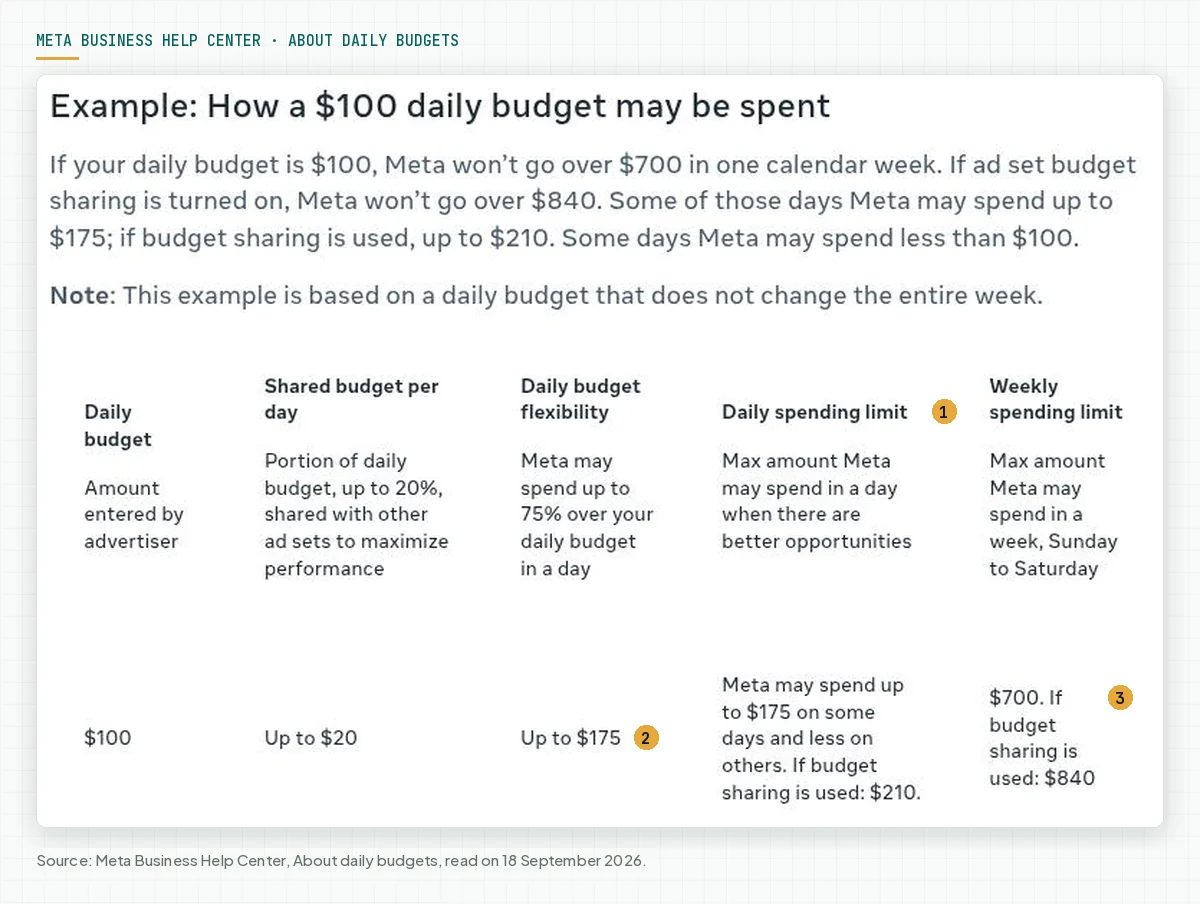
The Meta Marketing API page for developers still shows the old number, "up to 25% more than your daily budget". The Budget card in our Ads Manager uses 75%, so we use the Ads Manager and Help Center number. Source: the Budgets page in the Marketing API documentation.
The weekly cap: 7 times the daily budget, Sunday to Saturday
For every week ending Saturday at midnight, spend is not more than 7 times the daily budget. The day and the week follow the ad account time zone. On our account, the Ads Manager date picker says "Dates are shown in Jakarta Time".
Meta considers refunds for campaign or ad set spend that passes 1.75 times the daily budget on 1 day. The same applies to spend above 7 times the daily budget in 1 Sunday to Saturday week. Source: the FAQ on the About daily budgets page.
Starting or changing the budget mid-week
If an ad set starts or the budget changes mid-week, Meta prorates the budget for the days left. Meta then adds up to 25% of the daily budget as flexibility.
In the Meta example, the budget drops from $100 to $50 on Wednesday at 12 a.m. Meta then spends no more than $212.50 from Wednesday to Saturday. Source: the About changing your daily budget page.
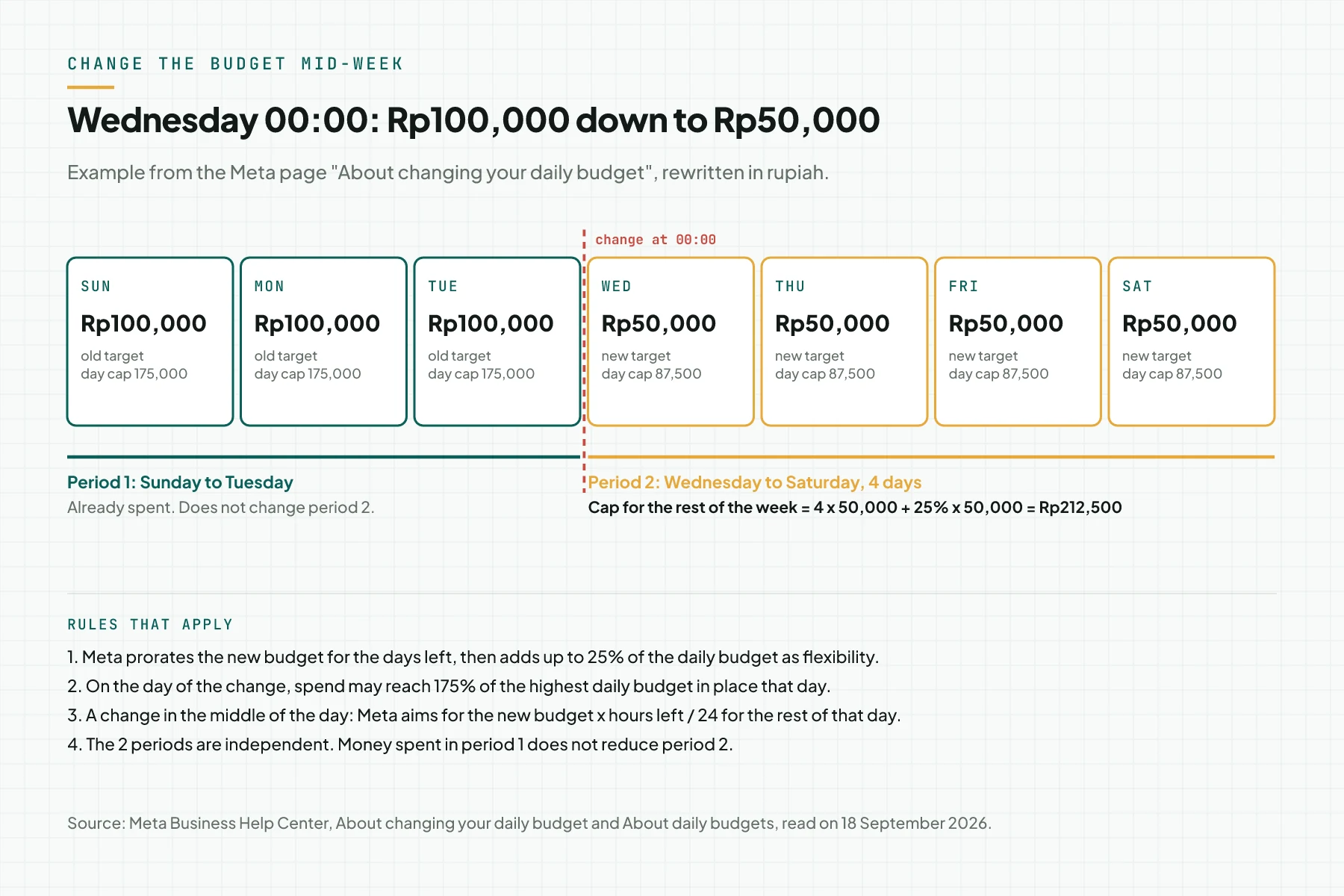
Meta adds 3 more rules on the pages About changing your daily budget and About budgets.
- On the day of the change, spend may reach 175% of the highest daily budget in place that day.
- A change in the middle of the day makes Meta aim for the new budget times the hours left divided by 24.
- A campaign shorter than 7 days uses a cap of the daily budget times the number of days.
Ad set budget sharing adds 20%
Ad set budget sharing shares up to 20% of 1 ad set's daily budget with other ad sets in the campaign. The daily cap rises to 210% and the weekly cap rises to 8.4 times the daily budget.
The feature is not available with campaign budgets. Source: the About daily budgets page.
Other controls that stop the ads first
The daily budget is not the only number, because ads run until the budget or one of the spending limits is reached, whichever is lower. The payment threshold only decides when you are charged and does not stop the ads. Source: the page How budgets, spending limits, prepaid balance limits and your payment threshold differ.
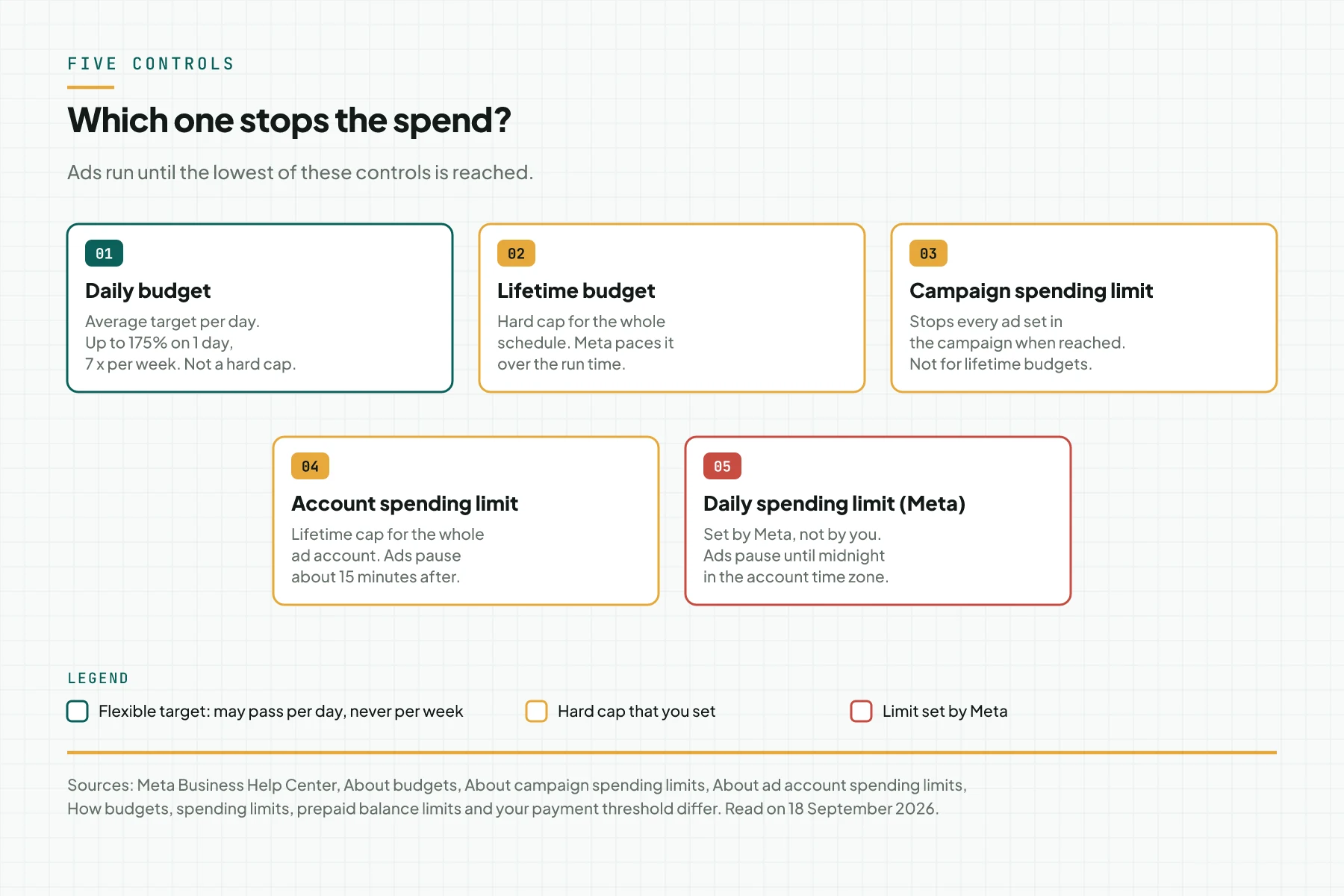
Meta sets the daily spending limit from the ad and payment history of the account. When it is reached, ads pause and resume at 00:00 in the account time zone. On our account, that limit was Rp356,189 on 18 September 2026, so the Rp612,500 daily cap could not happen on our account that day.
Evidence from our account: 7 days with a Rp100,000 daily budget
In our test, the campaign RD - TOFU - Lead Dari Mana started on Sunday 6 September 2026 at 21:52 with a Rp100,000 daily budget. The History page shows only 1 budget change, from Rp100,000 to Rp30,000 on Monday 14 September at 15:42. So the week of 6 to 12 September used 1 fixed budget.
| Date | Day | Spend | Percent of daily budget |
|---|---|---|---|
| 6 September 2026 | Sunday, from 21:52 | Rp12 | 0% |
| 7 September 2026 | Monday | Rp97,642 | 98% |
| 8 September 2026 | Tuesday | Rp55,197 | 55% |
| 9 September 2026 | Wednesday | Rp1,373 | 1% |
| 10 September 2026 | Thursday | Rp146,495 | 146% |
| 11 September 2026 | Friday | Rp138,804 | 139% |
| 12 September 2026 | Saturday | Rp160,359 | 160% |
| Total | 7 days | Rp599,882 | 86% of the Rp700,000 cap |
No day passed the 175% cap of Rp175,000. The week total stayed under the 7x cap of Rp700,000. The daily numbers moved from 1% to 160% of the daily budget, although the budget did not change.
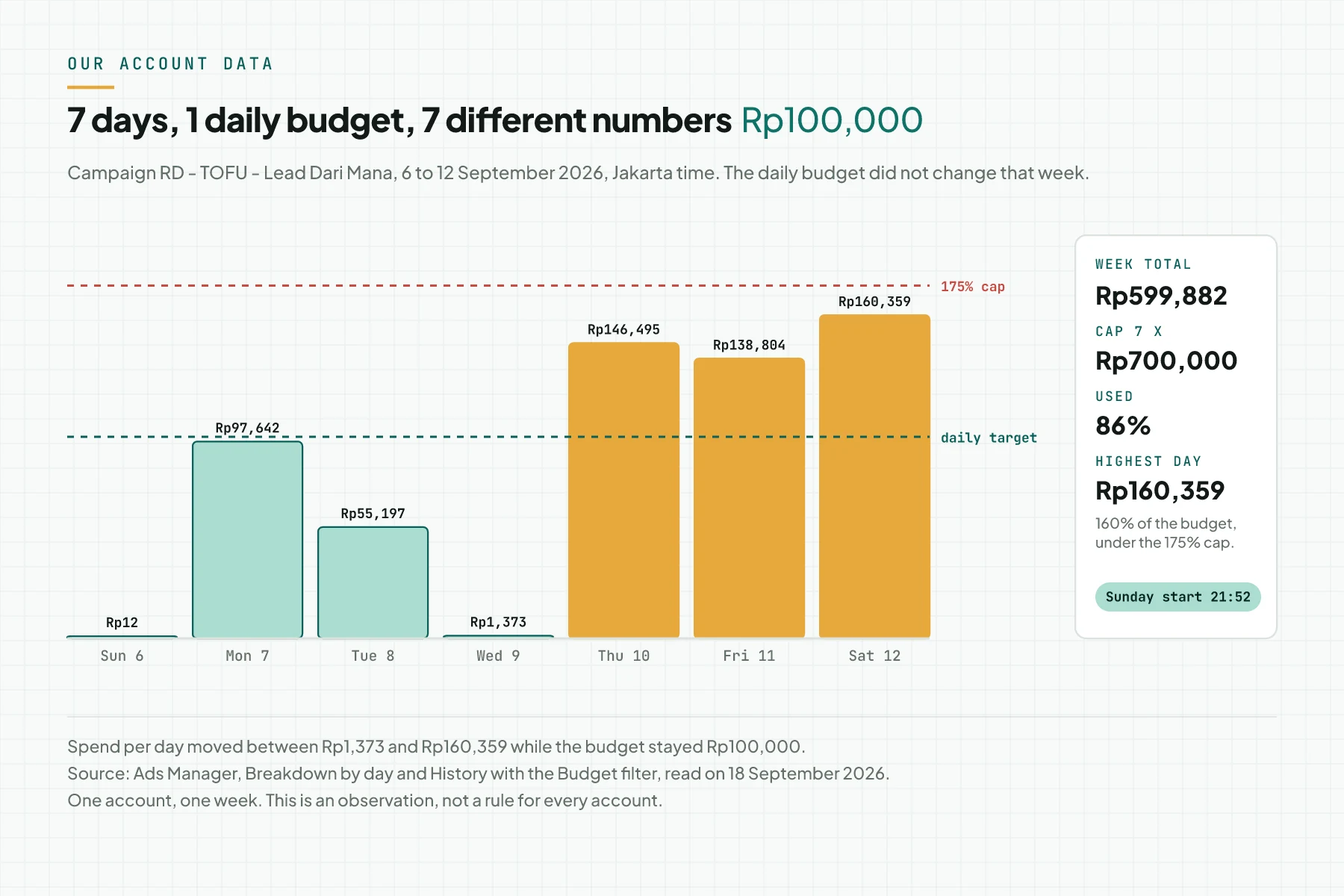
We changed nothing on Wednesday 9 September, and Meta does not explain daily allocation. So we do not name a cause for the Rp1,373 on that day. After the budget dropped to Rp30,000 on 14 September, Tuesday 15 September spent Rp26,861, under the new target.
Daily budget, lifetime budget, and spending limits
The table below summarises 7 spend controls from the Meta pages we read on 18 September 2026. The last column names where you set each one in Ads Manager.
| Control | What it limits | Can it be passed? | What happens when reached | Where to set it |
|---|---|---|---|---|
| Daily budget | Average per day over 1 week | Yes, up to 175% per day; never per week | Spend slows until the next week | Budget card on the campaign or ad set |
| Lifetime budget | Total over the schedule | No | Ads stop at the end of the schedule or budget | Budget card on the campaign or ad set |
| Ad set spending limit | Minimum or maximum for 1 ad set inside a campaign budget | The maximum is managed per week; 1 day may pass it | The ad set stops receiving extra budget | Edit ad set, Budget & schedule |
| Campaign spending limit | Total for 1 campaign | No | Every ad set in the campaign stops | Edit campaign, Campaign details |
| Account spending limit | Total for the ad account since it was set | No | All ads stop about 15 minutes later | Billing & payments, Payment settings |
| Daily spending limit (Meta) | Account total per day | No | Ads pause until 00:00 in the account time zone | Set by Meta; shown in Billing & payments |
| Payment threshold | When the charge happens | Not a cap | You are charged; ads keep running | Billing & payments |
Table sources: the budgets and spending limits comparison page, About campaign spending limits, About ad account spending limits. The ad set spending limit row uses About ad set spend limits with Advantage+ campaign budget. A campaign spending limit cannot be combined with a campaign lifetime budget, because the lifetime budget already acts as the cap.
Prerequisites
- The Admin role on the ad account. Only an Admin can create an account spending limit.
- The ad account time zone. The daily and weekly caps follow that time zone.
- 1 campaign that has run for 7 days or more, to read spend per day.
- Access to Billing & payments, to read the daily spending limit of the account.
- A simple calculator: the daily budget times 1.75 and times 7.
- 1 place to record budget changes, for example the decision log of your campaign.
Step 1: Read the 3 numbers on the campaign Budget card
Open Ads Manager › Campaigns, tick the campaign, then click Edit. Scroll to the Budget card. Under the daily budget field, Meta writes the daily target, the daily cap, and the weekly cap.
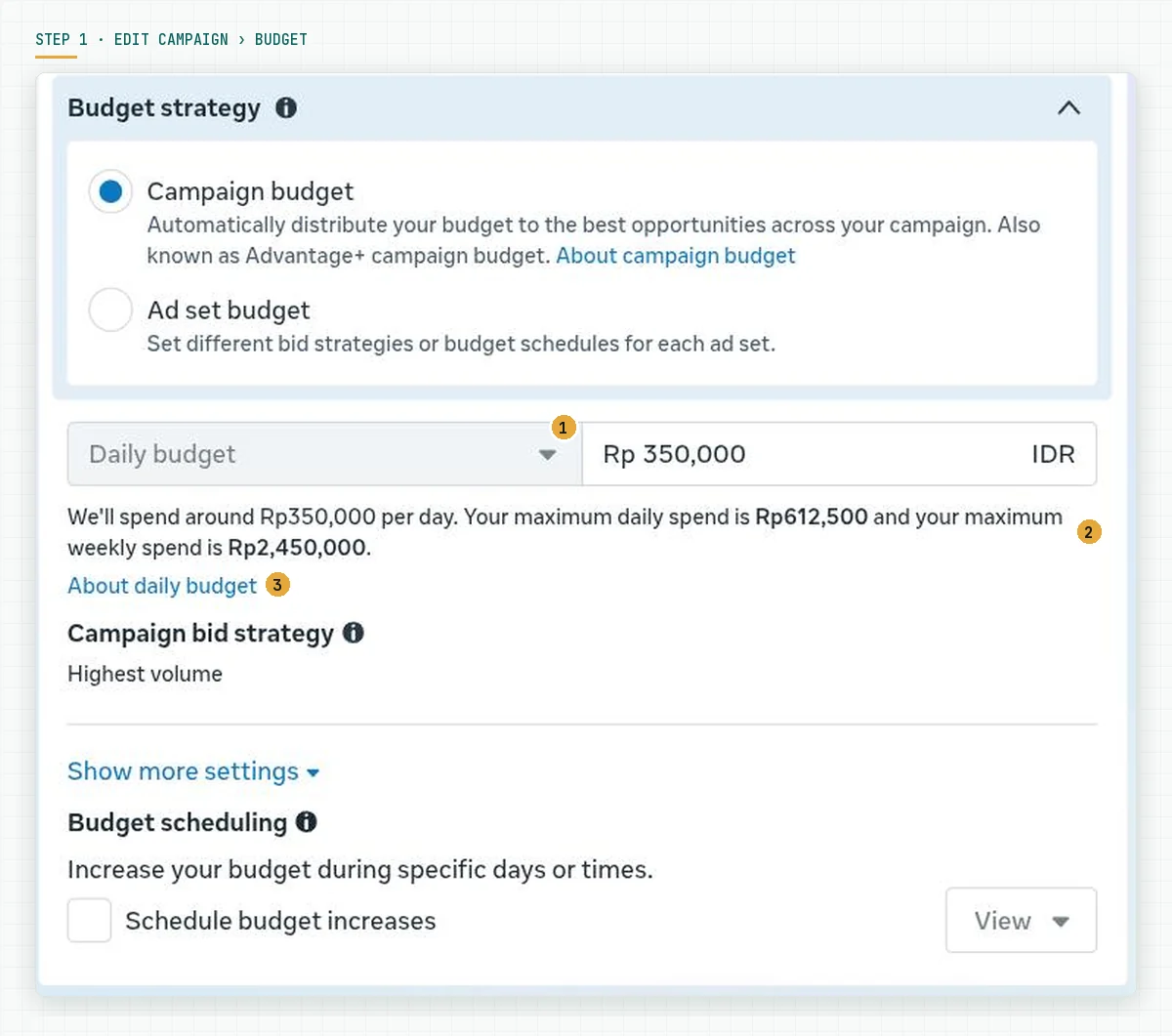
On our account, the text reads: "We'll spend around Rp350,000 per day. Your maximum daily spend is Rp612,500 and your maximum weekly spend is Rp2,450,000." The Daily budget selector is greyed out, so a live campaign cannot move to a lifetime budget from this card.
Check the result: 350,000 times 1.75 equals 612,500, and 350,000 times 7 equals 2,450,000. If the numbers on your card do not follow that formula, check whether ad set budget sharing is on. Formula source: the About daily budgets page.
Step 2: Calculate the daily and weekly caps before you change the budget
Hover over the Budget column in the campaign list, then click the pencil icon. The popover shows the same sentence in a short form. Do not click Publish if you only want to read the numbers.
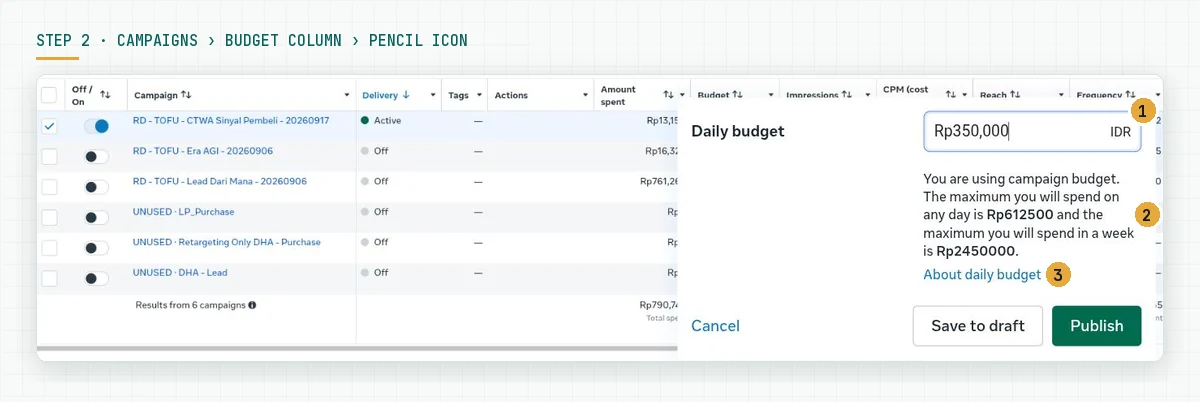
Use the table below for daily budgets that small businesses use often. The second and third columns are the amounts that must be ready in your account.
| Daily budget | Daily cap (x1.75) | Weekly cap (x7) |
|---|---|---|
| Rp50,000 | Rp87,500 | Rp350,000 |
| Rp100,000 | Rp175,000 | Rp700,000 |
| Rp200,000 | Rp350,000 | Rp1,400,000 |
| Rp350,000 | Rp612,500 | Rp2,450,000 |
| Rp1,000,000 | Rp1,750,000 | Rp7,000,000 |
On our IDR account, the Meta Marketing API showed a minimum daily budget of Rp17,715 on 18 September 2026. That minimum follows the exchange rate, so read it again before you set a small budget. We explain how to derive a budget from market size in the article on TAM, SAM, SOM to a Meta Ads budget.
Step 3: Check spend per day with Breakdown
Open Ads Manager › Campaigns, click Breakdown, then choose By time › Day. Set the date range from Sunday to Saturday of a week that has ended. Each campaign then shows 1 row per day.
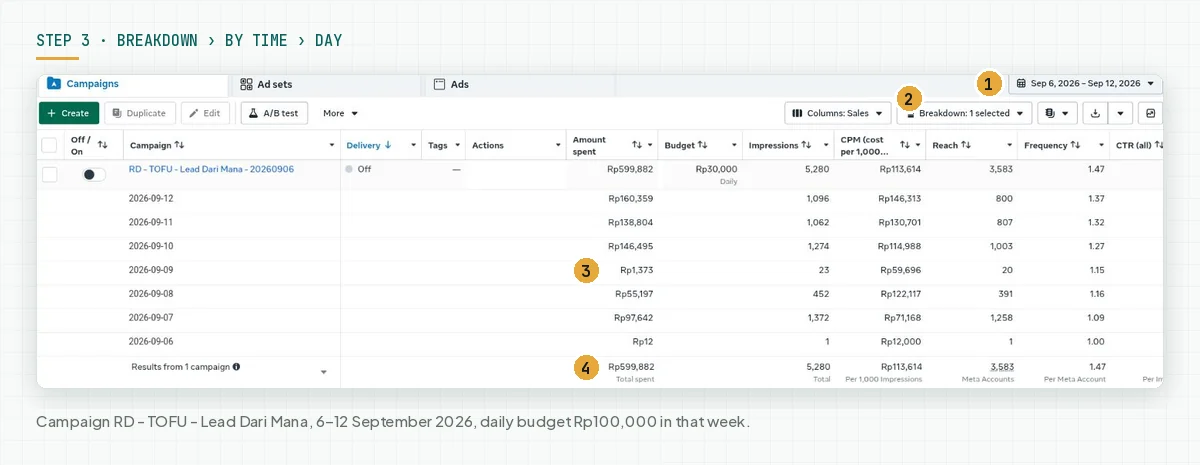
Check 2 things: no day row above 175% of the daily budget, and no week total above 7 times the daily budget. If either is passed, keep a screenshot for a review request to Meta.
The Budget column in this table shows the current budget, not the budget of that week. In the image above, the column says Rp30,000, although that week ran on Rp100,000. Step 4 closes that gap.
Step 4: Match the budget change history in History
Tick the campaign, then click the clock-shaped History icon in the right sidebar. Change the Activity history filter to Budget, then set the same date range as in step 3.
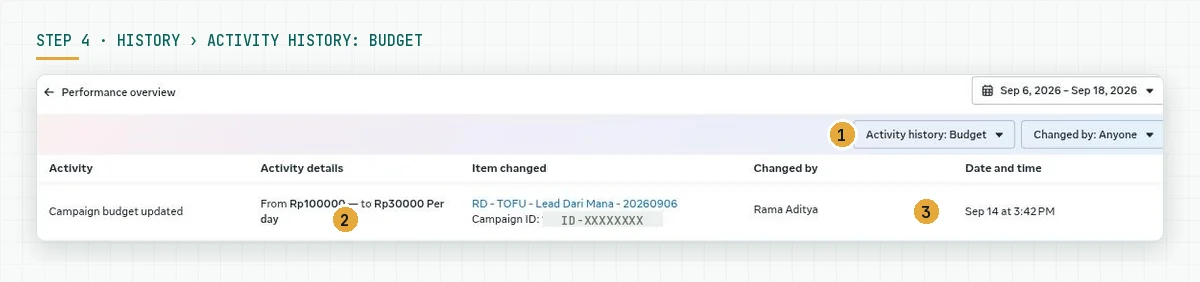
Each row names the old value, the new value, who changed it, and the time of the change. Write that time in the decision log. The proration rule in the mechanism section counts from this time, not from the time you open Ads Manager.
Meta writes that a budget change takes effect about 15 minutes after Publish. Source: the page Change your budget in Meta Ads Manager.
Step 5: Read the account daily spending limit in Billing & payments
Open the Ads Manager menu, choose Billing & payments › Accounts, then click your ad account. Under the payment methods, Meta shows Daily spending limit (set by Meta) and the status of today's spend.
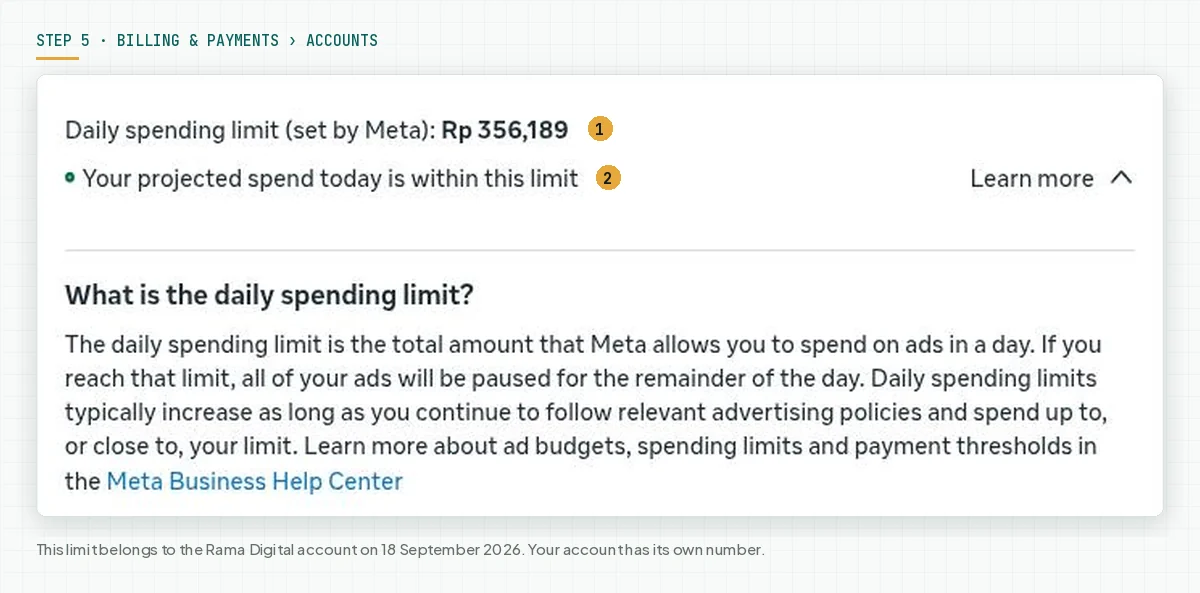
Compare this number with the daily cap from step 2. On our account, the Rp356,189 limit is lower than the Rp612,500 daily cap. So on that day, Meta could not spend 175% of the Rp350,000 daily budget on our account.
Meta writes that the daily spending limit rises on its own when the account follows the advertising standards and spends close to the limit. If ads stop before the budget is used, check this number first. Source: the budgets and spending limits comparison page.
Step 6: Set a hard cap when a total must not be passed
A daily budget does not protect a total. If the business owner approved 1 total amount, set 1 of the 3 hard caps below. Choose the one that matches the scope of the approved amount.
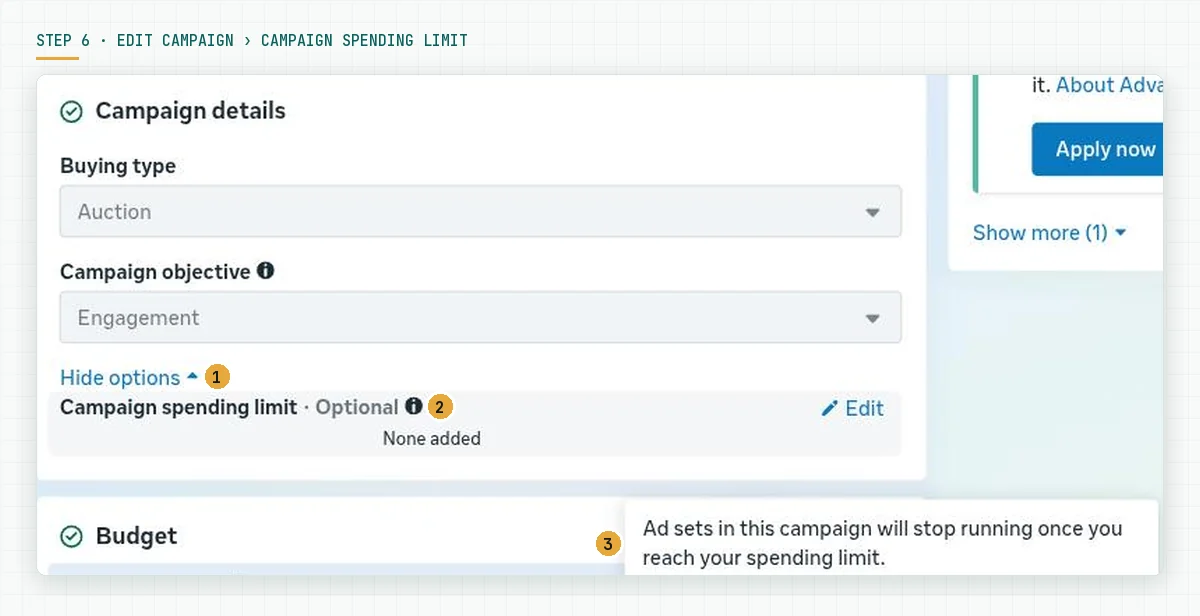
- Campaign spending limit for 1 campaign. Open Edit campaign › Campaign details › Show more options › Campaign spending limit › Edit. Enter the total, then Publish. The change saves in about 15 minutes. Source: the page Create a campaign spending limit.
- Account spending limit for the whole account. Open Billing & payments › Payment settings › Account spending limit › Set limit. This limit does not reset each month, unless your account has the automatic reset option on the 1st. Source: the page Set an ad account spending limit.
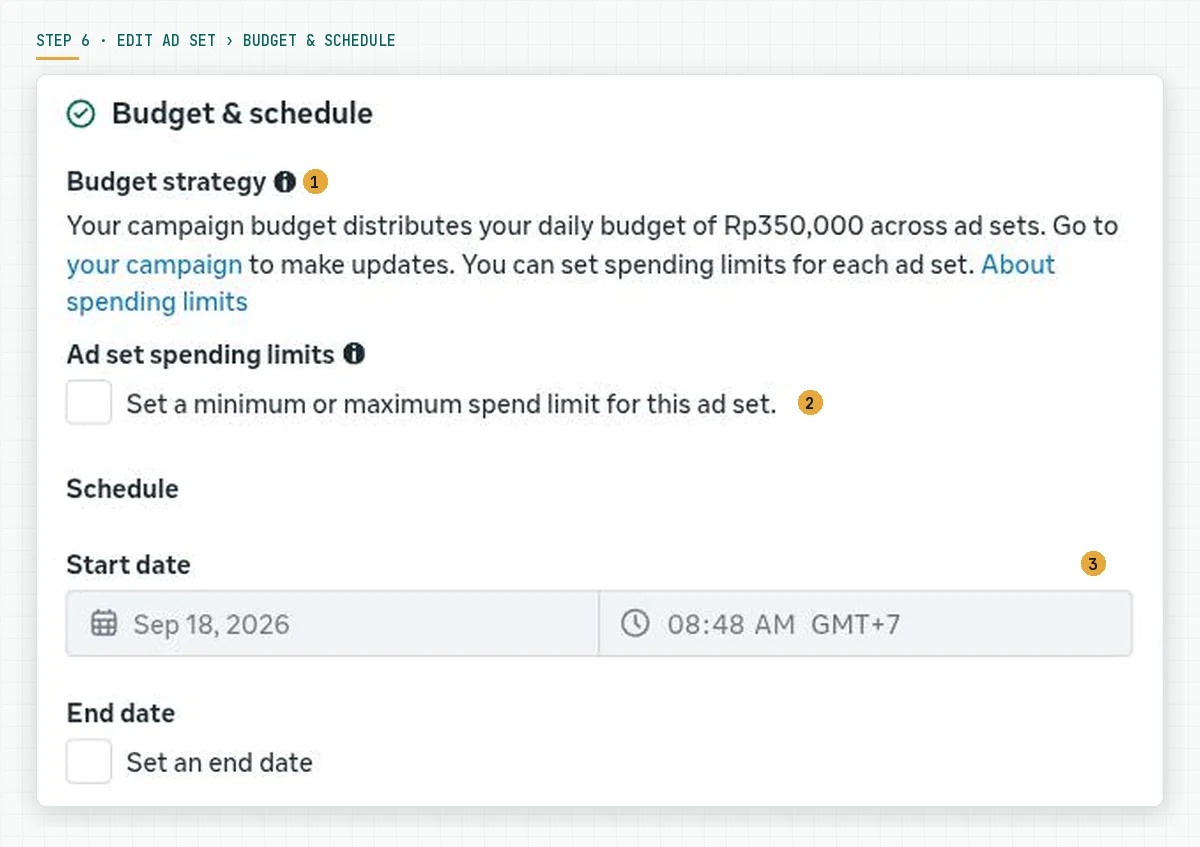
- Ad set spending limits for 1 ad set inside a campaign budget. Open Edit ad set › Budget & schedule › Ad set spending limits. The maximum is managed per Sunday to Saturday week, so 1 day may still pass it. Source: the page About ad set spend limits.
For a campaign with a fixed schedule, a lifetime budget is a hard cap without extra settings. A schedule shorter than 1 day must use a lifetime budget. Source: the FAQ on the About daily budgets page.
Step 7 (optional): Change the daily budget at the start of the day and record the time
If you must change the budget, do it at the start of the day in the account time zone. Meta counts the rest of the day from the time of the change.
The cap for that day follows the highest daily budget in place. The diagram in the mechanism section shows the calculation.
The size of the change matters too. Meta writes that $100 to $101 is not likely to restart the learning phase, while $100 to $1,000 may restart it. Source: the page Significant edits and learning phase.
Rama Digital recommendation: change the budget once per day, then record the time and the old and new values in the decision log. Wait 7 days before the next change. This recommendation applies to a campaign that has left the learning phase.
If your account runs across branches, read our guide to Meta Ads budget governance for multi-location businesses first.
Worked example: 1 week with a Rp350,000 daily budget
The table below is a simulation with dummy numbers, not account data. The campaign uses a campaign budget of Rp350,000 per day with no change for 1 week and no ad set budget sharing.
| Day | Spend that day | Week to date | What to check |
|---|---|---|---|
| Sunday | Rp250,000 | Rp250,000 | Under target; Rp2,200,000 left for the week |
| Monday | Rp420,000 | Rp670,000 | 120% of target; still under the Rp612,500 daily cap |
| Tuesday | Rp612,500 | Rp1,282,500 | Exactly the 175% daily cap; no more allowed |
| Wednesday | Rp180,000 | Rp1,462,500 | A quiet day; no problem |
| Thursday | Rp350,000 | Rp1,812,500 | Exactly the target |
| Friday | Rp400,000 | Rp2,212,500 | Rp237,500 left under the weekly cap |
| Saturday | Rp237,500 | Rp2,450,000 | Exactly the 7x weekly cap; spend stops |
The week total equals Rp2,450,000, and no day is above Rp612,500. On an account with a daily spending limit of Rp356,189, like ours, the Tuesday number cannot happen. Meta pauses the ads at Rp356,189 until midnight.
Checklist before you raise the budget
- Record the daily budget, the daily cap, and the weekly cap for every active campaign. Owner: ads admin. Evidence: a table in the decision log.
- Confirm that the ad account time zone matches the working hours of the team. Owner: account admin. Evidence: a screenshot of the account settings.
- Check the daily Breakdown every Monday for the previous Sunday to Saturday week. Owner: ads admin. Evidence: a table export.
- Read the account daily spending limit before you set a budget above that number. Owner: account admin. Evidence: a screenshot of Billing & payments.
- Set an account spending limit equal to the monthly total approved by the business owner. Owner: business owner. Evidence: the account spending limit history.
- Record every budget change with the date, time, old value, and new value. Owner: ads admin. Evidence: History with the Budget filter.
- Stop criterion: 1 day passes 175% or 1 week passes 7 times the daily budget. Stop adding budget, keep the Breakdown screenshot, then request a review from Meta through Business Support Home. Owner: account admin.
Meta Ads compared with Google Ads: the same principle, different numbers
Google Ads uses the same principle with different numbers. A campaign may spend up to 2 times the average daily budget on 1 day, and no more than 30.4 times in 1 month. Source: the page About overdelivery and your average daily budget, read on 18 September 2026.
| What you can verify | Meta Ads | Google Ads |
|---|---|---|
| Daily cap | 175% of the daily budget | 200% of the average daily budget |
| Averaging period | 1 calendar week, Sunday to Saturday | 1 billing month |
| Period cap | 7 times the daily budget | 30.4 times the average daily budget |
| Spend above the cap | Meta considers a refund | Google does not charge above the cap |
Rama Digital recommendation: use a daily budget when your team follows up chats and forms every day and wants an even spend. Use a lifetime budget when the campaign schedule is fixed and the business owner set 1 total amount. Before you set the amount itself, read how to derive a Meta Ads budget from TAM, SAM, and SOM.
Frequently asked questions
Can Meta charge more than the daily budget on 1 day? Yes, on 1 day the charge may reach 175% of the daily budget. In 1 Sunday to Saturday week, the total does not pass 7 times the daily budget, unless ad set budget sharing is on.
On which day does the Meta week start? The Meta calendar week starts on Sunday and ends on Saturday at midnight, in the ad account time zone. Ads Manager shows that time zone on the date picker.
Why did my ads stop before the daily budget was used? Check 4 things: the daily spending limit set by Meta, the account spending limit, the campaign spending limit, and the payment status. The Billing & payments page shows the daily spending limit, the account spending limit, and the payment status on 1 screen.
Does a budget change restart the learning phase? It depends on the size: Meta writes that $100 to $101 is not likely to, while $100 to $1,000 may restart the learning phase. With a campaign budget, one change can affect several ad sets at once.
Daily budget or lifetime budget for a small business? A daily budget fits when you want an even spend every day. A lifetime budget fits when you have 1 total amount and a fixed schedule, and a schedule shorter than 1 day must use one.
Can spend above 175% be claimed back? Meta writes that Meta considers refunds for spend above 1.75 times the daily budget per day or 7 times per week. Request it through Business Support Home with a screenshot of the daily Breakdown.
Next step
The 175% and 7x rules protect the bill, not the results. Ad results still depend on the offer, the creative, the chat response time, and the tracking.
If you want us to manage the budget, the funnelFunnelThe order of stages a buyer passes, from meeting you to paying you.Open the glossary, and the weekly reports, choose the Meta Ads Performance Management service. It covers the account audit, tracking, creative, and a decision log. If you only want a check of your account budget settings, book a 30-minute initial consultation and bring a screenshot of your daily Breakdown.
Sources
- Meta Business Help Center: About daily budgets
- Meta Business Help Center: About budgets
- Meta Business Help Center: About changing your daily budget
- Meta Business Help Center: About lifetime budgets
- Meta Business Help Center: About pacing
- Meta Business Help Center: How budgets, spending limits, prepaid balance limits and your payment threshold differ
- Meta Business Help Center: About campaign spending limits
- Meta Business Help Center: Create a campaign spending limit in Meta Ads Manager
- Meta Business Help Center: About ad account spending limits
- Meta Business Help Center: Set an ad account spending limit
- Meta Business Help Center: About ad set spend limits with Advantage+ campaign budget
- Meta Business Help Center: Significant edits and learning phase
- Meta Business Help Center: Change your budget in Meta Ads Manager
- Meta for Developers: Budgets (Marketing API)
- Google Ads Help: About overdelivery and your average daily budget