Direct answer: agentAI agentAn AI program that performs work steps by itself, for example reading a message, drafting a reply, and recording the result.Open the glossary teams run 1 lead and several teammates inside 1 ClaudeClaude ProThe paid subscription for the Claude AI assistant from Anthropic. It unlocks connectors to outside tools.Open the glossary Code session, so 1 team uses 1 account. For a second and third account, run 1 session per account on the same machine with 1 config folder. Give each session a name, then ask Claude to message another session with @name.
Main condition: cross-session messaging needs Claude Code v2.1.224 or later on macOS, Linux, or WSL 2, and v2.1.234 on native Windows. Each account needs a Pro, Max, Team, or Enterprise plan, because the Free plan does not include Claude Code. Limit: agent teams are still experimental, messages between sessions are plain text, and a token session has no Remote Control and no claude.ai connectors.
We tested this whole flow on 23 September 2026 with Claude Code 2.1.280 on Linux. The test used 3 Claude accounts that we own, 1 through /login and 2 through tokens, on a demo repo named todo-scan. The session names come from characters of the webtoon Noblesse; paths, email, organization, and other sessions on our machine are masked.
The problem: 1 account runs out, and the other sessions do not know what happened
A person with 2 or 3 Claude accounts usually opens 1 terminal per account. Then they copy findings from 1 terminal to another by hand. This is slow, and context often gets lost on the way.
According to the Claude pricing page on 23 September 2026, Claude Code uses the same usage pool as chat on your plan. That pool resets every 5-hour window, and paid plans also have weekly limits. The Costs documentation says an agent team uses about 7 times the tokens of a standard session when teammates run in plan mode.
So the task is not to add as many agents as possible. The task is to move work to the pool of another account without copying context by hand. When you want to run many subagents from 1 script, also read our Claude Code dynamic workflows guide (Indonesian).
How agent teams and cross-session messaging work
2 features work together. Agent teams organize work inside 1 session. Cross-session messaging connects the sessions that you run yourself, including sessions of other accounts.
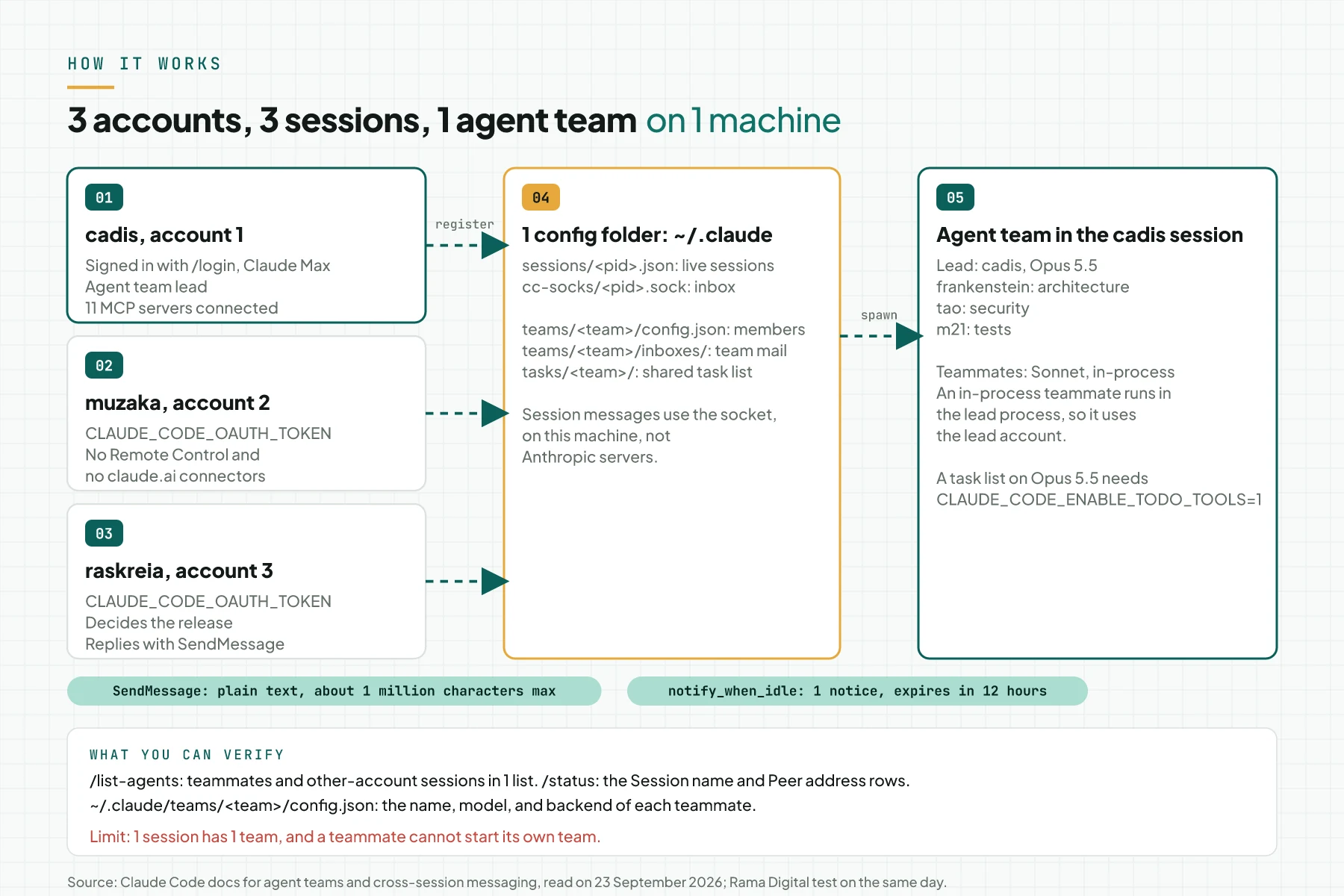
Agent team: 1 lead, several teammates, 1 mailbox
According to the agent teams documentation, 1 team has a team lead, teammates, a shared task list, and a mailbox. The lead is the main session that creates the teammates and splits the work. Each teammate is a separate Claude Code instance with its own context window.
The mailbox of each agent is a JSON file at ~/.claude/teams/{team-name}/inboxes/{agent-name}.json. The team name is session- plus the first 8 characters of the session ID. The feature is off by default, and CLAUDE_CODE_EXPERIMENTAL_AGENT_TEAMS=1 turns it on.
Cross-session messaging: ListAgents, SendMessage, and a socket
Claude uses 2 tools: ListAgents to find sessions and SendMessage to send a message. Each session registers itself in files on disk and opens 1 inbox socket. According to Message your other Claude Code sessions, a message on the same machine goes over that socket, not through Anthropic servers.
A message is plain text, without the sender's conversation history or files. Once delivered, it counts toward usage like a prompt that you type in the receiving session. So work that a message starts uses the pool of the receiving account; this is our inference from that rule.
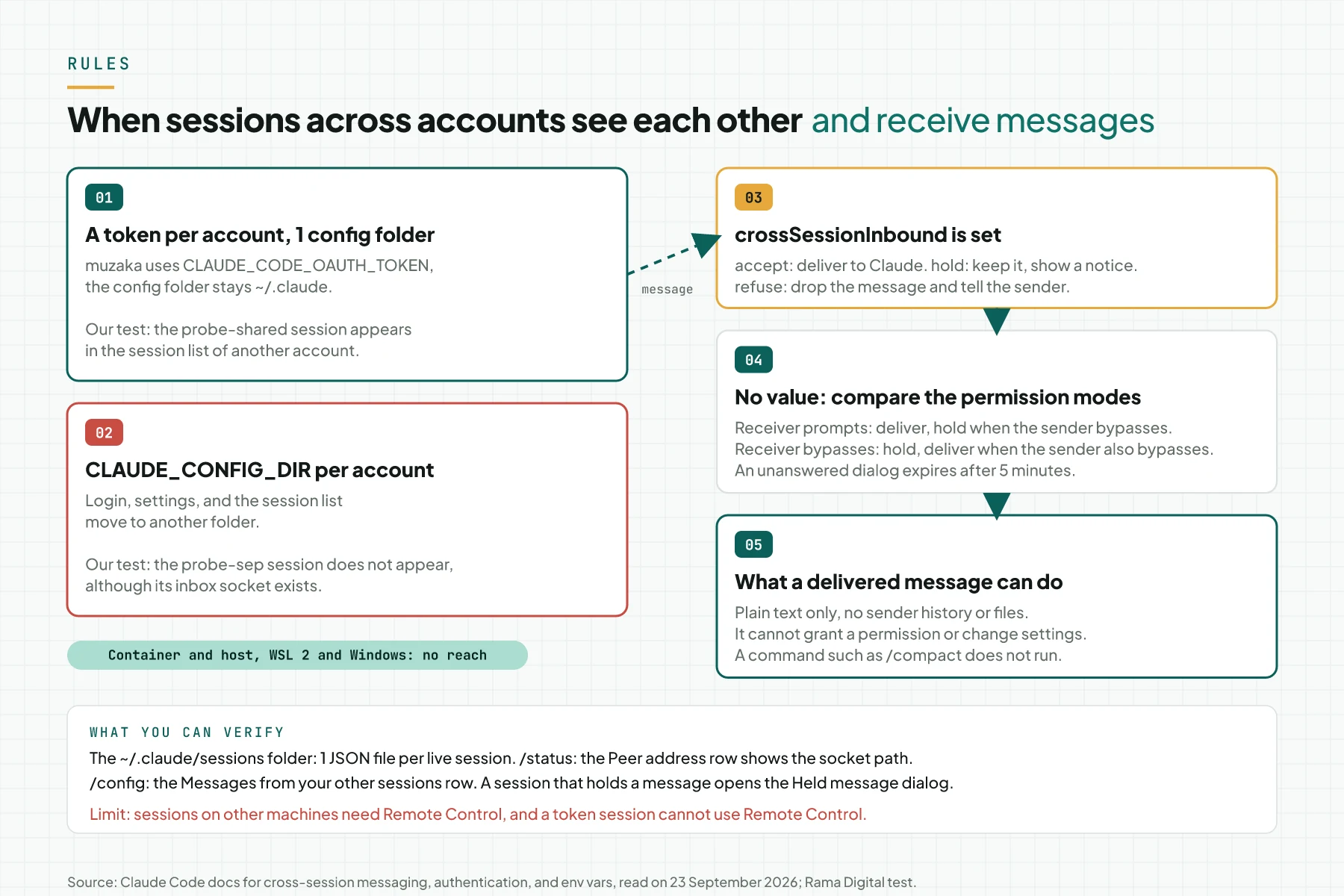
Accounts and the config folder: the key to sessions that see each other
Claude Code picks a credential in a fixed order. According to the Authentication documentation, CLAUDE_CODE_OAUTH_TOKEN is number 5, above the /login credential at number 7. You make that token with claude setup-token; it lasts 1 year and cannot start a Remote Control session or load claude.ai connectors.
The env vars documentation suggests CLAUDE_CONFIG_DIR to run several accounts side by side. But the cross-session documentation says 2 sessions reach each other only when both can see the same files. In our test, a session with its own CLAUDE_CONFIG_DIR did not appear in another session's list, but a token session with the shared folder did.
Noblesse names for each session
We named the sessions after characters from Noblesse, a webtoon by Son Jae Ho and Lee Gwang Su. Short names without spaces make the @mention easy. The roles are our choice for the demo, not part of the story.
| Session name | Character according to the Noblesse Wiki | Role in the demo | Account |
|---|---|---|---|
cadis | Cadis Etrama Di Raizel, a Noble from Lukedonia with the title Noblesse | Agent team lead | Account 1, through /login |
frankenstein | Frankenstein, the devoted servant of Raizel and a scientist | Architecture and performance teammate | Account 1, through the lead |
tao | Tao, a modified human | Security teammate | Account 1, through the lead |
m21 | M-21, a modified human | Test teammate | Account 1, through the lead |
muzaka | Muzaka, former Lord of the werewolves and the equal friend of Raizel | Peer session for the test plan | Account 2, through a token |
raskreia | Erga Kenesis Di Raskreia, Lord of the Nobles | Session that decides the release | Account 3, through a token |
The pattern fits the story: the teammates work in 1 household with the lead, and muzaka and raskreia are Lords with their own domains. They talk as equal sessions by message, not as subordinates. Name source: the Noblesse Wiki, read on 23 September 2026.
Subagents, an agent team, or cross-session messaging
This table uses the agent teams, cross-session messaging, and Run agents in parallel documentation on 23 September 2026.
| What you can verify | Subagent | Agent team | Cross-session messaging |
|---|---|---|---|
| Where it runs | Inside 1 session | 1 lead session and its teammates | Separate sessions that you run |
| Communication | The result returns to the caller | Teammates message each other and share a task list | Plain-text messages through SendMessage |
| Account | The account of that session | The account of the lead session | Each session can use its own account |
| Feature status | Available | Experimental, off by default | On since v2.1.224 with no setup |
| Token cost | Lower, results are summarized | Higher, about 7 times in plan mode | Each message counts as a prompt in the receiving session |
| Good fit | Focused tasks where only the result matters | Review and research that need challenge | Moving work to the pool of another account |
The same documentation names 2 more options. Agent view monitors many background sessions on 1 screen through claude agents, and dynamic workflows run many subagents from 1 script. Cross-session messaging also reaches the sessions that you dispatch from agent view.
Rama Digital recommendation: use an agent team in the main account session for review or research that needs 3 points of view. Send the result to a session of another account when the decision or the next work can run in parallel. Use a subagent or 1 session when the task is sequential or touches the same files.
Prerequisites
- Claude Code v2.1.224 or later on macOS, Linux, or WSL 2; native Windows needs v2.1.234. A session @mention needs v2.1.232, and an idle notice needs v2.1.236 in both sessions.
- 2 or 3 Claude accounts that you own, with a Pro, Max, Team, or Enterprise plan. The Anthropic Consumer Terms, effective 8 October 2025, forbid sharing account credentials with anyone else.
- 1 machine with 1 operating-system user. On macOS and Linux, the inbox socket accepts connections only from the same user.
- Any terminal for in-process mode. Split-pane mode needs tmux or iTerm2 and does not work in the VS Code terminal, Windows Terminal, or Ghostty.
- 1 test repo that is safe to change. We used a demo repo, todo-scan, with 4 files.
- 1 review or research task for the first team. The documentation suggests a task without code writing for a first try.
Step 1: Check the version and store a token for each extra account
Open a terminal and run claude --version. The version must be 2.1.224 or later; we used 2.1.280. For each extra account, run claude setup-token and approve the access from a browser that is signed in to that account.
The command prints the token but does not save it. Store the token in a file with permission 600. Do not put the token in a script, in .bashrc, or in your shell history.
claude setup-token          # approve in a browser signed in to account 2
read -rsp 'Paste the muzaka token: ' t && echo
if [ ${#t} -ge 90 ]; then
  (umask 077; printf '%s' "$t" > ~/.config/claude-token-muzaka)
else
  echo 'The token is cut. Run setup-token again.' >&2
fi
unset t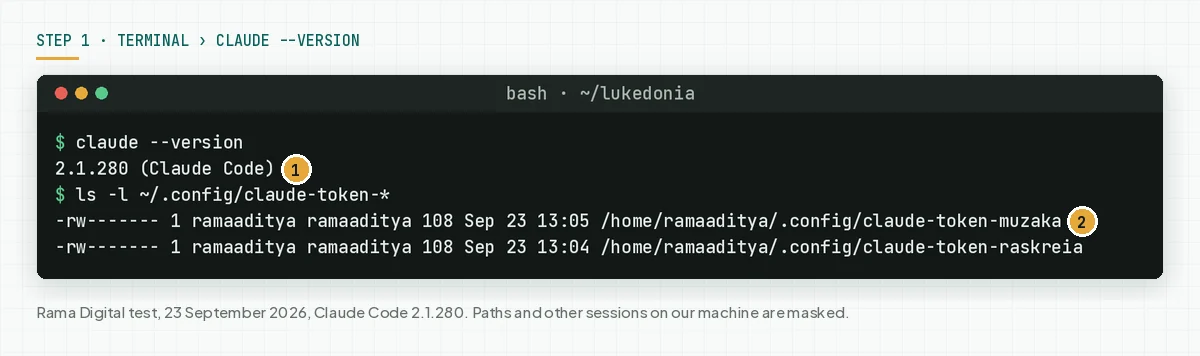
Check: ls -l ~/.config/claude-token-* shows -rw------- for each file. In our test, each token was 108 bytes, so a token that got cut during the paste is easy to see. Source: Authentication, section Generate a long-lived token.
Step 2: Create 1 launcher per account with 1 config folder
Add these functions to ~/.bash_aliases or ~/.bashrc. The cadis function uses the /login credential, and muzaka and raskreia read a token from a file. All 3 turn on agent teams and use the same config folder.
cadis()    { CLAUDE_CODE_EXPERIMENTAL_AGENT_TEAMS=1 claude "$@"; }
muzaka()   { _claude_token muzaka "$@"; }
raskreia() { _claude_token raskreia "$@"; }

_claude_token() {
  local name=$1 token_file=~/.config/claude-token-$1
  shift
  if [ ! -s "$token_file" ]; then
    printf 'No token for %s yet.\n' "$name" >&2
    return 1
  fi
  CLAUDE_CODE_EXPERIMENTAL_AGENT_TEAMS=1 \
  CLAUDE_CODE_OAUTH_TOKEN="$(<"$token_file")" claude "$@"
}
Do not add CLAUDE_CONFIG_DIR to these launchers. In our test, a probe session with a separate CLAUDE_CONFIG_DIR did not appear in the list of another session, although its inbox socket existed. A second probe with the same token and the shared folder appeared at once.
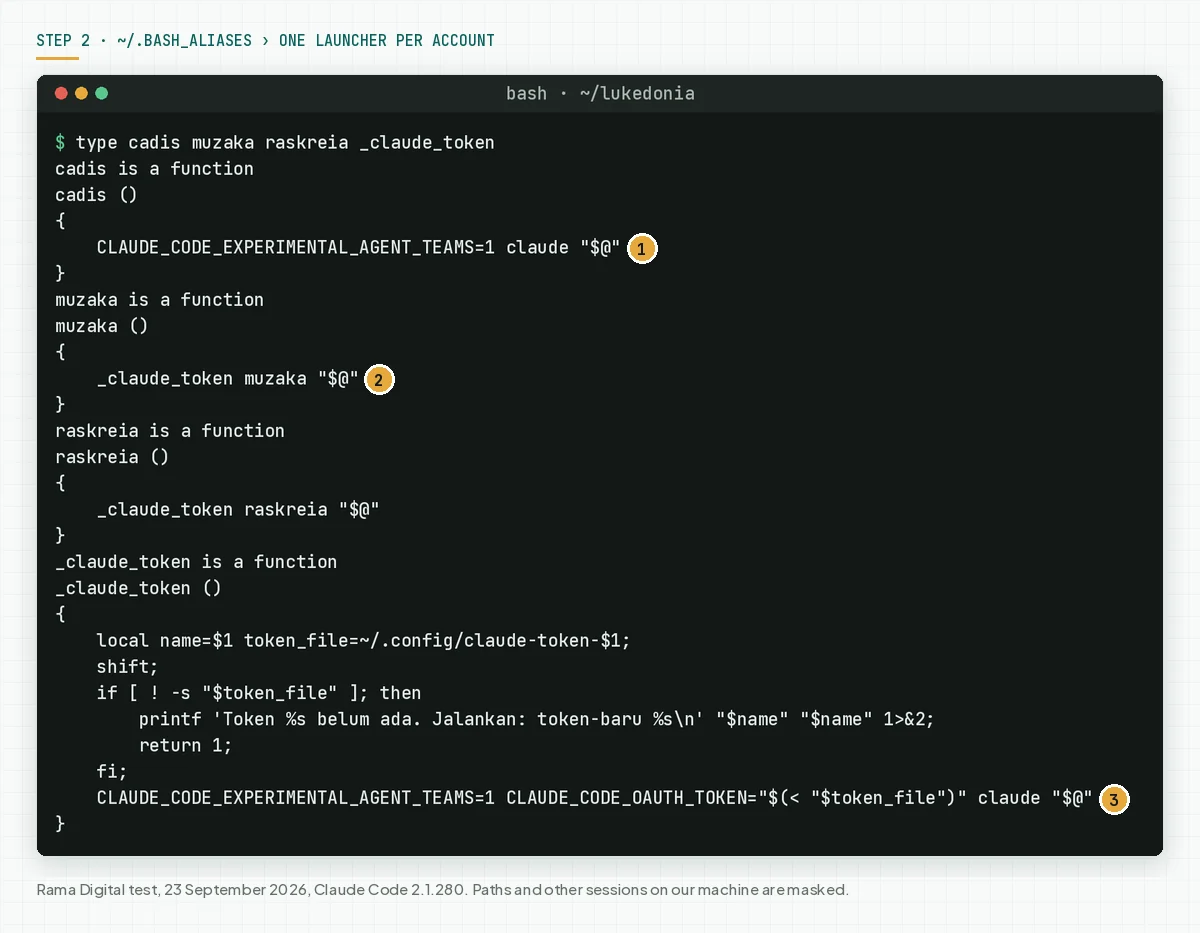
The result: the 3 accounts share settings.json, the global CLAUDE.md, skills, plugins, and the session history in ~/.claude. Check: run type muzaka _claude_token. The output must contain CLAUDE_CODE_OAUTH_TOKEN and must not contain CLAUDE_CONFIG_DIR.
Step 3: Start each account as a named session
Open 3 terminals or 3 tmux windows in the repo folder. Run 1 launcher in each terminal with the --name flag. That name becomes the message address for the other sessions.
cadis --name cadis          # terminal 1, account 1
muzaka --name muzaka        # terminal 2, account 2
raskreia --name raskreia    # terminal 3, account 3
Type /status in each session. A token session shows Auth token: CLAUDE_CODE_OAUTH_TOKEN, and the cadis session shows Login method: Claude Max account. The Peer address row shows the inbox socket of that session.
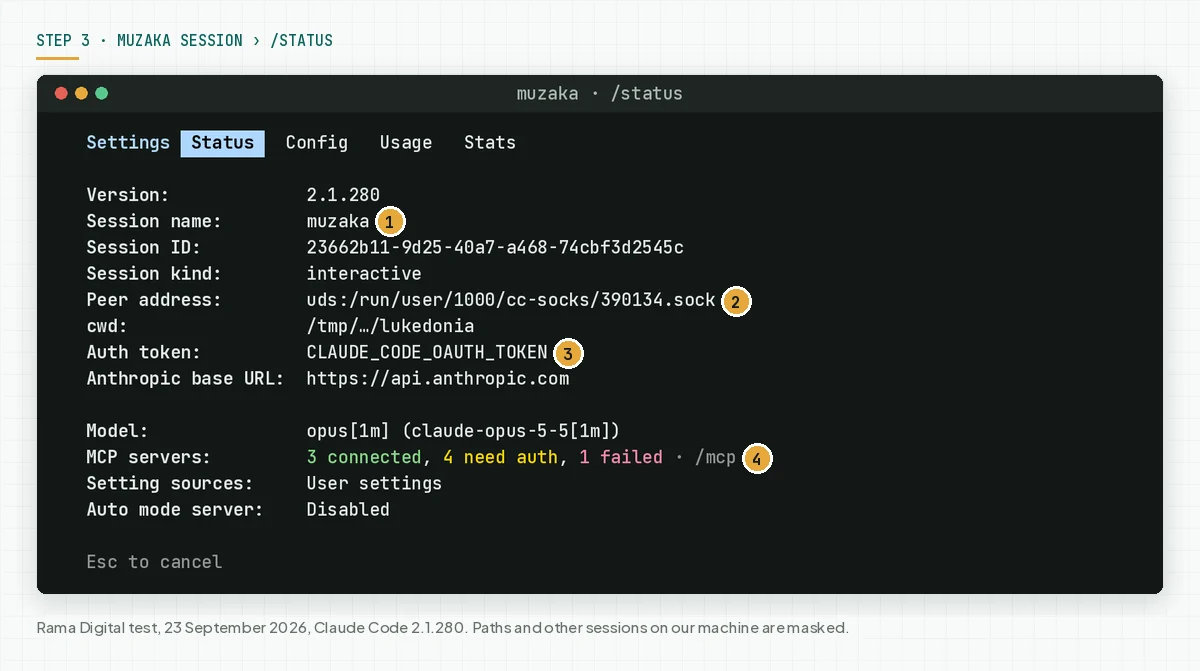
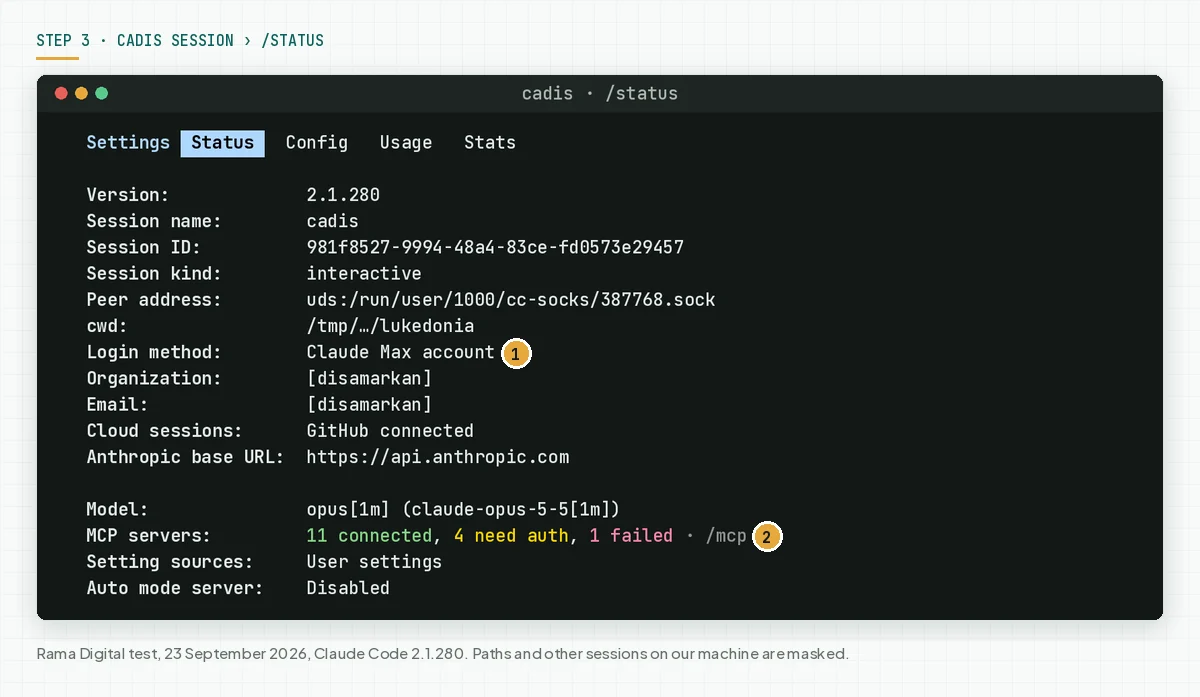
In our test, the header of a token session said Claude APIAPIThe official door 2 systems use to exchange data, without anybody copying it by hand.Open the glossary, not the plan name. Pick a name that no other session uses; when a live session already has the name, Claude Code gives your session a variant. During the test, 1 other session on our machine sent work to the name muzaka, because that name matched the account it looked for.
Check: the Session name row in /status equals the name that you typed. Source: the cross-session documentation, section See which sessions Claude can reach.
Step 4: Form an agent team in the cadis session
In the cadis session, write the task and the name of each teammate in 1 prompt. Name the teammate model, because the model in the spawn prompt has the highest priority. The Costs documentation suggests Sonnet for teammates.
Create an agent team to review this todo-scan repo. Spawn 3 teammates
named exactly frankenstein, tao, and m21. frankenstein reviews
architecture and performance, tao reviews security, m21 reviews tests.
Use Sonnet for each teammate. Do not edit files and do not run
commands, only read the code. Have them challenge each other's
findings by message, then summarize the 3 most important findings.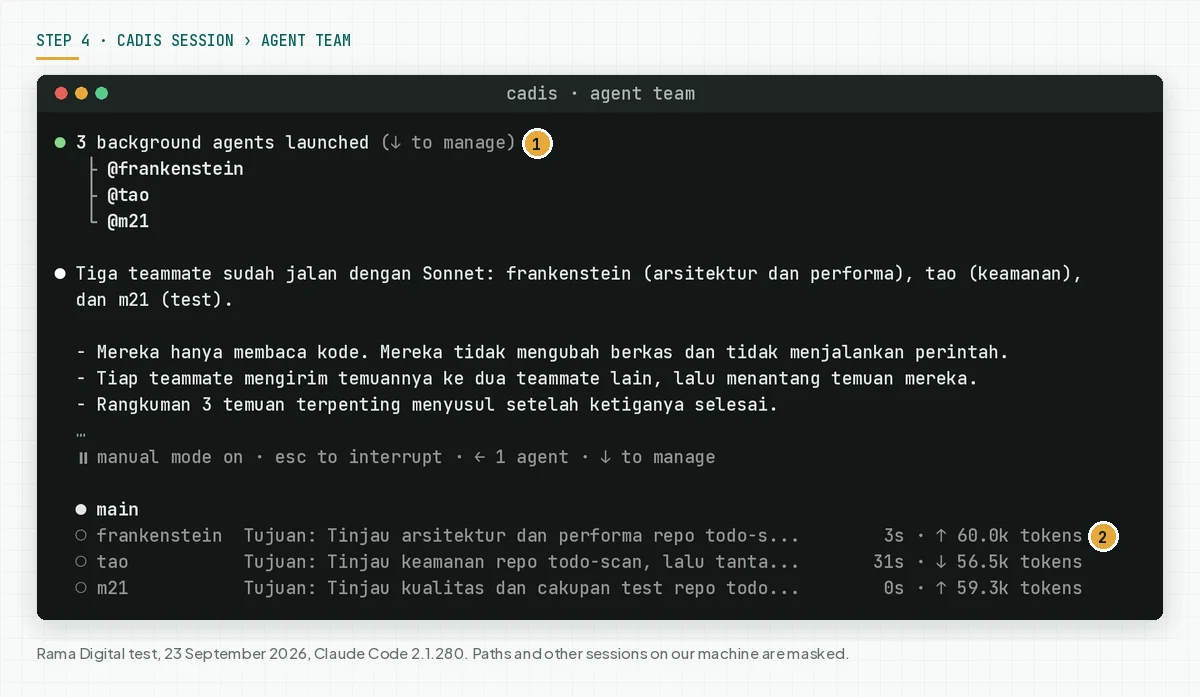
Claude Code does not ask for confirmation when the lead creates a teammate. In our test, 3 teammates started at 13:22 WIB (UTC+7), challenged each other's findings, and the lead summarized 3 findings at 13:23 WIB. The team config.json file listed team-lead, frankenstein, tao, and m21 with model sonnet and the in-process backend.
Teammates start with the permission mode of the lead, and their permission prompts appear in the lead session. When the lead uses --dangerously-skip-permissions, all teammates also skip permissions. For this reason, we ran the demo in manual mode.
Check: the agent panel also shows subagents, so open ~/.claude/teams/session-<8 characters>/config.json to confirm that a team formed. Select a teammate with the up or down arrow, press Enter to open its transcript, and press x to stop it. Source: the agent teams documentation, section Start your first agent team.
Step 5 (optional): Turn on the shared task list
The shared task list needs the TaskCreate, TaskList, TaskGet, and TaskUpdate tools. According to the Tools reference, since v2.1.268 those tools are on by default only for Claude 3.x, Opus 4–4.7, Sonnet 4–4.6, and Haiku 4.5. The Opus 5.5 lead in our first test created no task, so the team coordinated through messages.
For an Opus 5.5 lead, start the session with CLAUDE_CODE_ENABLE_TODO_TOOLS=1. In-process teammates follow the tools of the lead session. Other changes on this model are in our Claude Opus 5.5 changes guide.
CLAUDE_CODE_ENABLE_TODO_TOOLS=1 cadis --name cadisThen ask the lead to create tasks with owners and dependencies. In the second test, the lead created 3 tasks: frankenstein replaced statSync with lstatSync, m21 added 2 regression tests, and tao reviewed both.
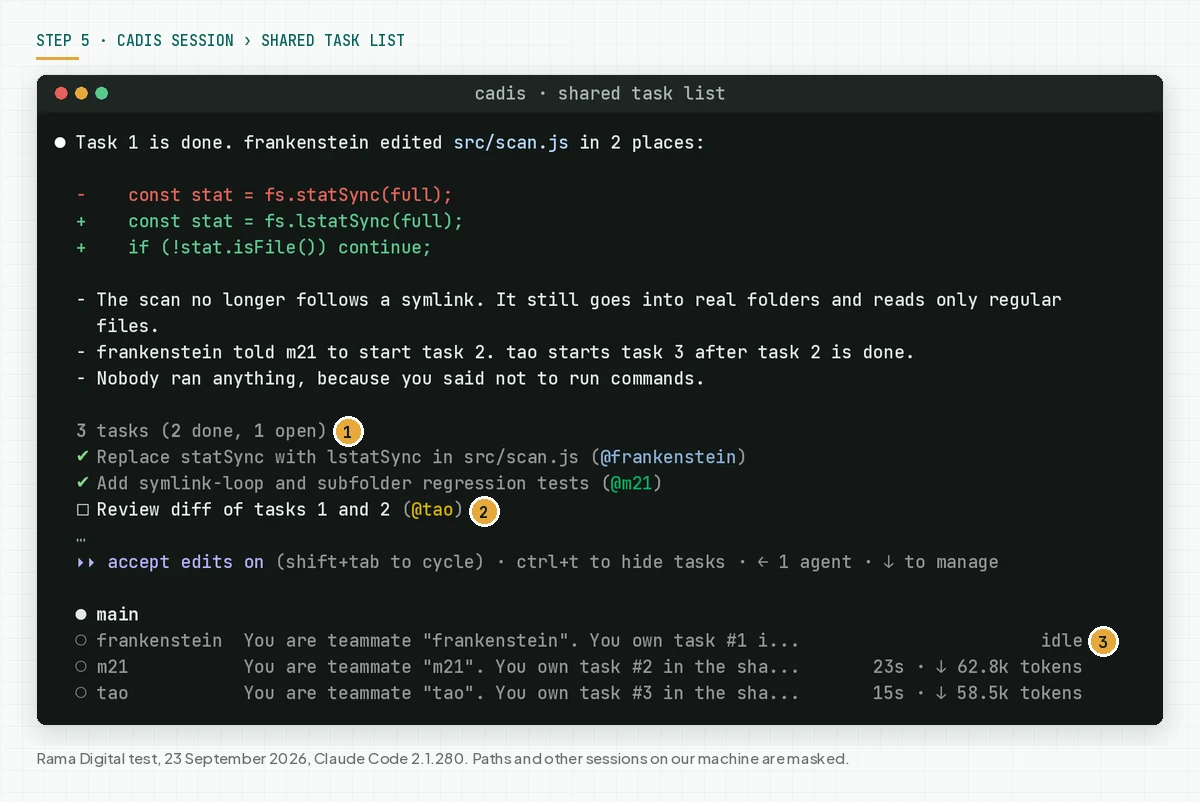
Check: press Ctrl+T to show or hide the task list. In our test, tao read the task list just before m21 marked task 2 done, so the lead had to nudge tao. The agent teams documentation says task status can lag.
Step 6: Check every agent that you can reach
Type /list-agents in the cadis session. The first line is the name of this session, the name that other sessions use to message it. Below it, Claude Code lists the teammates, the other sessions on this machine, and cloud sessions when the session is connected to Remote Control.
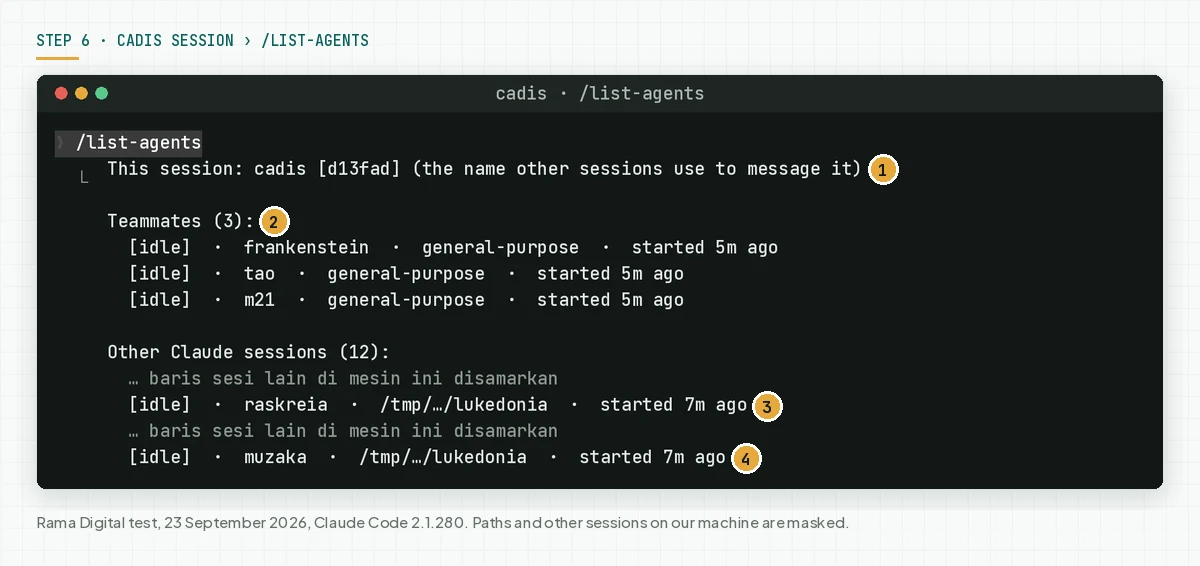
In our test, 1 list held 3 teammates on the cadis account and the raskreia and muzaka sessions of 2 other accounts. When /list-agents is not recognized, that session does not have cross-session messaging, so check its version. The other name of this command is /peers.
Step 7: Send the team findings to a session of another account
Type @ and the first letters of the session name, then pick the session from the typeahead. Claude Code inserts @raskreia and tells Claude which session you mean. Write the request, then let Claude compose the message.
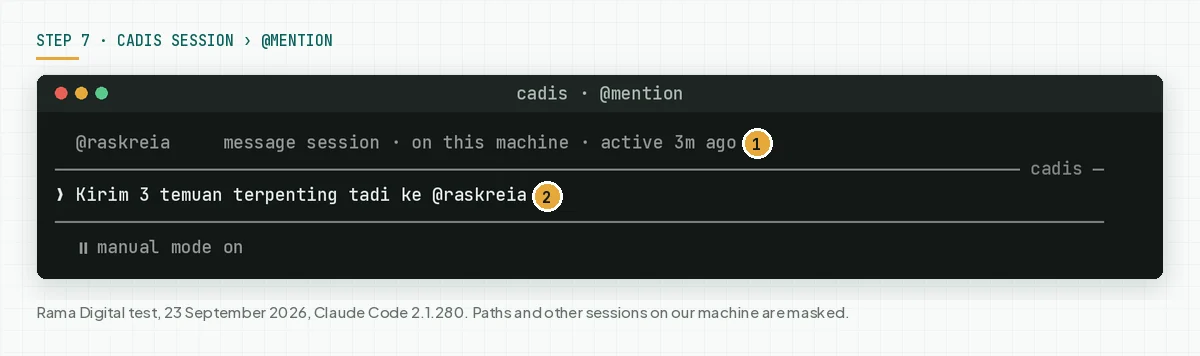
Send the 3 top findings to @raskreia. Ask raskreia to decide which
findings must be fixed before release 0.1.0, then reply to cadis.
The raskreia session was idle, so Claude Code started a new turn with the message. raskreia read the code, decided that all 3 findings must be fixed, and replied to cadis in 18 seconds. A message shows as a 1-line preview; press Ctrl+O to read the full text.
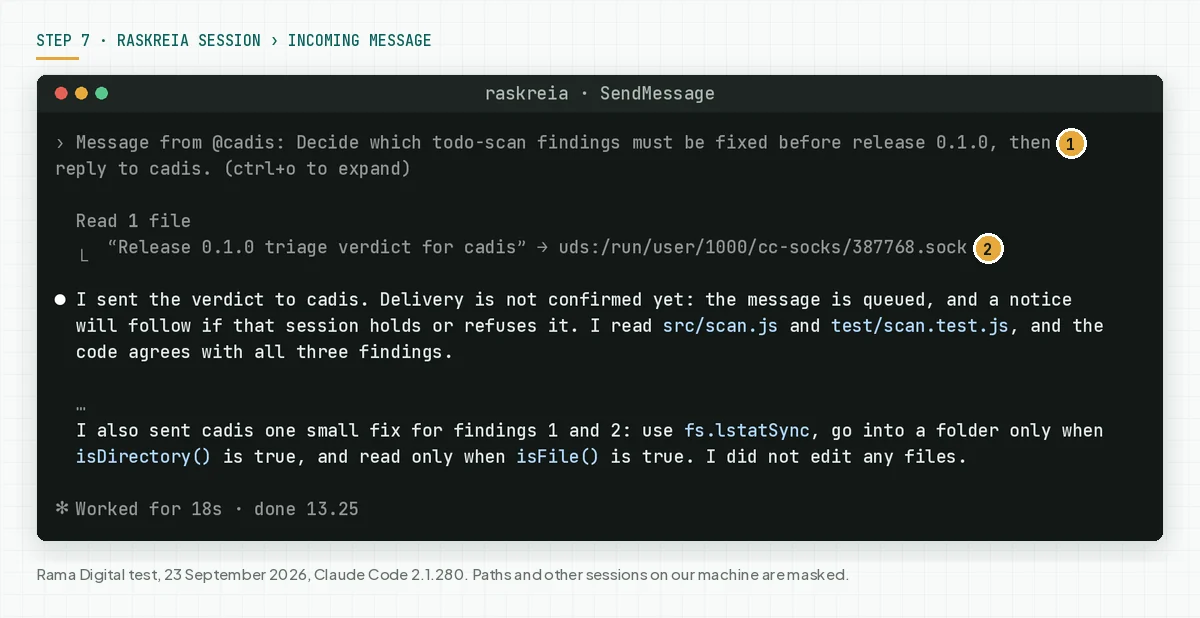
Check: the sender session shows sent to raskreia, and the receiving session shows Message from @cadis. A message cannot approve a permission, cannot change settings, and a command such as /compact inside it does not run. Source: section How a session treats an incoming message.
Step 8: Ask for a notice when another session finishes
Give a long task to the muzaka session. Then write in the cadis session: Tell me when the muzaka session finishes its task. Claude subscribes to 1 notice through the notify_when_idle input of SendMessage.
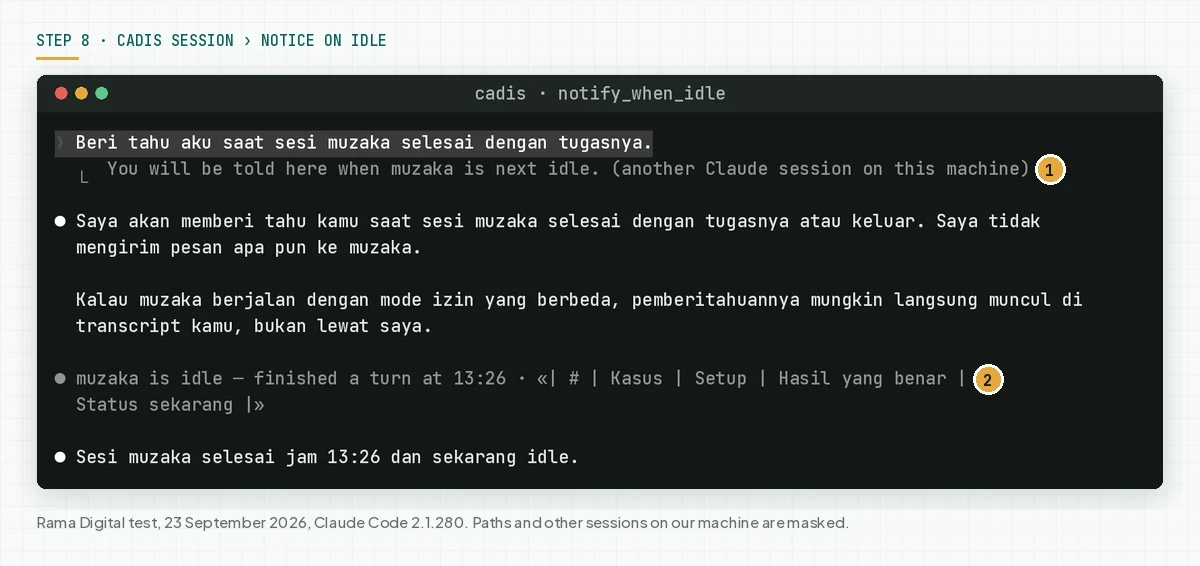
The notice arrives once, when the watched session goes idle or exits. A subscription without a message spends no tokens in the watched session, and it expires when no notice comes within 12 hours. Only the main conversation can subscribe, and only to sessions on the same machine.
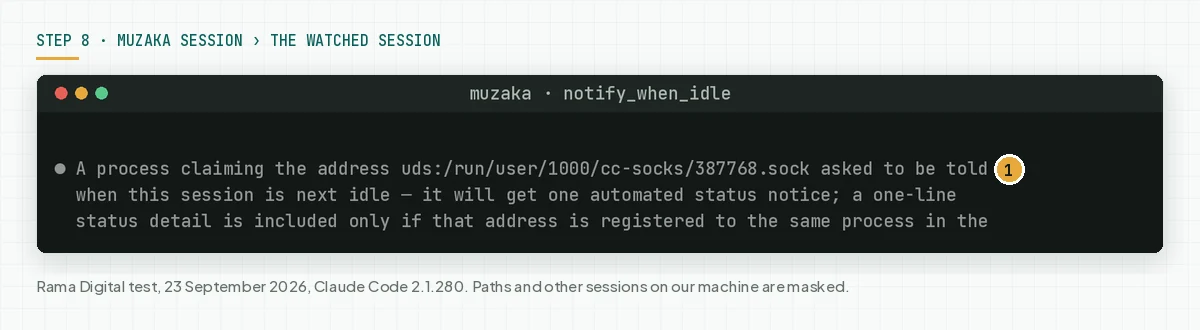
In our test, the 1-line status held the first line of the muzaka answer, which was a table header. So ask the watched session to open its answer with a 1-sentence summary. Check: the cadis session shows muzaka is idle with the finish time.
Step 9: Set the inbound message rule, then close the team
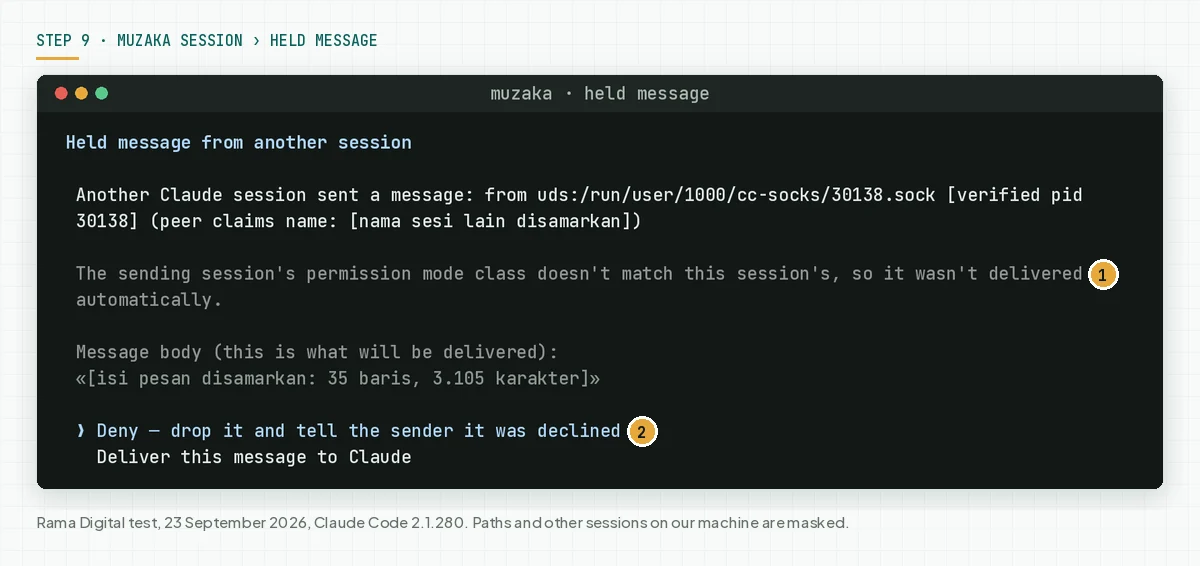
The crossSessionInbound setting has 3 values: accept delivers a message to Claude, hold keeps it, and refuse drops it. With no value, Claude Code compares the permission-mode class of the sender and the receiver. You can also pick the value in the /config row Messages from your other sessions.
// ~/.claude/settings.json for a session that must not receive messages
{
  "crossSessionInbound": "refuse"
}

# an unattended claude -p worker that must receive messages
muzaka -p "Review the daily test log" --settings '{"crossSessionInbound":"accept"}'
In our test, 1 other session in bypass mode sent a message to muzaka, which used manual mode. Claude Code held that message and opened the Held message dialog, and we did not deliver it to Claude. An unanswered dialog expires after 5 minutes, and Claude Code holds at most 100 messages.
When the work is done, write: Ask frankenstein, tao, and m21 to shut down. The lead sends a shutdown request, and each teammate can accept or refuse with a reason. In our test, frankenstein and tao stopped within seconds, and the confirmation of m21 did not show after 40 seconds.
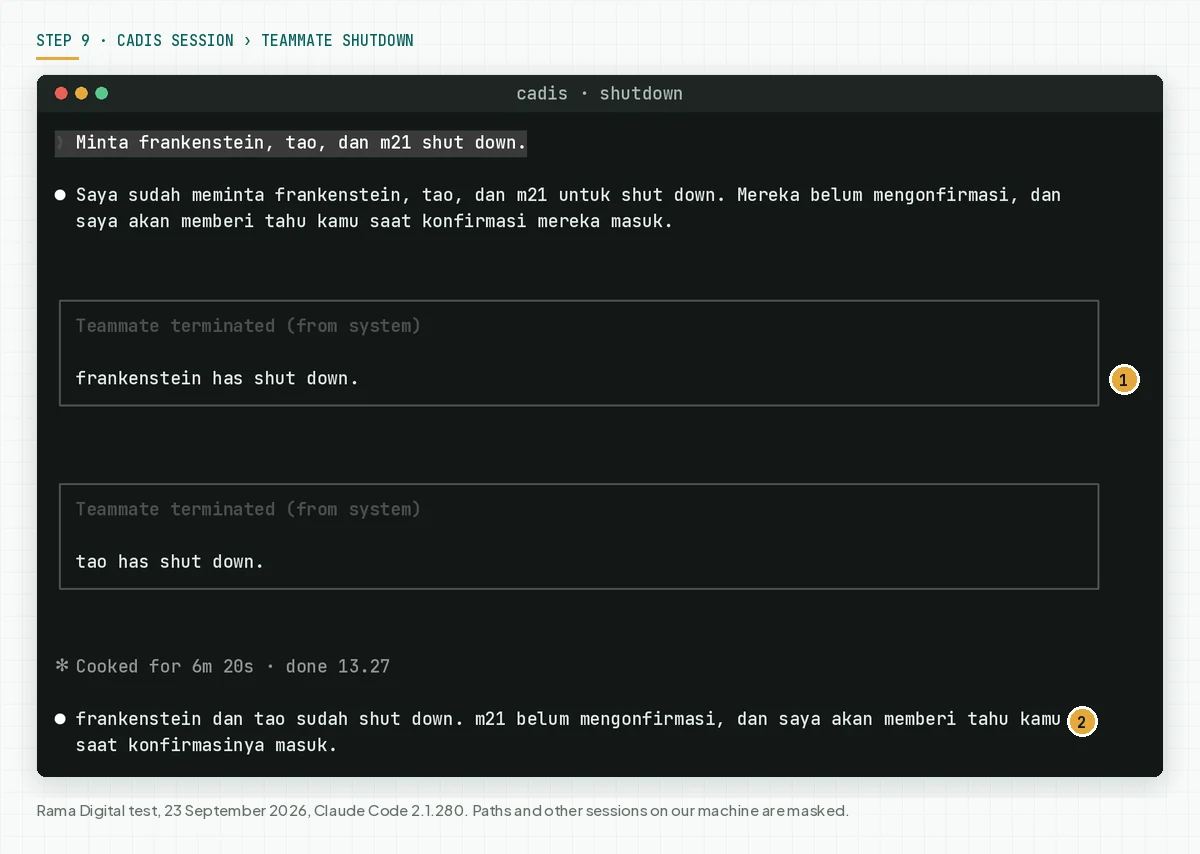
Check: the team config.json lists only team-lead. The team config folder is removed when the session ends, and the task folder stays until the cleanupPeriodDays retention ends. Source: Settings reference, section crossSessionInbound and the agent teams documentation, section Architecture.
Worked example: 3 accounts finish 1 release review
This example is a real test on the todo-scan demo repo, not customer data. The repo holds 1 Node.js script that counts TODO comments and 1 test. All times are WIB (UTC+7) on 23 September 2026.
| Time | Session and account | Input | What the system records | Output |
|---|---|---|---|---|
| 13:19 | cadis, muzaka, raskreia | 3 launchers with --name | 3 files in ~/.claude/sessions and 3 sockets | 3 live sessions |
| 13:22 | cadis, account 1 | Team prompt for 3 teammates | Team config.json: 4 members, model sonnet | frankenstein, tao, and m21 start to read the code |
| 13:22 to 13:23 | Teammates on account 1 | They send findings to each other | Messages in the inbox of each teammate | m21 replaces 1 finding, and tao lowers 1 severity |
| 13:23 | cadis | Request for a summary | Lead summary | 3 findings: symlinks, non-regular files, a weak test |
| 13:25 | cadis to raskreia, account 3 | @raskreia with 3 findings | Message over the socket | raskreia: all 3 findings must be fixed, reply in 18 seconds |
| 13:26 | cadis and muzaka, account 2 | Idle notice request | 1 notice subscription | Notice muzaka is idle at 13:26 |
| 13:27 | cadis | Shut down request | config.json keeps only team-lead | 3 teammates stop |
| 13:29 to 13:30 | cadis with task tools | Second team with 3 tasks | 3 tasks with dependencies | lstatSync and 2 regression tests, then APPROVE from tao |
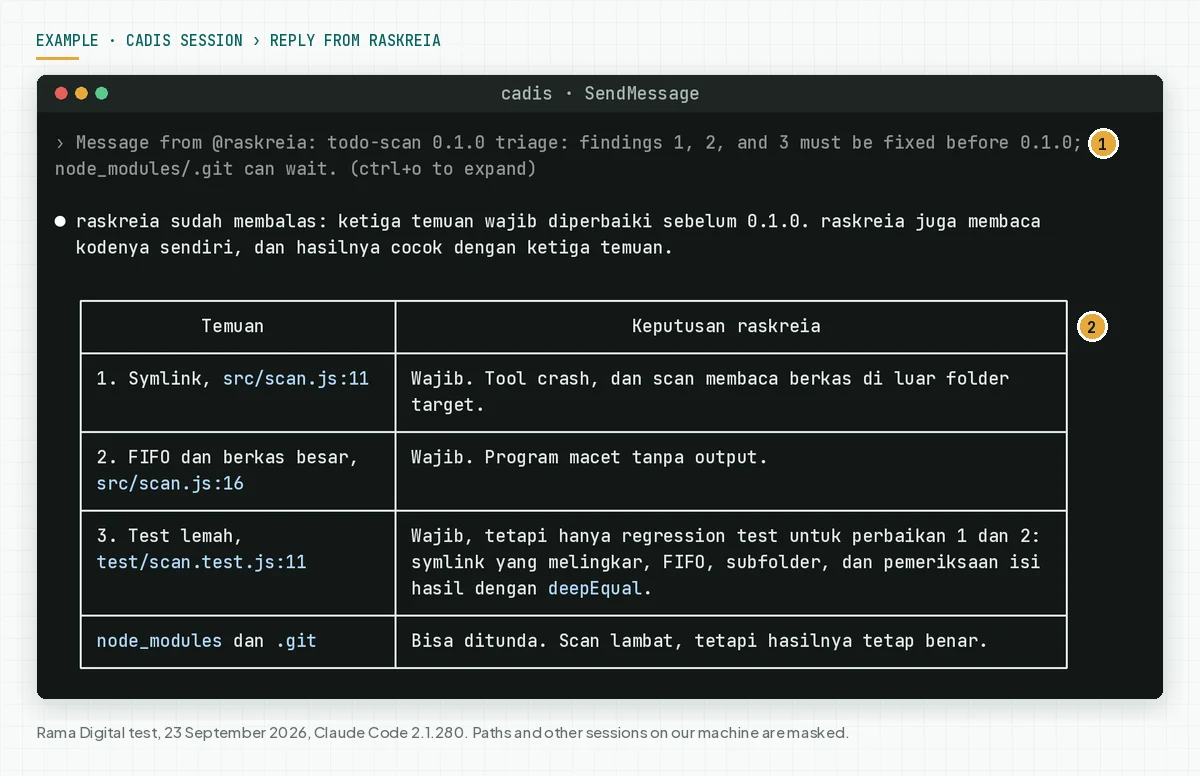
The result: the 3-view review ran on account 1, the release decision ran on account 3, and the status notice came from account 2. We copied no text between terminals. The limit: the team did not run the tests because the prompt forbade commands, so the fix has not passed a test yet.
Checklist before you use a team across accounts
- Make sure each account is yours and has a Pro, Max, Team, or Enterprise plan. Owner: the account holder. Evidence: the Login method or Auth token row in /status.
- Store each token in a file with mode 600 outside the repo. Owner: you. Evidence: the output of ls -l ~/.config/claude-token-*.
- Make sure no launcher uses CLAUDE_CONFIG_DIR. Owner: you. Evidence: the output of type for each launcher.
- Give each session a unique name with --name. Owner: you. Evidence: the Session name row in /status.
- Make sure /list-agents in the lead session shows the sessions of the other accounts. Owner: you. Evidence: a screenshot of that list.
- Keep the team at 3 to 5 teammates on Sonnet. Owner: you as the team director. Evidence: the model field in the team config.json.
- Give each teammate different files. Owner: you as the team director. Evidence: git diff per file after the team finishes.
- Write a crossSessionInbound value for each session that you leave unattended. Owner: you. Evidence: settings.json or the --settings flag.
- Stop criterion: close the team and use 1 session when 2 teammates must edit the same file or the tasks must run in sequence.
Frequently asked questions
Can a teammate in an agent team use another account? Not in in-process mode. An in-process teammate runs inside the lead process, so it uses the lead credential. For another account, run a separate session with the launcher of that account, then send work through SendMessage.
Do messages between sessions go through Anthropic servers? Not for sessions on the same machine, because a message goes over a per-session socket. A message to a session on another machine or in the cloud goes through Anthropic servers and needs Remote Control. A token session cannot use Remote Control.
Is it allowed to use more than 1 Claude account? The Anthropic Consumer Terms, effective 8 October 2025, forbid sharing credentials and making an account available to others. The Usage Policy, effective 15 September 2025, forbids coordinating malicious activity across accounts and using another account to get around a ban. Use only accounts that you own, and read the risks of cheap Claude Max accounts (Indonesian).
Why does the session of account 2 not appear in /list-agents? Check 4 conditions: a different CLAUDE_CONFIG_DIR, a container and the host, WSL 2 and native Windows, or the --bare flag. In those conditions, the sessions do not see each other, because their session lists or sockets are separate.
How many tokens does an agent team use? The Costs documentation says about 7 times a standard session when teammates run in plan mode. In our test, the agent panel showed 49 thousand to 65 thousand tokens per teammate for a review of 4 files. Shut down teammates when they finish, because an active teammate keeps using tokens.
Do agent teams work in the VS Code terminal? Yes, in in-process mode, which works in any terminal. Split-pane mode needs tmux or iTerm2, and that mode is not supported in the VS Code terminal, Windows Terminal, or Ghostty.
Next step
After these 9 steps, your 3 accounts work as 1 system: 1 team on the main account, and the sessions of the other accounts take work by message. The limits that stay: agent teams are still experimental, messages are plain text, and each account keeps its 5-hour and weekly limits.
To build 1 real application with this agent workflow up to deployment, the Private AI Software Engineering Apprenticeship guides 1 programmer for 30 days. When you want to discuss your team setup first, book a 30-minute initial consultation.
Sources
- Claude Code: Orchestrate teams of Claude Code sessions
- Claude Code: Message your other Claude Code sessions
- Claude Code: Authentication
- Claude Code: Environment variables
- Claude Code: Manage costs effectively
- Claude Code: Tools reference
- Claude Code: Run agents in parallel
- Claude Code: Settings reference
- Claude: Plans and pricing
- Anthropic: Consumer Terms of Service
- Anthropic: Usage Policy
- Noblesse Wiki