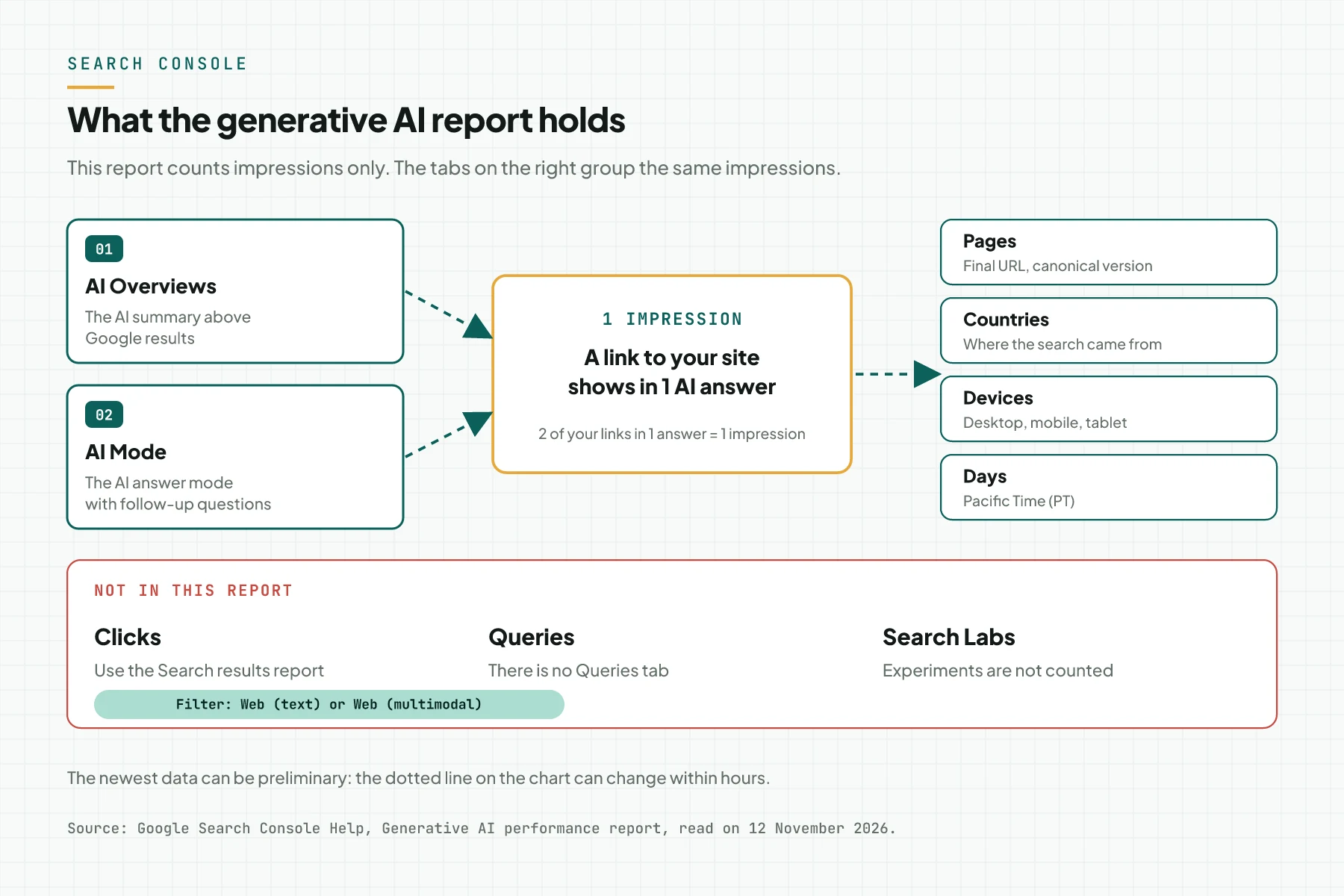
Direct answer: the generative AI report in Search Console counts how many times a link to your site shows in Google AI OverviewsAIOAIO has 2 meanings: AI Overview, the AI answer summary above Google results, and AI Optimization, the work to get your page cited in that summary.AIO Service for Google AI Overviews and AI Mode. Open Performance > Search results > Generative AI, then read 4 tabs: Pages, Countries, Devices, and Days. The report has 1 metric only: impressionsImpressionThe number of times your ad or page appeared on a screen. An impression is not a person and not a search.Open the glossary.
Main condition: this guide applies to a Search Console property that already has impressions in Google AI features. Google opened the report to all sites on 31 August 2026. Limit: the report holds no clicks, queries, or positions, so it cannot prove sales on its own.
We wrote this guide on 12 November 2026. The sources are the Google help page for this report, the Google announcement of 3 June 2026, and the ramadigital.id Search Console property, which we read on the same day.
Why you read this report on its own
Before this report, AI Overview impressions were mixed into the Search results report. According to the Search Console performance documentation, 1 AI Overview takes 1 position, and all links in it share that position. That data still counts in the Web search type. So you could not see which pages Google cited in AI answers.
The new report separates those impressions. You can now answer 3 questions with data: which pages show in AI answers, from which countries, and on which devices. For the signals that help AI answers trust a business, read entity consistency for GEO.
How the report counts impressions
Features included
The report counts impressions from AI Overviews and AI Mode in Google Search. Search Labs experiments are not included, because those features are still in development. Google Discover has its own generative AI report. Source: Generative AI performance report.
What 1 impression means
1 impression means a link to your site showed in 1 generative AI feature. When 2 results from the same site show in 1 feature, the chart counts 1 impression. When you add a URL filter, the chart counts per URL.
Tabs and filters
The Pages tab groups impressions by the final URL after redirects, with the canonical URL as the reference. The Countries tab uses the country where the search started. The Devices tab splits desktop, mobile, and tablet. The Days tab uses Pacific Time. The search type filter has 2 options: Web (text) and Web (multimodal), which is image search such as Google Lens.
Preliminary data and table limits
The newest data can be preliminary, and the chart shows it as a dotted line. The 1,000 row limit of the performance report also applies here. The chart total and the table total can differ, because the chart counts per property and the Pages tab counts per page.
The generative AI report and the Search results report
The 2 reports complete each other. Use this table to pick the report that answers your question.
| Attribute | Generative AI report | Search results report |
|---|---|---|
| Metrics | Impressions only | Clicks, impressions, CTRCTRClicks divided by impressions, as a percentage. CTR shows how often people press the ad or the search result they saw.Open the glossary, position |
| Query tab | None | Yes |
| Coverage | AI Overviews and AI Mode | All Web results, AI features included |
| Main use | Which pages show in AI answers | Queries, clicks, and position of those pages |
So read the generative AI report to pick pages. Then read the Search results report for the queries and clicks of the same pages.
What you need
- Access to the Search Console property of your site.
- A domain property, so all subdomains and protocols go into 1 report.
- The setting Settings > AI controls > Search generative AI set to Include. The Google guide says a site must be included in generative AI features to be eligible.
- 1 worksheet to record the monthly numbers.
Step 1: Open the Generative AI report
Pick your property, then open Performance > Search results > Generative AI in the left menu. The page title is "Performance on Search generative AI features" with a Beta label. The Search results report also shows a box with an Open report link to this report.
Check: the chart shows Total impressions. If the report does not show, see the questions and answers below.
Step 2: Set the date range and search type
Pick 3 months to see the trend, or Custom for 1 calendar month. Keep the filter Search type: Web (text) for normal text search. Change to Web (multimodal) when people often find your business through product photos.
Check: the chart title names the date range you picked. Remember that dates use Pacific Time, so a day in Indonesia moves by 14 to 15 hours.
Step 3: Read the Pages tab
Open the Pages tab and sort by impressions. The top 10 pages are the pages that Google cites most often in AI answers. Also record your sales pages that do not show at all.
Check: you can open every URL in the table, and each URL is the canonical version. If an old URL shows, check the redirect and the canonical tag of that page.
Step 4: Read the Countries and Devices tabs
Open the Countries tab to see where the searches came from. Then open the Devices tab to split desktop, mobile, and tablet. Compare this device split with the Search results report for the same range.
Check: the row count of the Countries tab shows the number of countries. If the desktop share in the AI report is larger than in the Search results report, also test your pages on wide screens.
Step 5: Calculate the AI share of impressions
Record the total AI impressions for 1 month. Open the Search results report with the same range, then record the total Web impressions. Divide the first number by the second to get the AI share of all impressions.
Check: both numbers use the same month and the same search type. This share shows how much AI features shape the impressions of your site.
Step 6: Export the data each month
Press EXPORT at the top right to download the chart and table data. Values that show as ~ or - become 0 in the downloaded file. Keep 1 file per month with the date in the file name.
Check: the file holds the tabs you need, and the total in the file equals the total on screen. For a 30 day plan that uses this data, read a 30 day content calendar from Search Console AI features.
Reading example: ramadigital.id data
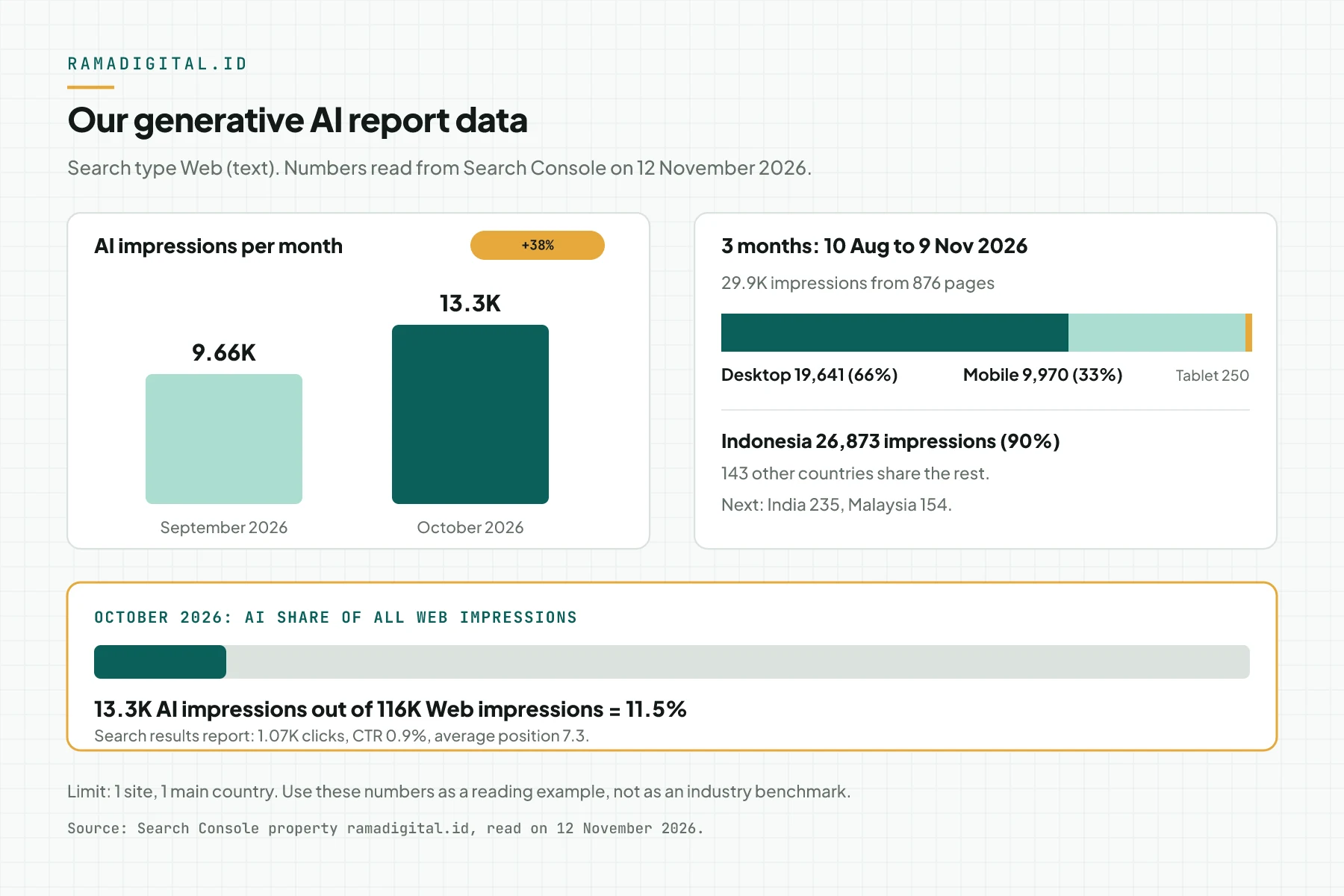
In our test on 12 November 2026, the ramadigital.id report for 10 August to 9 November 2026 recorded 29.9K impressions from 876 pages. We used the Web (text) filter. The numbers in this table come from our own site, not from client data.
| Question | Number from the report | Our reading |
|---|---|---|
| Do AI impressions grow? | September 9.66K, October 13.3K | Up 38% in 1 month |
| Which devices? | Desktop 19,641, mobile 9,970, tablet 250 | 66% of AI impressions from desktop |
| Which countries? | Indonesia 26,873 out of 144 countries | 90% of impressions from Indonesia |
| How large is the AI share? | October: 13.3K AI out of 116K Web | 11.5% of Web impressions from AI features |
| Which pages are cited? | Social media image size guide 2,931, TAM SAM SOM article 1,722 | Guide pages with numbers and tables show most often |
Inference from this data: the pages that show in AI answers already answer 1 question with numbers. This matches the Google guide for generative AI features, which says that optimization for AI features is still SEOSEOThe work of making your page easy to find and easy to choose in search results, without paying for ads.SEO services work. Limit: this is data from 1 site, so use it as a reading example, not as an industry benchmark.
Monthly checklist
- The site owner checks that the Search generative AI setting is Include. Evidence: a screenshot of Settings.
- The SEO team exports last month's generative AI report. Evidence: 1 dated file.
- The SEO team records the top 10 pages in the Pages tab. Evidence: a list of URLs and impressions.
- The SEO team calculates the AI share of total Web impressions. Evidence: 2 numbers and the result.
- The content writer checks 3 sales pages that do not show. Evidence: fix notes per page.
- The SEO team compares clicks of the top pages in the Search results report. Evidence: a click table for this month and last month.
- Stop criterion: stop the work on a page when its AI impressions do not grow after 2 months, then pick another page.
Questions and answers
Why does the generative AI report not show in my Search Console?
Google writes that this usually happens when the site does not have enough impressions in AI features yet. Another cause is a site that is excluded from generative AI features. Check Settings, then AI controls.
Does the generative AI report show clicks from AI Overviews?
No. This report shows impressions only. Clicks from AI features still count in the Search results report under the Web type, but you cannot separate them from normal clicks.
Can I see the queries that trigger an AI Overview?
No. This report has the Pages, Countries, Devices, and Days tabs, without a query tab. For queries, filter the Search results report with the URL of a page that shows in the AI report.
Does an llms.txt file add impressions in this report?
No. The Google guide of 15 May 2026 says that Google Search does not use llms.txt. A page still needs to be indexed and eligible to show with a snippet to be cited in an AI Overview.
Why is the chart total different from the sum of the Pages table?
The chart counts impressions per property, so 2 of your links in 1 AI answer become 1 impression. The Pages tab counts per page, so each of those links gets 1 impression.
Next step
The limit that still applies: this report shows which pages show, but it does not show queries or clicks. You still need the Search results report to measure business results.
If you want our team to map your queries, read the cited sources, and fix your pages, see the AIO Service for Google AI Overviews. To discuss your Search Console data first, book a 30 minute Initial Consultation.
Sources
- Google Search Console Help: Generative AI performance report (Search), read on 12 November 2026.
- Google Search Central Blog: Introducing Search Generative AI performance reports in Search Console, 3 June 2026.
- Google Search Central: optimizing your website for generative AI features, announced 15 May 2026.
- Google Search Central: AI features and your website, updated 10 December 2025.
- Google Search Console Help: Performance report (Search results), read on 12 November 2026.