Direct answer: EmbeddingGemma 2 is an open embedding model from Google DeepMind. It turns text, code, images, video, and audio into 768-dimension vectors in 1 shared space. Use it for search and RAG on your own machine. Start with the 270M text encoder, task prefixes, and 256-dimension vectors.
Main condition: this path fits when customer data must not go to a third-party APIAPIThe official door 2 systems use to exchange data, without anybody copying it by hand.Open the glossary, or when your catalog holds photos and recordings. Limit: for Indonesian text only, our test showed no gain over EmbeddingGemma 1. An embedding only ranks documents. It does not make a chatbot answer correct.
On 13 October 2026, EmbeddingGemma 2 launched on its Product Hunt page and held daily rank 1 with 256 points when we read it at 09:32 WIB. Google announced the model on 6 October 2026 on the Google blog. We ran the model on an RTX 4060 8 GB laptop on 13 October 2026. The test data is a dummy dental clinic FAQ and 6 menu photos from Wikimedia Commons.
The problem: customer words do not match FAQ words
A customer writes "my teeth ache every time I drink iced tea". Your FAQ says "sensitive teeth". Keyword search finds no match, because no word is the same. The chatbot then gives a general answer, or sends the chat to an admin.
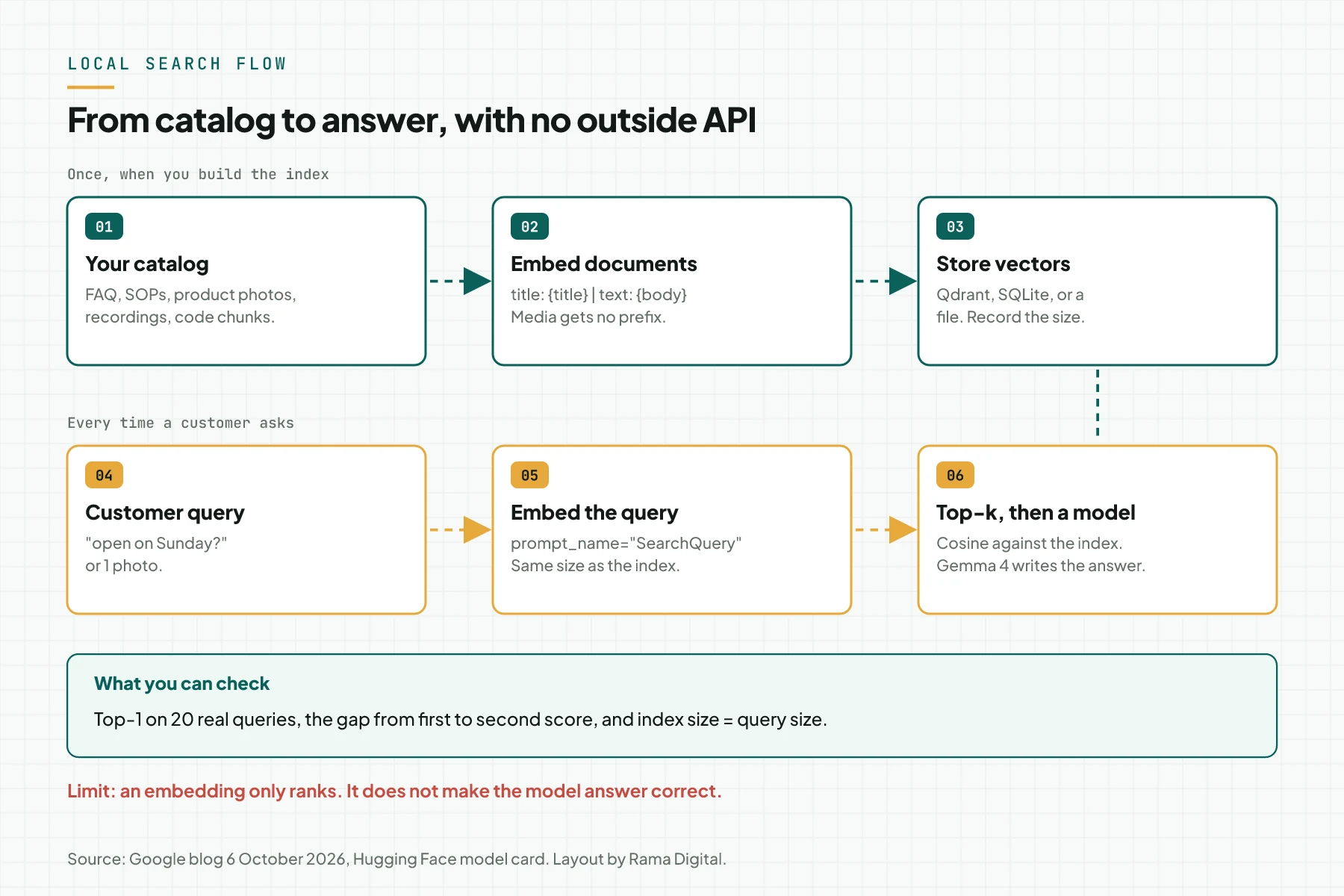
An embedding turns a sentence into a list of numbers. Sentences with close meaning get close numbers, even when the words differ. That is the base of RAG, which we explain in a local AI knowledge base for company documents (Indonesian).
The second problem is data. A cloud embedding API receives every question and every document you send. On the free tier of the Gemini API, the Gemini API pricing page says "Used to improve our products: Yes". EmbeddingGemma 2 runs on your own machine, so the text stays inside your network.
How EmbeddingGemma 2 works
The model has 740M parameters in total and uses the Gemma 4 architecture. Its license is Apache 2.0, so commercial use is allowed. The weights are on Hugging Face and Kaggle since 6 October 2026, according to the Google blog.
1 vector space for 4 modalities
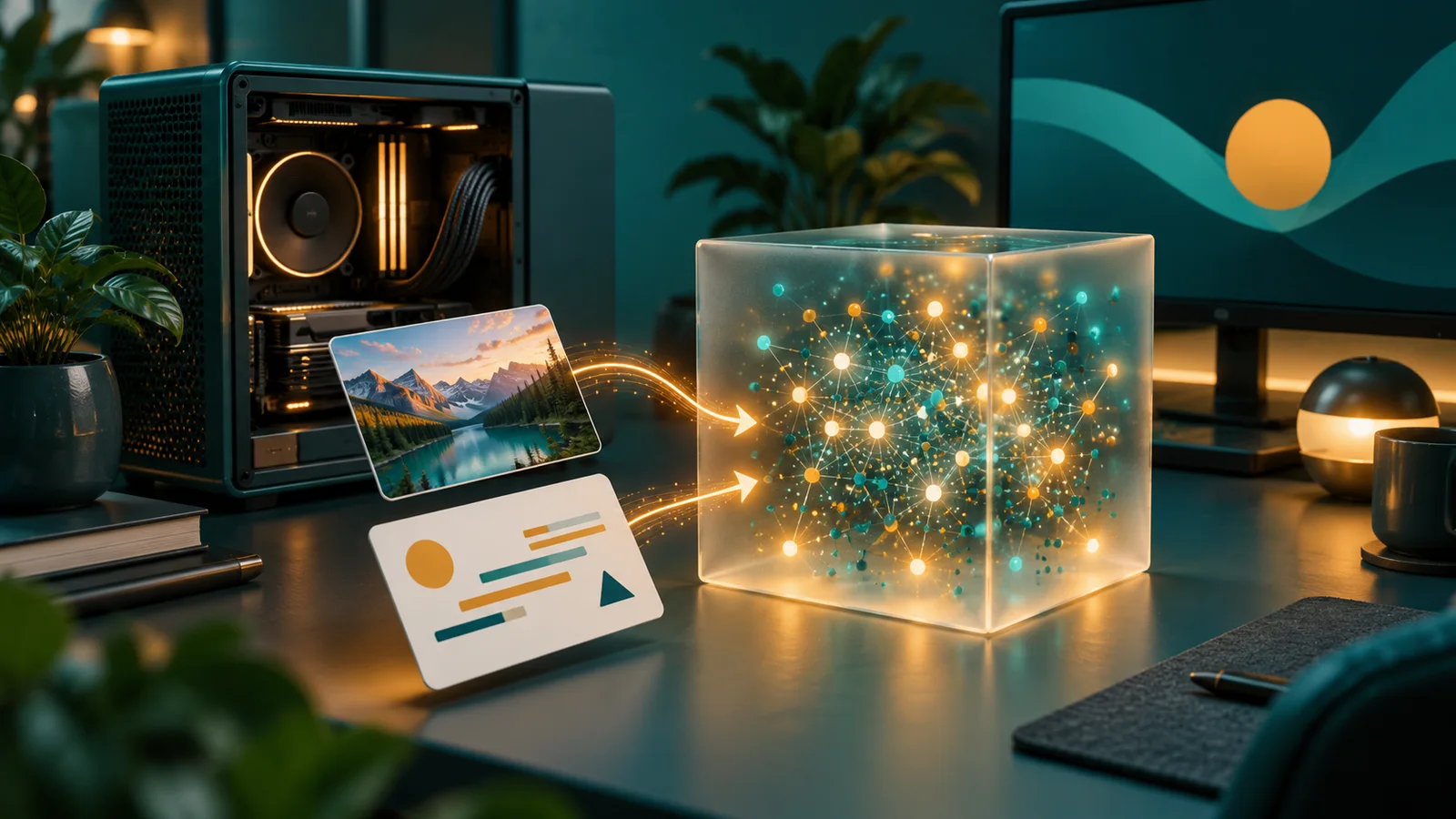
Text, images, video, and audio go into the same 768-dimension space, according to the Hugging Face model card. So a text query compares directly with a photo vector. You do not need a second model for images.
1 input can also mix modalities. Example: a product description, 2 photos, and 1 demo video become 1 vector. The position markers are the tokens <|image|>, <|video|>, and <|audio|> inside the text.
Modular encoders: load only what you use
The text and code base is 270M: a 130M transformer and a 140M embedder. The image encoder adds 170M. The audio encoder adds 300M. The table in the Hugging Face model card gives 4 setups: 270M, 440M, 570M, and 740M.
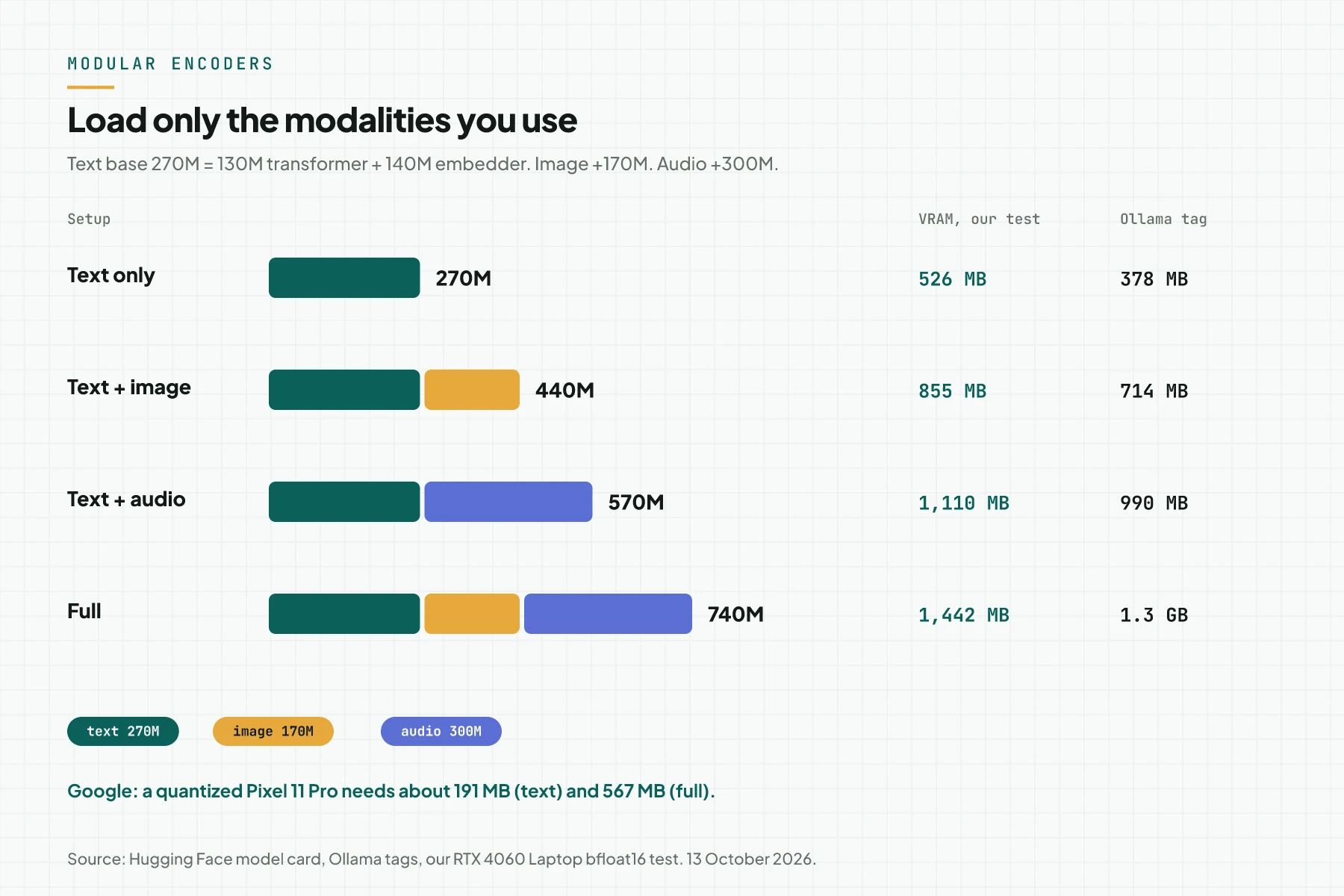
Google writes that a quantized Pixel 11 Pro needs about 191 MB of active RAM for text and about 567 MB for the full model. That is a vendor claim. In our test without quantization, peak VRAM was 526 MB for text and 1,442 MB for the full model.
An 8,192-token context that all modalities share
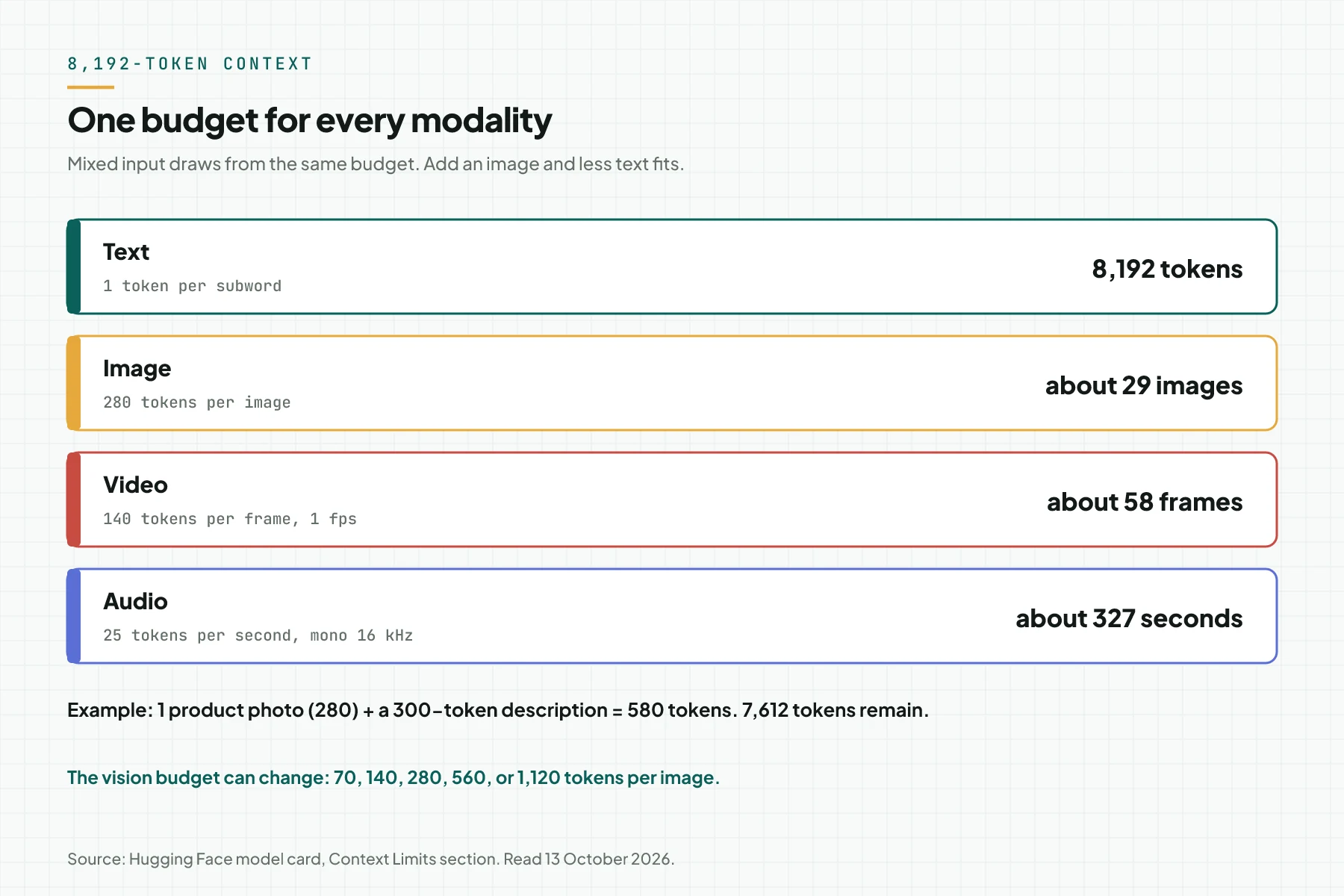
EmbeddingGemma 1 accepts 2K text tokens, according to the EmbeddingGemma 1 model card. Version 2 accepts 8,192 tokens. An image uses 280 tokens, a video frame 140 tokens, and audio 25 tokens per second.
Task prefixes
The model was trained with short prefixes in front of text. A search query uses task: search result | query: {query}. A document uses title: {title} | text: {body}. Images, video, and audio take no prefix. The model card names 7 prompts, among them SearchQuery, CodeRetrieval, and Classification.
Matryoshka (MRL)
A 768-dimension vector can be cut to 512, 256, or 128. The front of the vector carries the most important information. A cut vector must be normalized again, and the query must use the same size as the documents.
Comparison: EmbeddingGemma 1, EmbeddingGemma 2, and Gemini Embedding 2
This table uses facts from vendor pages we read on 13 October 2026. Gemini prices are paid-tier prices in US dollars per 1 million tokens.
| Attribute | EmbeddingGemma 1 | EmbeddingGemma 2 | Gemini Embedding 2 |
|---|---|---|---|
| Where it runs | Your machine | Your machine | Google API |
| Parameters | 300M | 270M to 740M | Not stated |
| Input | Text | Text, code, images, video, audio | Text, images, video, audio, PDF |
| Context | 2K tokens | 8,192 tokens | 8,192 tokens |
| Dimensions | 768, MRL to 512, 256, 128 | 768, MRL to 512, 256, 128 | 128 to 3,072 |
| MTEB multilingual v2 | 61.15 | 61.36 | Not compared in this source |
| MTEB code v1 | 68.76 | 78.68 | Not compared in this source |
| License or cost | Gemma, Hugging Face access needs approval | Apache 2.0, no gate on Hugging Face | Text $0.20, image $0.45, audio $6.50, video $12.00 |
The MTEB scores come from the Hugging Face model card. The Gemini data comes from the Gemini Embedding 2 model page and the Gemini API pricing page. Gemini batch mode cuts the price in half.
What you need
- 1 machine with Python 3.12. We used an RTX 4060 Laptop 8 GB. A CPU also works, with float32.
- About 8 GB of disk for PyTorch CUDA and 1.5 GB for the model weights.
- Internet access once, to download
google/embeddinggemma-2. After that, run withHF_HUB_OFFLINE=1. - 20 to 50 real customer questions, with names and numbers removed. Pair each question with the correct document.
- 1 catalog you can edit: an FAQ, SOPs, or a folder of product photos.
Step 1: Choose a runtime and check its version
Check the runtime version before you download the model. On 13 October 2026, Ollama 0.32.3 on our test machine refused ollama pull embeddinggemma-2:270m-bf16-text with code 412. The message asked for a newer Ollama version.
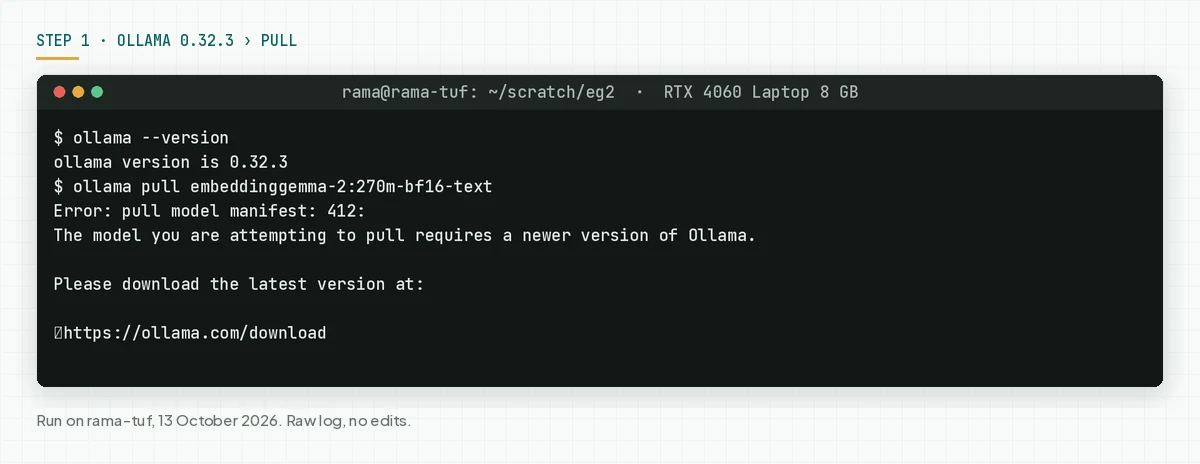
The Ollama v0.40.0 release on 25 September 2026 added EmbeddingGemma 2 for MLX, the Apple Silicon path. For Linux and Windows, the llama.cpp update for this model is only in v0.40.4-rc0, a release candidate dated 12 October 2026. The Ollama tag list also marks many tags as MLX.
Rama Digital recommendation: on an Apple Silicon Mac, use the latest Ollama. On Linux or Windows with an NVIDIA GPU, use sentence-transformers until a stable Ollama release carries the llama.cpp support. Check: the runtime loads the model with no version error.
Step 2: Install sentence-transformers and load the encoders you need
Make a separate Python environment, so the PyTorch version does not break other projects. We used torch 2.14.1, transformers 5.19.0, and sentence-transformers 6.1.0. Load the text encoder only when your catalog is text only.
uv venv --python 3.12 .venv
uv pip install --python .venv/bin/python torch --index-url https://download.pytorch.org/whl/cu128
uv pip install --python .venv/bin/python -U sentence-transformers transformers pillow

# load the text encoder only (270M)
import torch
from sentence_transformers import SentenceTransformer
dtype = torch.bfloat16 if torch.cuda.is_bf16_supported() else torch.float32
model = SentenceTransformer(
    "google/embeddinggemma-2",
    model_kwargs={"torch_dtype": dtype},
    config_kwargs={"vision_config": None, "audio_config": None},
)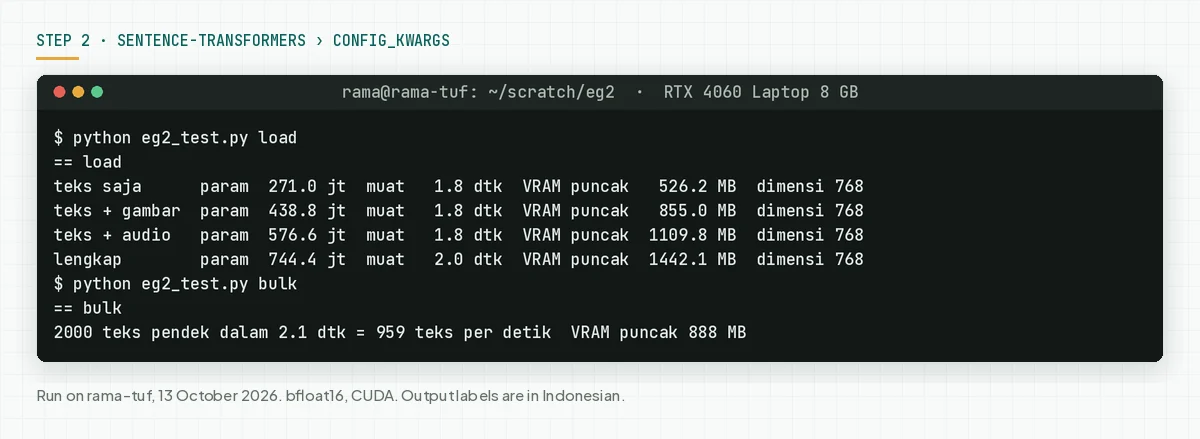
In our test, each setup loaded in 1.8 to 2.0 seconds from the local cache. The text encoder processed 959 short texts per second with a batch of 64. Check: model.encode(["test"]) returns a 768-dimension vector. Source for config_kwargs: the Hugging Face model card.
Step 3: Use task prefixes, then test with your own FAQ
Format each document as title: {title} | text: {body}. Use prompt_name="SearchQuery" for queries. Then measure top-1 with real questions, not with vendor examples.
docs = [f"title: {title} | text: {body}" for title, body in faq]
d = model.encode(docs, normalize_embeddings=True)
q = model.encode("open on Sunday?",
                 prompt_name="SearchQuery", normalize_embeddings=True)
scores = model.similarity(q, d)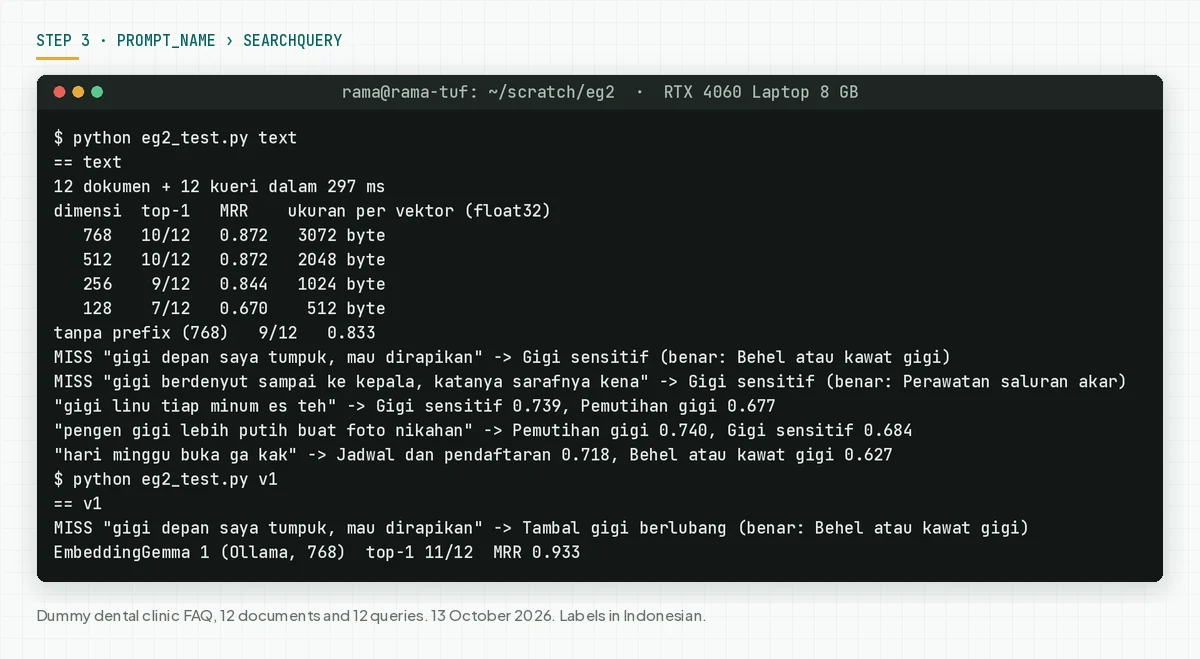
In our test, the prefix raised top-1 from 9 to 10 of 12 queries. EmbeddingGemma 2 missed "my front teeth overlap" and "my tooth throbs up to my head". EmbeddingGemma 1 through Ollama missed only the first query. A gap of 1 query in 12 does not prove the old model is better.
This result agrees with the Hugging Face model card: the MTEB multilingual score only rose from 61.15 to 61.36. The large gain is in code, from 68.76 to 78.68. Check: you record top-1 and MRR for 20 real queries, with and without the prefix.
Step 4: Cut dimensions with MRL, then normalize again
Use truncate_dim and normalize_embeddings=True on queries and documents. Store the dimension in the index metadata. A 768-dimension query cannot be compared with a 256-dimension index.
q = model.encode(queries, prompt_name="SearchQuery",
                 truncate_dim=256, normalize_embeddings=True)
d = model.encode(documents, truncate_dim=256, normalize_embeddings=True)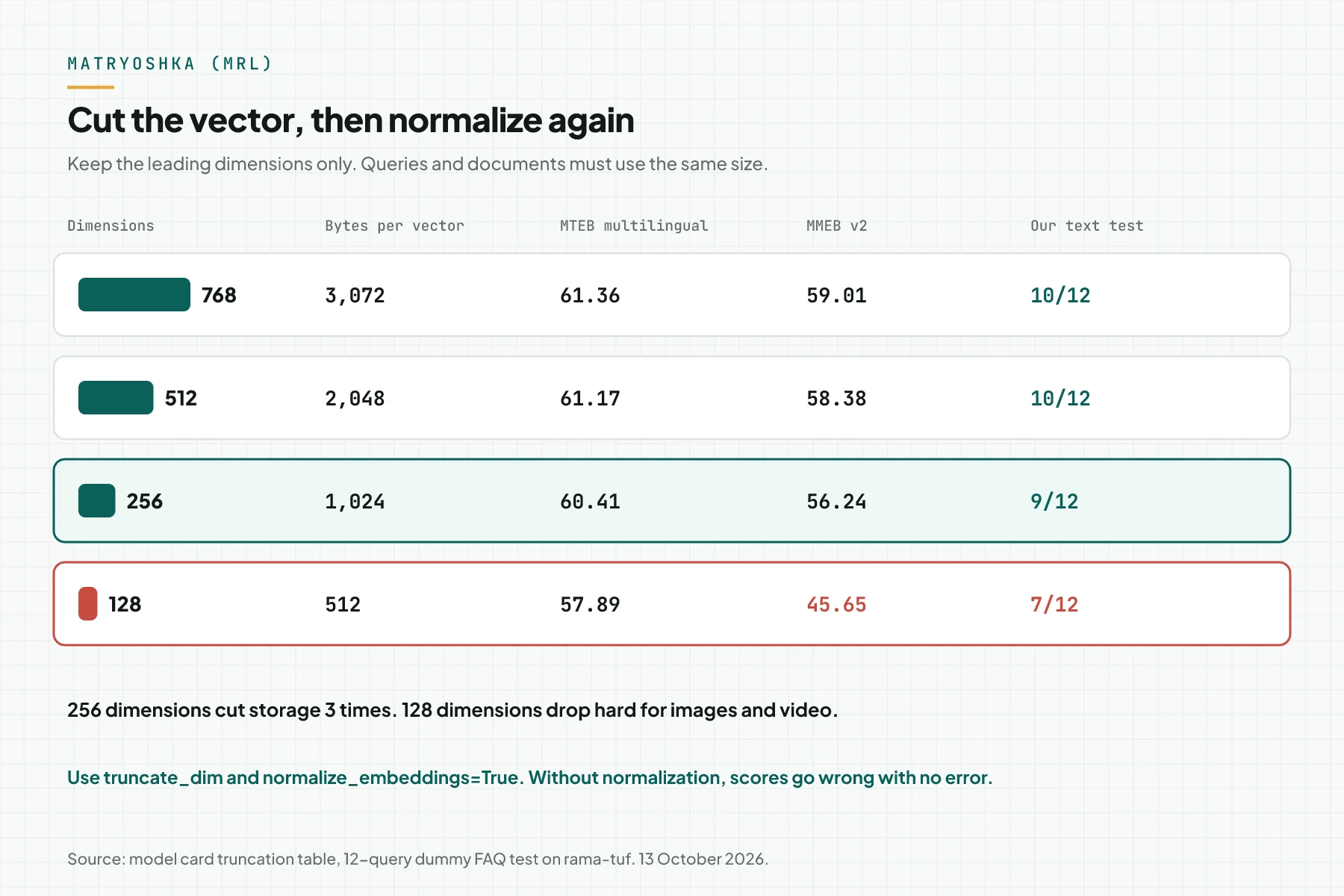
One float32 vector of 768 dimensions takes 3,072 bytes. At 256 dimensions, it takes 1,024 bytes. For 1 million documents, that is 3 GB against 1 GB, before the index. The model card says 128 dimensions lower multimodal quality a lot. Check: top-1 at your chosen size drops by 1 query at most from the 768 result.
Step 5 (optional): Find photos with an Indonesian sentence
Load the text and image setup, which is 440M. Embed each photo without a prefix. Then send a text query with SearchQuery. We used 6 food photos from Wikimedia Commons as a dummy menu.
model = SentenceTransformer("google/embeddinggemma-2",
    model_kwargs={"torch_dtype": dtype},
    config_kwargs={"audio_config": None})          # 440M
photos = model.encode([{"image": p} for p in paths], normalize_embeddings=True)
q = model.encode("minuman panas hitam, ampasnya mengendap",
                 prompt_name="SearchQuery", normalize_embeddings=True)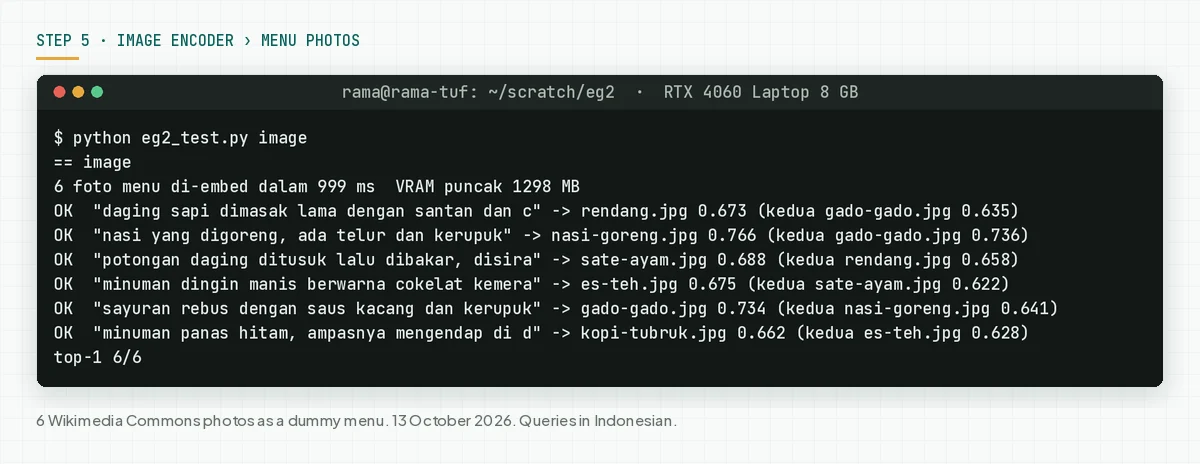
The query "hot black drink, the grounds settle at the bottom of the glass" (in Indonesian) found kopi tubruk with a score of 0.662. The second photo, iced tea, got 0.628. The query names no menu item at all. Embedding 6 photos took 999 ms and 1,298 MB of peak VRAM.
The 6 of 6 score comes from 6 photos of clearly different dishes. A real catalog has similar photos, such as 12 coffee variants. Test again with your catalog. The official guide is the Google multimodal guide. Check: the first and second scores are recorded for each test query.
Step 6: Lock precision at bfloat16 or float32
Set torch_dtype to bfloat16 when the GPU supports it, or float32 on a CPU. Do not use float16. The model card says the model activations exceed the float16 range, and the failure shows no error.
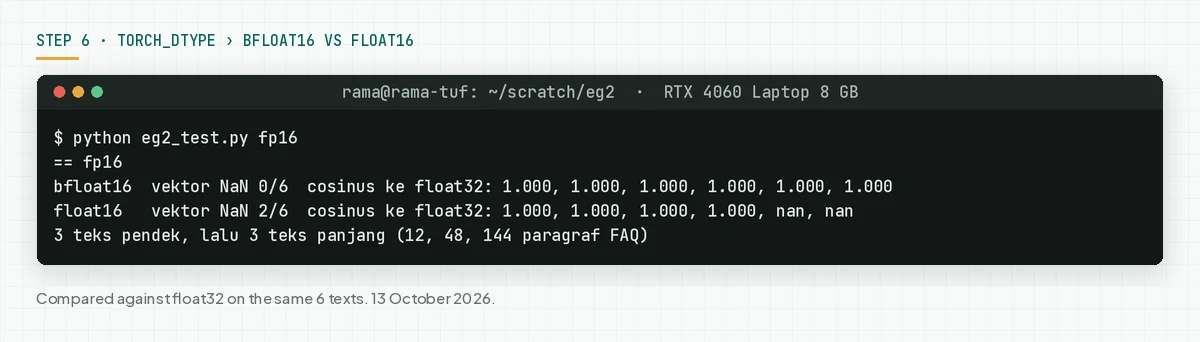
We compared bfloat16 and float16 with float32 results on 3 short and 3 long texts. The short texts passed in float16. The two longest texts gave NaN. So a 1-sentence test does not catch this problem. Check: torch.isnan(emb).any() is False on the longest document in your catalog.
Example: a dental clinic chatbot with a local index
A simulation with dummy data. The scores come from our test on 13 October 2026. The 0.70 threshold is an example, not a number from Google.
| Time | Input | What the system records | Output |
|---|---|---|---|
| 09:00 | 12 FAQ entries indexed at 256 dimensions | 12 vectors, 1,024 bytes each, dim=256 | A 12 KB index |
| 09:05 | "open on Sunday?" (in Indonesian) | First: Schedule and registration 0.718. Second: 0.627 | The bot answers opening hours from the FAQ |
| 09:07 | "my front teeth overlap, I want them fixed" | Wrong first: Sensitive teeth. Score under 0.70 | The chat goes to an admin |
| 09:10 | The admin adds 1 sentence about crowded teeth to the braces FAQ | 1 vector rebuilt | The same query is tested again |
The lesson from the simulation: a score threshold and a path to a human matter as much as the model. For how to split work between a bot and an admin, read RAG, knowledge base, and agent memory (Indonesian).
Checklist before customers use it
- The developer records the runtime, torch, and transformers versions. Evidence:
pip freezeoutput in the repo. - The developer loads only the encoders needed. Evidence: parameter count and peak VRAM in the log.
- The FAQ owner prepares 20 real queries with correct answers. Evidence: a CSV of queries and document IDs.
- The developer measures top-1 and MRR at 768 and 256 dimensions. Evidence: a dated results table.
- The developer tests the longest document in bfloat16 or float32. Evidence: 0 NaN in the log.
- The service owner sets a score threshold and a path to an admin. Evidence: a written rule and 3 test chats.
- The developer stores the dimension and prefix in the index metadata. Evidence:
dimandpromptfields on each collection. - Stop and go back to EmbeddingGemma 1 or another model when top-1 on 20 real queries drops by more than 2 queries from the current model.
When to choose EmbeddingGemma 2, version 1, or Gemini Embedding 2
Choose EmbeddingGemma 2 when your catalog holds photos, recordings, video, or code, and the data must stay on your machine. Stay on EmbeddingGemma 1 when your index is Indonesian text only and already works well. A model change means you rebuild every vector.
Choose Gemini Embedding 2 when you do not want to run a server, you need PDF input, and the data may be processed by the Google API. Rama Digital recommendation: test all three with the same 20 real queries. Decide from top-1, monthly cost, and data rules, not from a benchmark score.
To choose a laptop or server for the generative model beside it, read Gemma 4: laptop specs and benchmarks (Indonesian) and when a company needs a local AI server (Indonesian).
Frequently asked questions
Is EmbeddingGemma 2 free for business use? Yes. Its license is Apache 2.0, which allows commercial use. Your cost is power, hardware, and developer time. Use must still follow the Gemma Prohibited Use Policy, according to the model card.
Is EmbeddingGemma 2 better for Indonesian than version 1? Not proven. The MTEB multilingual score only rose from 61.15 to 61.36. In our 12-query test, version 1 got 11 right and version 2 got 10. Test with your own data.
How much memory does EmbeddingGemma 2 need? On an RTX 4060 Laptop in bfloat16, peak VRAM was 526 MB for text and 1,442 MB for the full model. Google states about 191 MB and 567 MB on a quantized Pixel 11 Pro.
Does EmbeddingGemma 2 work in Ollama yet? On Apple Silicon, yes, since Ollama v0.40.0 through MLX. On Linux and Windows, llama.cpp support is in v0.40.4-rc0 as of 12 October 2026. Ollama 0.32.3 refuses the model with code 412.
Can EmbeddingGemma 2 answer customer questions? No. The model only makes vectors to find and rank documents. A generative model, such as Gemma 4, writes the answer from the documents found. Both share the same text tokenizer and audio encoder.
Which dimension should I use with EmbeddingGemma 2? Start at 256 dimensions for text, because storage drops 3 times. Use 512 or 768 for photos and video. Avoid 128 dimensions for multimodal work, because the MMEB score falls from 59.01 to 45.65.
Next step
The limits above still apply: our test is small, and an embedding does not make an answer correct. Local AI Server for Companies sets up the hardware, model, knowledge base, a benchmark with your real queries, and SOPs. On 13 October 2026, that service page lists a price from Rp 99 million. Book a 30-minute session when you want to bring 20 real queries and choose a model from test results.
Sources
- Google blog, 6 October 2026. Parameters, license, Pixel 11 Pro RAM, context, and runtime partners.
- Hugging Face model card. Read 13 October 2026. Architecture, benchmarks, truncation table, prefixes, config_kwargs, context limits, and float16.
- Google multimodal guide and Google inference guide. Read 13 October 2026. Image, audio, and video input, and the vision budget.
- EmbeddingGemma 1 model card. Read 13 October 2026. The 2K context and 300M parameters.
- Product Hunt page. Read 13 October 2026 at 09:32 WIB. Daily rank and points.
- Ollama tag list, Ollama v0.40.0 release, and v0.40.4-rc0. Read 13 October 2026. Tags, sizes, and runtime support.
- Gemini Embedding 2 model page and Gemini API pricing page. Read 13 October 2026. Gemini Embedding 2 input, dimensions, and prices.