Direct answer: You can measure ChatGPT Ads conversionsConversionThe action you count as a result, for example a paid order, a sign-up, or a chat that becomes a qualified buyer.Open the glossary from your server alone, with no PixelPixelA piece of code on a web page that tells the ad platform somebody opened the page or took an action.What is the Meta Pixel? in the browser. Your server stores oppref from the landing pageLanding pageThe page an ad points to. It carries 1 offer and 1 action, with no menu pulling the visitor elsewhere.What is a landing page? URL and sends each business action to the Conversions APICAPIA server path that sends conversion data from your system to the ad platform, without depending on the buyer browser.What is the Conversions API (CAPI)?. A valuable action becomes a standard event, and a funnelFunnelThe order of stages a buyer passes, from meeting you to paying you.Open the glossary stage becomes a custom event.
Main condition: this method works when your server records leads, bookings, and payments, and when the visitor agrees to measurement as the law requires. Limit: a Pixel ID is still required, and the APIAPIThe official door 2 systems use to exchange data, without anybody copying it by hand.Open the glossary does not capture oppref by itself. A custom event cannot be an optimization target.
We did steps 1 to 4 in the Rama Digital Ads Manager account on 1 October 2026. We set up steps 5 and 6 on our server. Our ads are not live yet, so attributionAttributionHow a system decides which ad or channel receives the credit for 1 sale.High clicks, low sales: the tracking gap appears only after the first clicks.
We masked the Pixel ID and the API key. The code samples use <PIXEL-ID> and <API-KEY>.
The problem: ChatGPT ads bring clicks, but the purchase happens elsewhere
OpenAI opened ChatGPT Ads in Indonesia on 23 September 2026. Source: the OpenAI announcement about ChatGPT Ads in Southeast Asia and Taiwan.
We explain how to choose the moment to show an ad in our article on OpenAI Ads Manager for users who are already hot. We cover the sponsored agents format in our sponsored agents article.
A customer often buys outside the web page. The customer asks a question in chat, gets an invoice, and pays on another page. A Pixel in the browser does not see those steps.
Without a signal from your server, Ads Manager shows clicks only. The conversion column stays at 0, and you cannot compare campaigns. The same problem occurs with WhatsApp ads, as we explain in how to track CTWA ads.
We found 3 break points in this measurement:
- A redirect drops the query string. In our test, an old redirect on our site dropped the query string, so
opprefdid not reach the destination page. We fixed it before the first ad. - The server does not store
oppref. The OpenAI documentation says that the API does not capture this value for you. Source: OpenAI Developers: Conversions API. - A retry makes a new id. OpenAI asks you to reuse the same id on a retry, so one action is not counted 2 times.
How ChatGPT Ads conversion measurement works
The measurement uses 3 objects and 1 click reference. A data source receives events. A conversion event selects which event counts as a conversion, and a campaign uses that selection.
The diagram below shows 7 points from the ad click to the report in Ads Manager.
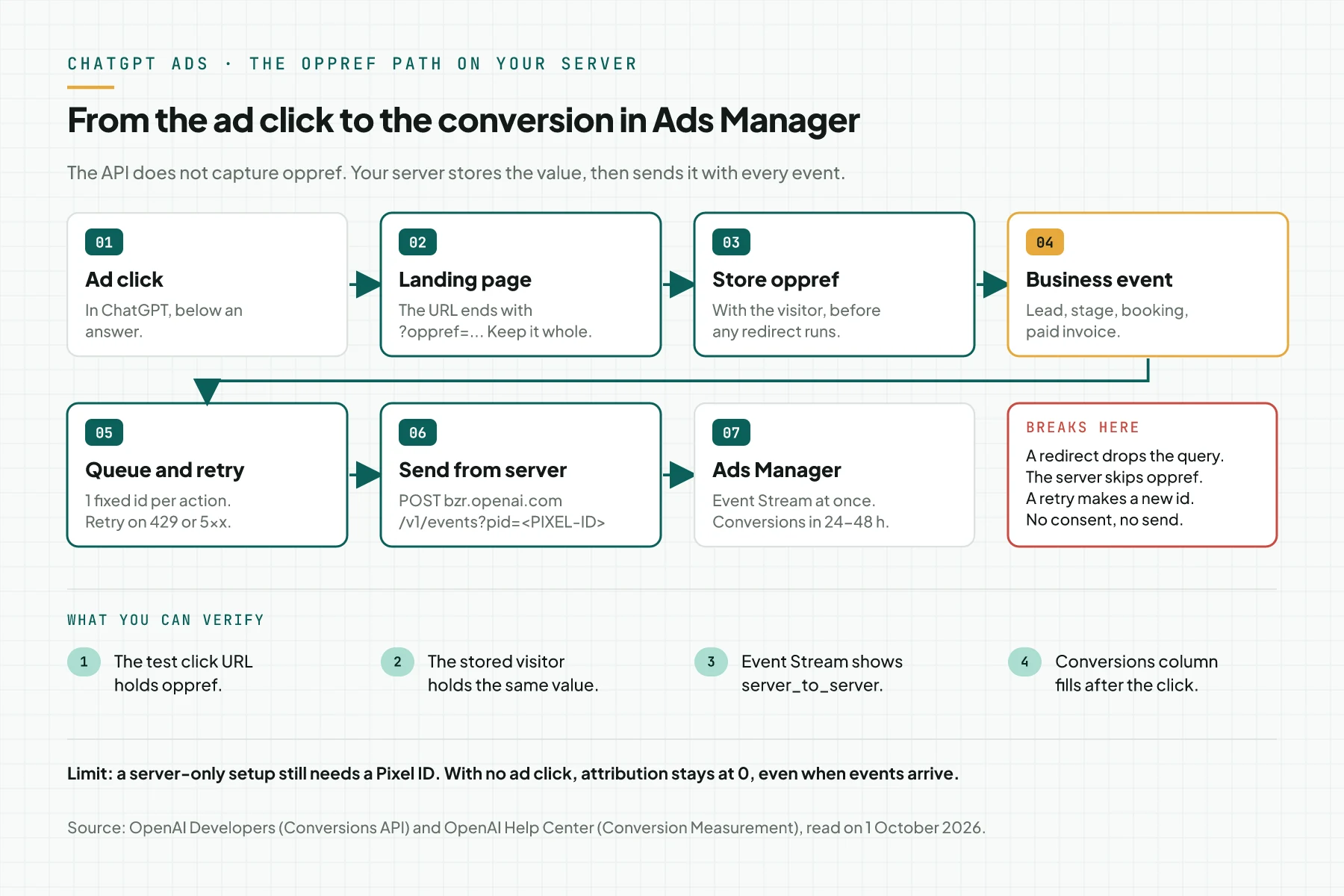
Points 3 and 5 are the weak points. The server stores oppref at point 3, and the queue uses the same id at point 5.
Data source and conversion event
A data source is the receiver of events from your site or your server. A conversion event is a setting that selects one event from that data source as the conversion. A campaign uses that conversion event for reports.
Sending events and creating conversion events are 2 separate steps. The setting does not send events. Source: OpenAI Developers: Conversion Tracking.
oppref: the click reference
OpenAI adds the oppref parameter at the end of the landing page URL. The Pixel stores that value in a first-party cookie. Source: OpenAI Help Center: Conversion Measurement.
The Conversions API does not capture oppref. Your server stores the value and sends it as it is with the event. Do not change the case, and do not cut the value.
OpenAI reports a conversion when 4 conditions are true:
- The event comes from a data source in your account.
- The event matches a conversion event of the campaign.
- The event falls inside the attribution window.
- The event can be linked to a click.
Conversions API: send from the server
The endpoint is POST https://bzr.openai.com/v1/events?pid=<PIXEL-ID>. The header Authorization: Bearer <API-KEY> carries the Conversions API key. The body holds {"events":[...]}.
One request accepts up to 1,000 events. If 1 event fails, the whole batch fails. The option validate_only: true checks the request and saves no event.
OpenAI states that the Conversions API is more reliable than the Pixel alone, and it asks you to send events from your server only. This is a vendor claim. Source: OpenAI Developers: Conversions API.
Standard events and custom events
OpenAI supports 13 event names: app_installed, app_opened, appointment_scheduled, checkout_started, contents_viewed, custom, items_added, lead_created, order_created, page_viewed, registration_completed, subscription_created, and trial_started. Source: OpenAI Developers: Supported Events.
The events app_installed and app_opened exist through the API only. This article does not use them.
The custom event holds an action that has no standard event. It must carry custom_event_name. We use custom events for funnel stages.
Attribution window and report timing
The click-through window is 7, 14, or 30 days. The view-through window is 0 or 1 day.
OpenAI uses last-touch attribution, not multi-touch. Source: OpenAI Help Center: Measure Results.
A conversion appears in reports after 24 to 48 hours. An event that does not match a conversion event of the campaign stays at 0 in reports. OpenAI does not backfill old data.
OpenAI can use modeled measurement. So the numbers in Ads Manager can differ from the number of events that your server sends.
Pixel, Conversions API, or both
This table compares 3 ways to send events. The table follows the OpenAI documentation that we read on 1 October 2026.
| Item | Pixel only | Conversions API only (server-only) | Pixel and Conversions API |
|---|---|---|---|
| Where the event is sent from | The visitor browser | Your server | The browser and the server |
| Installation | Install the Pixel code on the page | No Pixel in the browser. A Pixel ID is still required | Install the Pixel and the server code |
| Where oppref is stored | The Pixel stores it in a first-party cookie | Your server stores it and sends it | The Pixel stores it. The server sends it too |
| Actions outside the browser, such as payments and chats | Not visible | Visible when the server records them | Visible when the server records them |
| Deduplication | Not needed | Not needed | Required: the Pixel ID, the event name, and the id must match |
Source: OpenAI Developers: Conversion Tracking. That document states that a server-only setup still needs a Pixel ID, but you do not install the Pixel in the browser.
Rama Digital recommendation: choose server-only when the valuable action happens on your server or outside the browser. Choose the Pixel and the Conversions API together when the web page also triggers actions. In the second case, send the same id from both sides.
Prerequisites
- An Ads Manager account with access to the Tools › Conversions menu.
- A landing page on your domain that accepts URL parameters.
- A server or Worker that stores visitor data and runs a sending queue.
- A place to keep secrets for the Conversions API key.
- 1 test identity with a dummy email and a dummy phone number.
- 1 test transaction that you can create and cancel.
- Visitor consent for measurement, when the law requires it.
Step 1: Create a data source in Tools › Conversions
Open Tools › Conversions in Ads Manager. The Set up conversion tracking panel shows the first step, Create a data source. Create the data source from that page, then fill in the dialog.
Delete the default text in the Pixel Name field. In our test, the dialog filled in the default name My first pixel. Type your own name after the text is gone, for example ramadigital.id server.
Select the type Web. The text Automatic advanced matching says that the Pixel normalizes and hashes customer data in the browser. A server-only setup installs no Pixel, so you compute the hashes yourself in step 6.
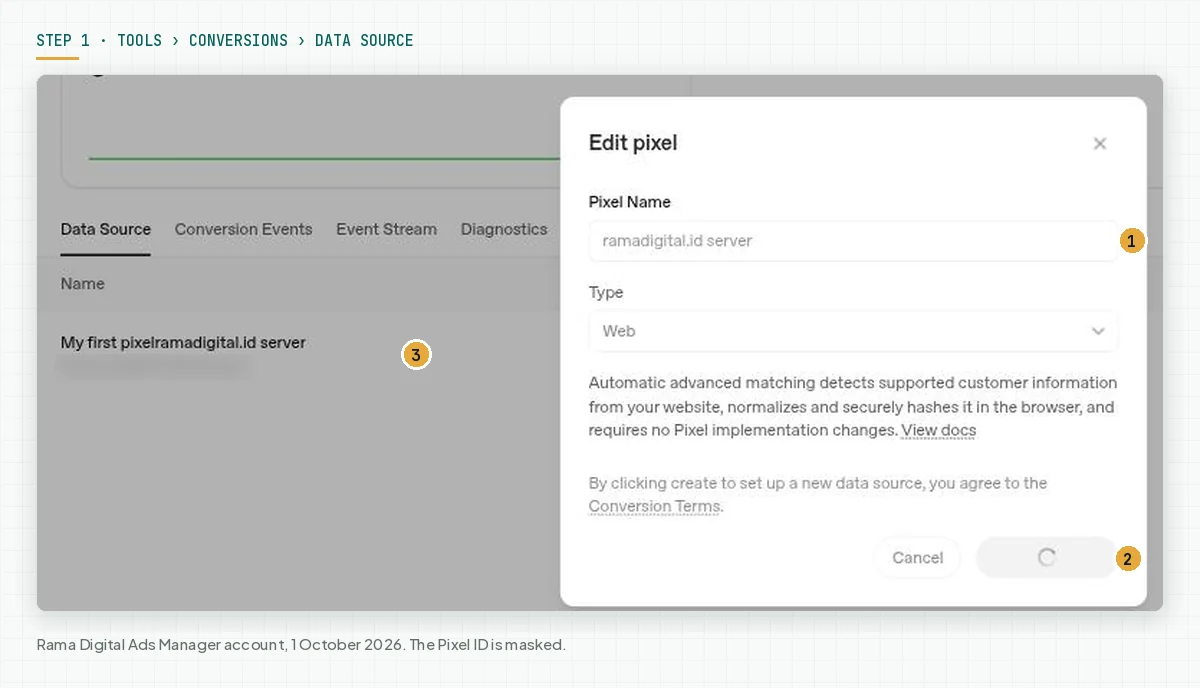
The Create button means that you accept the Conversion Terms. Read the terms before you select the button.
Ads Manager shows the message Data source created after the data source exists. Copy the Pixel ID from the data source row into your server configuration. This article uses the placeholder <PIXEL-ID>.
Verify: the data source row shows the Pixel ID and 0 events. Source: OpenAI Developers: Conversion Tracking.
Step 2: Create a conversion event for each business action
Open the Conversion Events tab on the same page, then select Create. The Create custom conversion dialog has 4 parts. Fill in one dialog for each business action that you want to measure.
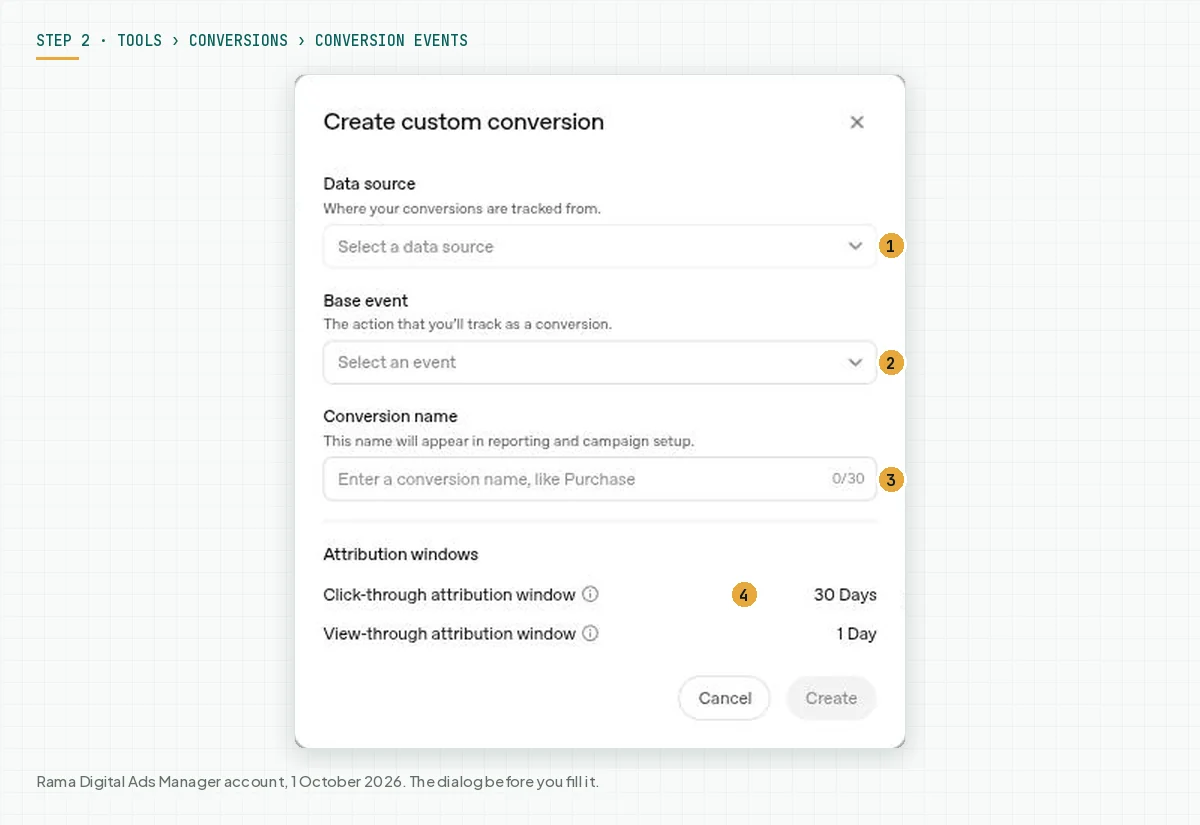
Select your data source in Data source. Select the OpenAI event in Base event. Type a clear name in Conversion name, because that name shows in reports and in campaign settings.
The default attribution window is 30 days for clicks and 1 day for views. OpenAI allows a click window of 7, 14, or 30 days. Source: OpenAI Help Center: Measure Results.
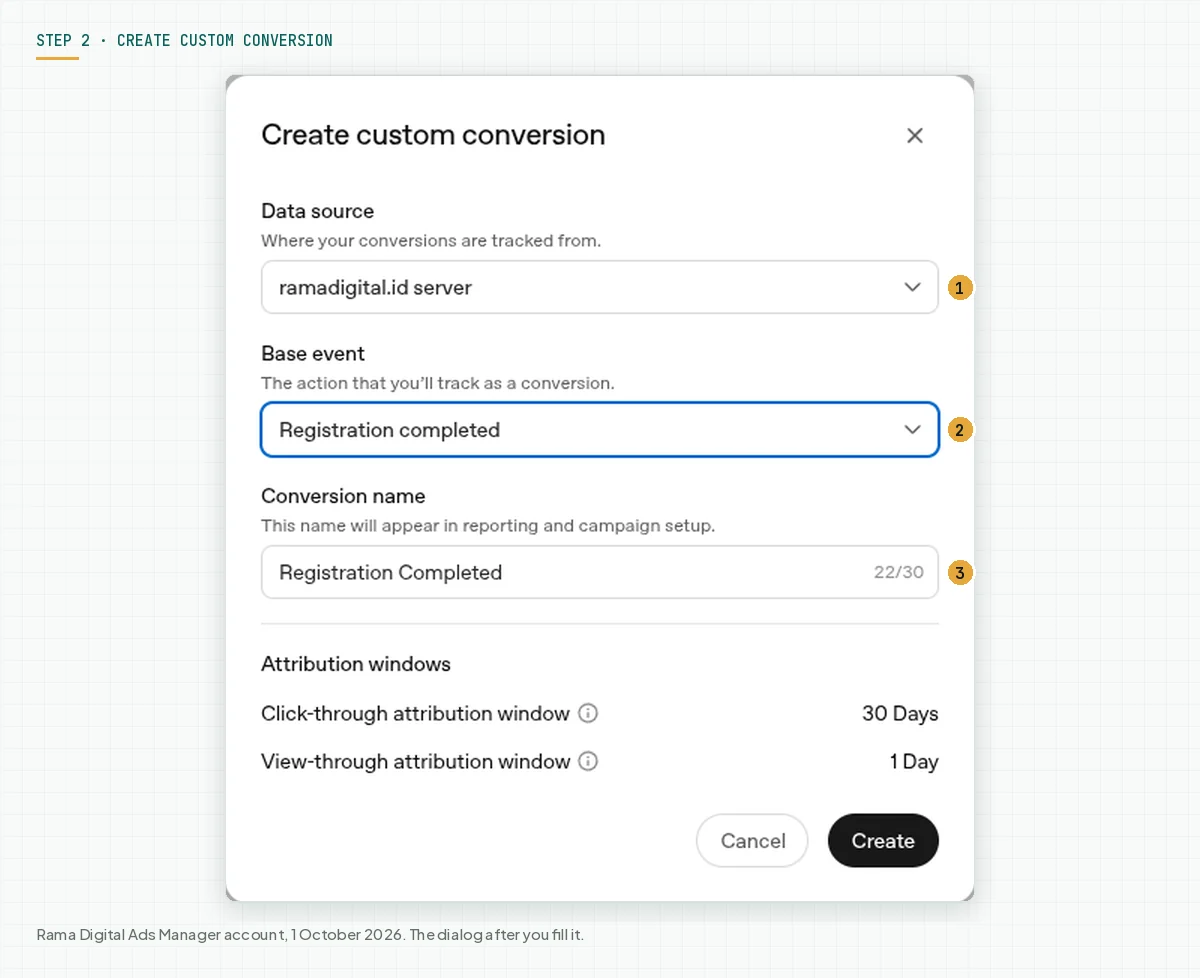
In our test, we created 4 conversion events: Order Created, Lead Created, Appointment Scheduled, and Registration Completed. We did not create a conversion event for checkout_started or for custom events on 1 October 2026. We created all of them before the first event, because OpenAI does not backfill old data.
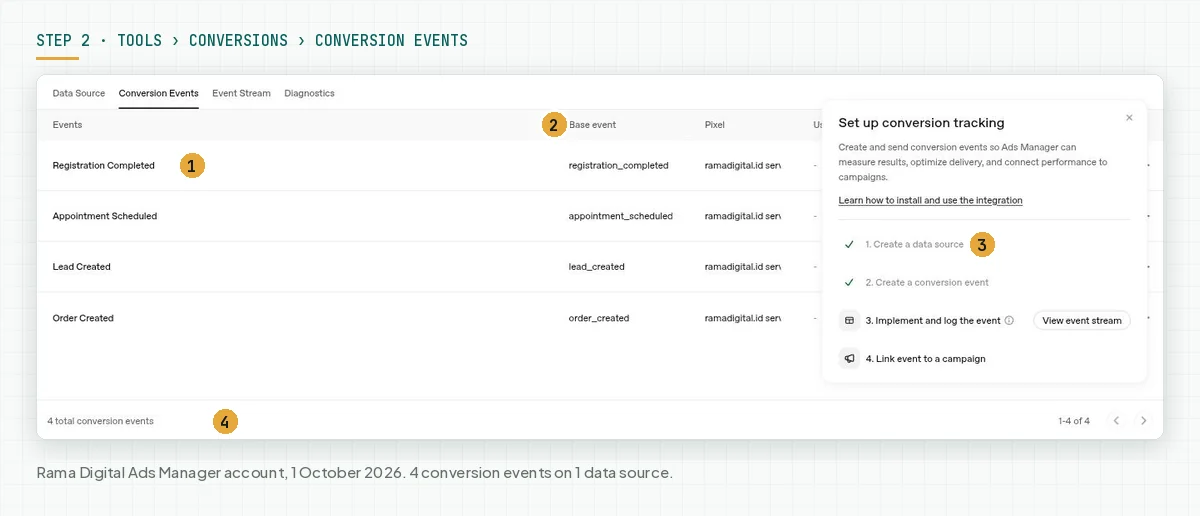
The API documentation also shows a conversion event for a custom event. That setting uses the same custom_event_name as the event that your server sends. We did not create that setting in our account yet.
Verify: the counter shows the number of conversion events that you created, and the panel marks steps 1 and 2. Source: OpenAI Developers: Conversion Tracking.
Step 3: Choose a standard or custom event for each stage
Map each business action and each funnel stage to 1 OpenAI event. Use a standard event when one fits. Use a custom event when none fits.
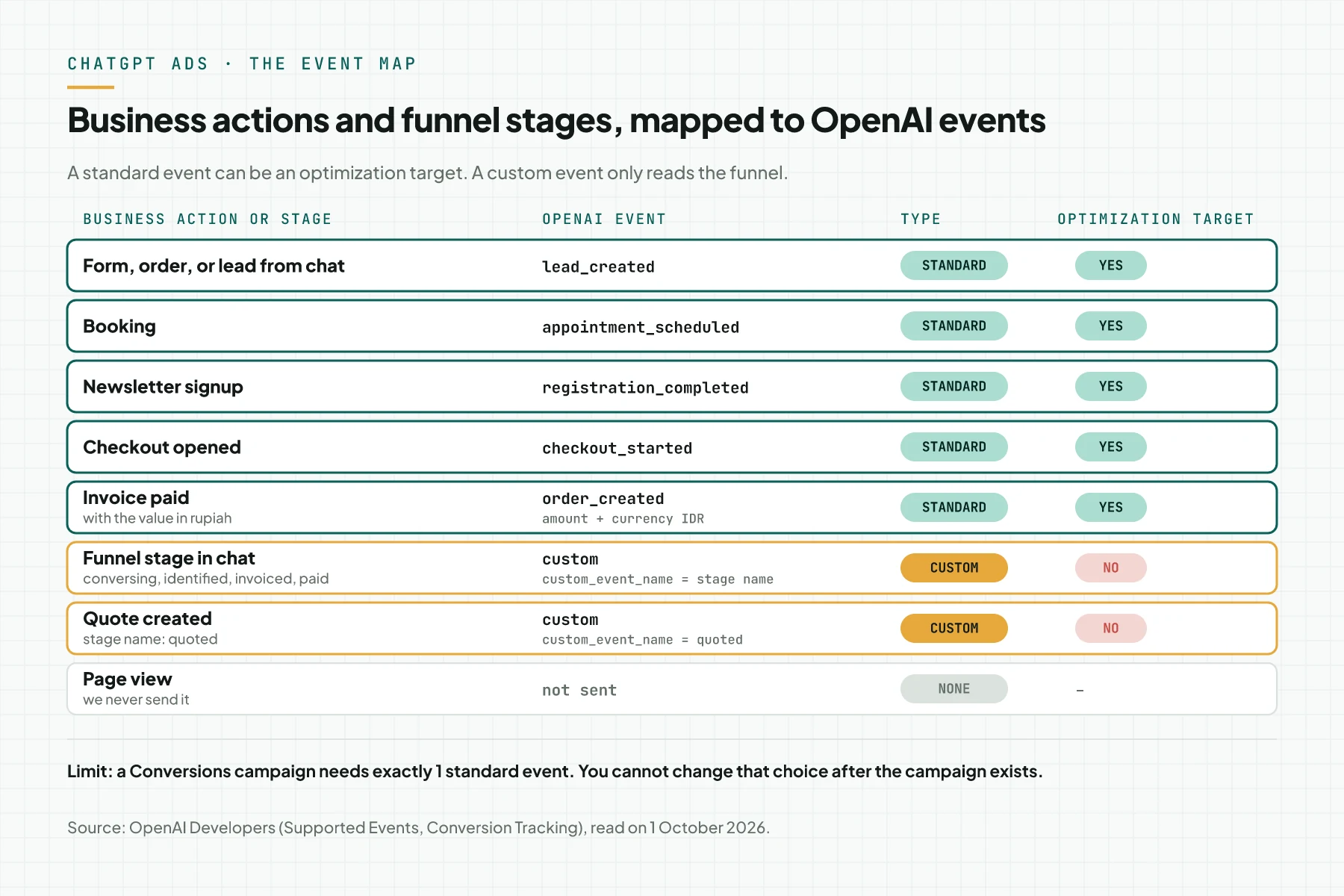
The map above is the map that we use. We send no page views.
A chat funnel stage and a quote become custom events with the stage name. Examples: conversing, identified, quoted, invoiced, and paid. A stage is the position of the customer in the funnel, and a custom event makes that position readable in Event Stream and in reports.
The OpenAI rules for a custom event name:
- Use 1 to 64 characters.
- Use letters, digits, underscores, or hyphens.
- Start and end with a letter or a digit.
- Do not use a standard event name. The API converts the name to lowercase.
Source: OpenAI Developers: Supported Events. If a stage has the same name as a standard event, add a prefix such as stage_.
A custom event cannot be an optimization target. A Conversions campaign needs exactly 1 standard event. Source: OpenAI Help Center: Conversion-Optimized Campaigns.
Rama Digital recommendation: choose the optimization target from the standard event that is closest to money and that really occurs in your account. If sales happen in chat, choose lead_created. If payments happen online, choose order_created.
We did not test whether a custom event can be a source for an audience. Check the Audiences menu in your account before you rely on that function.
Verify: each row of your map has an event name, a type, and a yes or no answer for the optimization target.
Step 4: Create a Conversions API key and store it as a server secret
Open the Conversion keys section on the Conversions page, then create a new key. The Conversions API key authenticates requests to bzr.openai.com only. Source: OpenAI Developers: Conversion Tracking.
Ads Manager shows the key with a masked value in that section. Copy the key value into the secret store of your server. In our test, we stored the key as a Worker secret, not in code, and we show no image of the key in this article.
# Cloudflare Workers: wrangler asks for the key value in the terminal
npx wrangler secret put OPENAI_CAPI_KEY

# Other servers: fill OPENAI_CAPI_KEY from a secret manager, not from a file in the repo
Send events from the server only. Do not put the key in the browser, in the repo, or in logs. If another person sees the key, create a new key and replace the secret.
Verify: the secret list command shows the name OPENAI_CAPI_KEY without its value. Your server code reads that secret at runtime.
Step 5: Capture oppref and keep it through redirects
Store oppref on the first visit, before a redirect or a form changes the URL. OpenAI adds the value at the end of the landing page URL, and the API does not capture it for you. Source: OpenAI Developers: Conversions API.
The sample below stores oppref with the visitor. The function names and the store are generic examples only.
// Run this on every request to the landing page.
export async function recordLanding(request, store) {
  const url = new URL(request.url);
  const oppref = url.searchParams.get('oppref');
  if (!oppref) return;
  // Store the value as it is. Do not edit, cut, or change the case.
  await store.saveVisit({
    visitorId: readVisitorId(request),
    oppref: oppref,
    landingPath: url.pathname,
    seenAt: Date.now(),
  });
}
In our implementation, the server stores oppref on the visitor row during the visit. The server queue sends events to OpenAI. The queue sends only when the visitor accepted marketing cookies.
Keep oppref through every redirect. A redirect that drops the query string breaks the click path. Use a redirect that copies the whole query.
// A redirect that keeps the whole query string, with oppref and UTM.
export function redirectKeepingQuery(request, newPath) {
  const from = new URL(request.url);
  const to = new URL(newPath, from.origin);
  to.search = from.search;
  return Response.redirect(to.toString(), 308);
}
Check your redirect with one command. Replace the domain with your domain, and use a test value, not a real oppref.
curl -sI "https://www.example.com/kontak?oppref=UJI123&utm_source=chatgpt" | grep -i "^location"The location line must hold oppref=UJI123 and utm_source=chatgpt. If one of them is missing, fix that redirect before you continue. We found this case in our old redirect.
Verify: open the landing page with ?oppref=UJI123, then check that the visitor data holds UJI123. The test value does not link to a click. It only proves that your server stores and forwards a value.
Step 6: Send events from the server and test with validate_only
Send each business action as one event with a POST to the Conversions API. Start with validate_only: true, because a validation request does not appear in event monitoring. Source: OpenAI Developers: Conversion Tracking.
This sample request validates 1 lead_created event. Replace timestamp_ms with the real time of the action.
curl -X POST "https://bzr.openai.com/v1/events?pid=<PIXEL-ID>" \
  -H "Authorization: Bearer <API-KEY>" \
  -H "Content-Type: application/json" \
  --data '{
    "validate_only": true,
    "events": [
      {
        "id": "lead-L1001",
        "type": "lead_created",
        "timestamp_ms": 1791166800000,
        "oppref": "<OPPREF-FROM-URL>",
        "action_source": "web",
        "source_url": "https://www.example.com/kontak",
        "user": {
          "emails_sha256": ["<SHA-256-HEX>"],
          "phone_numbers_sha256": ["<SHA-256-HEX>"]
        },
        "data": { "type": "customer_action" }
      }
    ]
  }'
The field rules that people get wrong most often:
idis required. Reuse the same id on a retry.timestamp_msis at most 7 days in the past and at most 10 minutes in the future.source_urlis required whenaction_sourceisweb.opprefis optional. Send its value as it is.data.typemust match the event type, as the table below shows.
Source: OpenAI Developers: Conversions API. This table shows data for the events that we use.
| Action | type | custom_event_name | data |
|---|---|---|---|
| Lead from a form or chat | lead_created | None | {"type":"customer_action"} |
| Booking | appointment_scheduled | None | {"type":"customer_action"} |
| Newsletter signup | registration_completed | None | {"type":"customer_action"} |
| Checkout opened | checkout_started | None | {"type":"contents"} |
| Paid invoice of Rp1,500,000 | order_created | None | {"type":"contents","amount":150000000,"currency":"IDR"} |
| Stage quoted | custom | quoted | {"type":"custom"} |
Hash customer data before you send it. OpenAI asks for SHA-256 as a lowercase hex string.
Email: trim the edges, then lowercase. Phone number: digits with the country code, no plus sign, and no leading zero. For example, +62 812-3456-7890 becomes 6281234567890.
Send city, region, postal code, and country as raw values. Source: OpenAI Developers: Conversions API.
The functions below build an event, compute the hashes, and send a batch with retries. The code repeats a request only for the codes 429 and 5xx.
const ENDPOINT = 'https://bzr.openai.com/v1/events';

async function sha256Hex(value) {
  const bytes = new TextEncoder().encode(value);
  const digest = await crypto.subtle.digest('SHA-256', bytes);
  return [...new Uint8Array(digest)].map((b) => b.toString(16).padStart(2, '0')).join('');
}

// Email: trim the edges, then lowercase.
const normalizeEmail = (email) => email.trim().toLowerCase();

// Phone: digits only, with the country code, no + and no leading zero.
// +62 812-3456-7890 and 0812-3456-7890 become 6281234567890.
function normalizePhone(phone, defaultCountry = '62') {
  const hasPlus = phone.trim().startsWith('+');
  let digits = phone.replace(/\D/g, '');
  if (!hasPlus && digits.startsWith('0')) digits = defaultCountry + digits.replace(/^0+/, '');
  return digits.replace(/^0+/, '');
}

async function buildEvent(action) {
  const user = {};
  if (action.email) user.emails_sha256 = [await sha256Hex(normalizeEmail(action.email))];
  if (action.phone) user.phone_numbers_sha256 = [await sha256Hex(normalizePhone(action.phone))];
  const event = {
    id: action.id, // a stable id from your action row, not a random number
    type: action.type,
    timestamp_ms: action.occurredAtMs,
    action_source: 'web',
    source_url: action.sourceUrl,
    data: action.data,
  };
  if (action.oppref) event.oppref = action.oppref;
  if (action.customEventName) event.custom_event_name = action.customEventName;
  if (Object.keys(user).length) event.user = user;
  return event;
}

async function sendEvents({ pixelId, apiKey, events, validateOnly = false }) {
  const url = ENDPOINT + '?pid=' + encodeURIComponent(pixelId);
  const body = JSON.stringify({ validate_only: validateOnly, events });
  for (let attempt = 1; attempt <= 4; attempt += 1) {
    let response;
    try {
      response = await fetch(url, {
        method: 'POST',
        headers: { Authorization: 'Bearer ' + apiKey, 'Content-Type': 'application/json' },
        body, // the same body on every attempt, so the event ids stay the same
      });
    } catch {
      response = null; // network failure: try again
    }
    if (response && response.ok) return;
    const retryable = !response || response.status === 429 || response.status >= 500;
    if (!retryable || attempt === 4) {
      throw new Error('Event rejected: ' + (response ? response.status + ' ' + (await response.text()) : 'no response'));
    }
    await new Promise((resolve) => setTimeout(resolve, 500 * 2 ** attempt));
  }
}
Keep 4 rules in your queue:
- Write the event to storage before you send it.
- Use the id of the action row, not a random number.
- Drop an event that is older than 7 days, because the API rejects it.
- Send batches that are safe to repeat, because 1 failed event fails the whole batch.
Send money as an integer in the minor unit of the currency, and send currency with amount. According to ISO 4217, IDR has 2 decimals. So Rp1,500,000 becomes amount 150000000 with currency IDR.
The OpenAI documentation does not mention IDR. This is our finding, not an official fact. Send 1 test transaction, then check the Order Created Sales column after 24 to 48 hours.
Verify: the validate_only request succeeds for each event type in the table. After that, send 1 test event with validate_only: false.
Step 7: Verify in Diagnostics and Event Stream
Open the Diagnostics tab before you send the first event. On our account, the tab shows 3 warnings:
- No active campaigns use conversion events
- No recent server-to-server events
- No recent conversion events
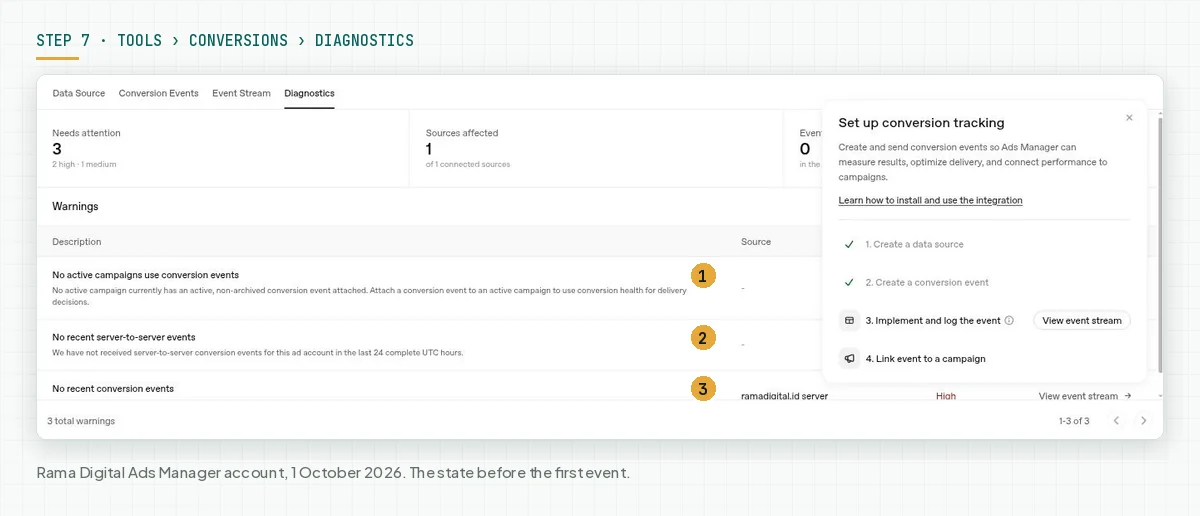
The second warning counts 24 complete UTC hours. Send the test event from step 6, then open the Event Stream tab. Check that warning again after the first event arrives.
Event Stream shows the latest events. The OpenAI monitoring endpoint returns a sample of events from about the last 15 minutes, so check right after you send.
Browser events use the channel pixel_sdk, and server events use server_to_server. Source: OpenAI Developers: Conversion Tracking.
Check that the data source in that row is the one that you created in step 1.
Event Stream proves that the event arrived. Event Stream does not prove attribution. OpenAI reports a conversion only when the event matches a conversion event of the campaign and links to a click.
Verify: Event Stream shows the test event with the channel server_to_server within 15 minutes after you send it.
Step 8: Link the conversion events to a campaign
Link the conversion events to a campaign so that Ads Manager reports the results. The Set up conversion tracking panel shows step 4, Link event to a campaign. Select the campaign and the conversion event that you want to monitor.
The OpenAI rules for this step:
- A Clicks or ImpressionsImpressionThe number of times your ad or page appeared on a screen. An impression is not a person and not a search.Open the glossary campaign can monitor conversions without a change of objective.
- A Conversions campaign needs exactly 1 active standard conversion event.
- You cannot change the campaign objective after the campaign exists.
- You cannot replace the conversion event of a Conversions campaign after the campaign exists.
- A custom event cannot be an optimization target.
Source: OpenAI Developers: Conversion Tracking and OpenAI Help Center: Conversion-Optimized Campaigns. Billing stays on Clicks or Impressions. OpenAI does not charge per conversion.
Rama Digital recommendation: start with a Clicks campaign and add conversion events to monitor. Choose a Conversions campaign after you know which standard event is the target, because you cannot change that choice. This rule holds when you do not have stable event data yet.
Add the OpenAI dynamic URL parameters to the ad URL: {campaign_id}, {ad_group_id}, {ad_id}, and {ad_account_id}. Store their values with oppref, so that you read results for each ad in your own storage. Source: OpenAI Help Center: Measure Results.
The Rama Digital ads were not live on 1 October 2026. We installed the tracking before the first ad. This article reports no conversion numbers, because attribution appears only after clicks arrive.
Verify: the campaign shows the conversion event that you selected. After clicks arrive, the conversion column fills within 24 to 48 hours.
Worked example: 1 day with dummy data
This example is a simulation with dummy data for 1 fictional visitor on Monday, 5 October 2026. The business is fictional, and the numbers are not customer results. Times use WIB.
| Time | Event | What the server records | Event to OpenAI |
|---|---|---|---|
| 09:10 | The visitor clicks the ad and opens /kontak?oppref=SIM-A1B2 | A new visitor row with oppref SIM-A1B2 | None. We do not send page views |
| 09:12 | The visitor accepts marketing cookies | The consent is recorded | None |
| 09:20 | The visitor sends the contact form | Lead L1001 | lead_created, id lead-L1001 |
| 09:35 | The chat moves to the stage conversing | Stage conversing | custom, name conversing |
| 10:05 | The visitor gives a phone number | Stage identified | custom, name identified |
| 10:40 | The team sends a quote of Rp1,500,000 | Quote Q2001 | custom, name quoted |
| 11:15 | The visitor books a 30-minute slot | Booking B3001 | appointment_scheduled |
| 11:30 | The team issues an invoice | Stage invoiced | custom, name invoiced |
| 11:32 | The visitor opens the payment page | Checkout opened | checkout_started |
| 13:00 | The payment of Rp1,500,000 arrives | Invoice paid, stage paid | order_created, amount 150000000 IDR, and custom name paid |
| 13:01 | OpenAI answers 503 for the payment batch | The queue schedules a retry | The queue sends the same batch again with the same ids |
The server sends 9 events for 1 visitor. Of those 9 events, 3 match a conversion event that we created: lead_created, appointment_scheduled, and order_created. Ads Manager reports those 3 events as conversions when a matching click exists.
The event checkout_started and the 5 custom events have no conversion event. They do not add to the conversion column. They still help you read the stage where customers stop.
Checklist before you raise the budget
- Create the data source and store the Pixel ID in the server configuration. Owner: ads admin. Evidence: an image of the data source row with a masked Pixel ID.
- Create 1 conversion event for each action that you measure. Owner: ads admin. Evidence: an image of the Conversion Events tab.
- Store the Conversions API key as a secret, not in the repo. Owner: developer. Evidence: a list of secret names without values.
- Confirm that the landing page stores a test
opprefand that redirects keep the query. Owner: developer. Evidence: thelocationline from curl. - Run
validate_onlyfor each event type. Owner: developer. Evidence: a log of successful responses. - Send 1 test event and see it in Event Stream with the channel
server_to_server. Owner: developer. Evidence: an image of Event Stream. - Test a retry with the same id. Owner: developer. Evidence: a queue log with 2 attempts and 1 id.
- Test a refusal of marketing cookies and confirm that 0 events are sent. Owner: product owner. Evidence: a queue log for the test visitor.
- Create 1 test transaction and compare the Order Created Sales column with the transaction value. Owner: ads admin. Stop criterion: stop raising the budget if Event Stream is empty 15 minutes after the test event. Also stop if the Sales number differs from the transaction value.
Frequently asked questions
Do I need to install the OpenAI Pixel in the browser? No, not for a server-only setup. You still need the Pixel ID from the data source, but OpenAI states that you do not need to install the Pixel in the browser.
Does the Conversions API capture oppref by itself? No, your server must store oppref from the landing page URL and send it as it is with the event. The Pixel stores that value in a first-party cookie, but the API does not.
Can I send funnel stages as custom events and optimize for them? You can send a stage as a custom event, but you cannot optimize for a custom event. A Conversions campaign needs exactly 1 standard event.
How long until conversions appear in reports? Conversions appear 24 to 48 hours after the event. An event with no matching conversion event stays at 0, and OpenAI does not backfill old data.
How do I send a value in rupiah? Send an integer in the minor unit with currency IDR, for example 150000000 for Rp1,500,000. The OpenAI documentation does not mention IDR, so check the Order Created Sales column after 1 test transaction.
How do I prevent duplicate events when I use both the Pixel and the Conversions API? Use the same Pixel ID, event name, and id on both sides, and use the same custom_event_name for a custom event. OpenAI keeps the first event that arrives and ignores the duplicates.
Next step
This tracking gives OpenAI a signal that you can inspect. Ad results still depend on the offer, the ad creative, and how fast you answer chats. We promise no conversion numbers, because our ads are not live yet.
No-code option: if you do not want to build the server path yourself, use Konektor. Setup takes about 5 minutes: paste the Pixel ID and the Conversions API key, test the connection, then add the ad link template. Konektor gives a free 14-day trial with no credit card, and the steps are in the Konektor guide to connect ChatGPT Ads.
If you want every ad click linked to a lead and a payment, the Attribution Bridge service sets up this path on your server. If you want to check the readiness of your account and landing page first, book a 30-minute Initial Consultation.
Sources
- Konektor: Connect ChatGPT Ads
- OpenAI Developers: Conversions API
- OpenAI Developers: Supported Events
- OpenAI Developers: Conversion Tracking
- OpenAI Help Center: Conversion Measurement
- OpenAI Help Center: Measure Results
- OpenAI Help Center: Conversion-Optimized Campaigns
- OpenAI: ChatGPT Ads expands to Southeast Asia and Taiwan
- ISO: ISO 4217 currency codes