OpenClaw 2026.9.3 shipped on September 8, 2026, with two operational changes that matter to teams: the supported Node.js range has a new minimum, and the update flow rehearses changes in isolated candidate state before activation. For production deployments, schedule this upgrade after checking Node.js, plugins, backups, and staging. Do not replace the runtime without a compatibility test.
Update rehearsal means that OpenClaw prepares and validates a candidate change away from the active state. If validation fails, the process can retain a failure or rollback result instead of treating the update as successful. This is different from running an installer and assuming that the Gateway will recover by itself.
What changed in OpenClaw 2026.9.3?
The official OpenClaw release records version 2026.9.3 as published on GitHub on September 8, 2026. Its main operational highlight is a safer update path: core and plugin changes are rehearsed in isolated candidate state, eligible migrations from 2026.9.2 are supported, and abandoned update records can be recovered without stopping a healthy matching Gateway. Read the OpenClaw 2026.9.3 release notes.
The second change affects operators and plugin maintainers. OpenClaw 2026.9.3 requires Node.js 24.16.0 or newer on the 24.x line, or Node.js 26.1.0 or newer; Node.js 26 is recommended. Node.js 22, 23, and 25 are unsupported, as are Node.js 24 or 26 versions below those floors. OpenClaw's official documentation connects the runtime rule to avoiding SQLite text truncation, so check the runtime before updating OpenClaw, not after the Gateway fails. See the OpenClaw Node.js requirements.
| Check | Supported result | Operator action |
|---|---|---|
| Node.js | 24.16.0+ or 26.1.0+ | Upgrade Node.js first when below the floor |
| Node.js 22, 23, or 25 | Unsupported | Do not start the OpenClaw 2026.9.3 rollout |
| Node.js 26 | Recommended line | Validate native dependencies and the service manager |
| OpenClaw 2026.9.2 | Supported migration path | Confirm a tested backup and rollback target |
What can break if Node.js and plugins are not checked?
If a deployment uses Node.js outside the new range, the upgrade may stop at runtime validation or run with an unsafe Node and SQLite combination. The official documentation names text truncation as the risk. In an agenticAgenticA way of working where an AI agent performs the routine steps and a person checks and approves the result.Open the glossary system, that can affect transcripts, state, tool results, or longer configuration data. Do not claim that every installation will fail; the risk depends on the Node version, SQLite library, data shape, and deployment path.
Plugin maintainers face a separate compatibility risk. OpenClaw 2026.9.3 removes several broad compatibility surfaces, including the root SDK and compat barrel, and changes some imports and structured callbacks. A plugin that still imports a removed surface may fail to load. The official OpenClaw Plugin SDK migration guide explains the move to focused subpaths and the new contracts. This matters to teams that maintain channel, provider, tool, or internal integration plugins.
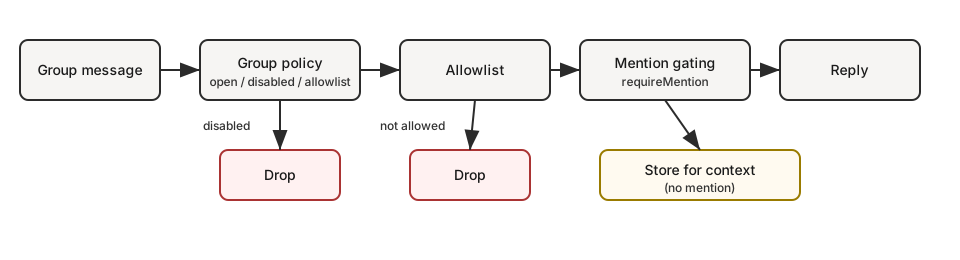
Validation does not stop at the installer. The official OpenClaw v2026.9.3 group-message-flow diagram shows group policy, allowlist, and mention gating before a reply. Therefore, post-upgrade acceptance tests should check the channel paths the deployment actually uses, not only the Gateway process status. This diagram is not a claim about a new 2026.9.3 feature; it is a reference for operational behavior that should remain tested. See the OpenClaw group message flow diagram.
For agentic workflow context, the Agentic AI workflow article covers access boundaries and approval at the process level. The OpenClaw 2026.9.2 article covers the earlier multi-agent change; this article focuses on the runtime and update behavior in 2026.9.3.
| Deployment condition | Decision | Reason |
|---|---|---|
| Supported Node.js, plugins pass tests | Schedule a controlled rollout | Rehearsal and recovery improvements can be used with measured risk |
| Node.js is below the floor | Delay OpenClaw and upgrade Node.js first | OpenClaw 2026.9.3 has a new runtime floor |
| Plugin uses legacy imports | Audit and migrate the plugin | Removed SDK surfaces can stop the plugin from loading |
| No staging or tested backup | Do not roll out to production | Rehearsal does not replace operator-owned backups and acceptance tests |
Safe upgrade checklist for operations teams
- Record the current version with
node -vand identify the service manager that runs the Gateway. - If Node.js is below 24.16.0 or 26.1.0, upgrade Node.js in staging first. Node.js 26 is the OpenClaw recommendation, but still test native dependencies.
- Inventory plugins and search for imports from
openclaw/plugin-sdk,openclaw/plugin-sdk/compat, or other legacy surfaces named in the migration guide. - Take a restorable backup and keep the current OpenClaw version as the rollback target.
- Test the 2026.9.3 upgrade in staging. Check Gateway startup, chat, tool calls, MCPMCPA standard that lets an AI program use your tools and data under clear permissions.Open the glossary, cron, browser, approvals, and result delivery.
- After rehearsal passes, roll out to one instance or agentAI agentAn AI program that performs work steps by itself, for example reading a message, drafting a reply, and recording the result.Open the glossary first. Verify logs, health checks, transcripts, and plugin status before expanding the rollout.
- If the update fails, treat the result as failed. Do not call the deployment successful only because the installer finished.
Operational conclusion: should you upgrade now?
The practical answer is: schedule it, but do not upgrade blindly. For deployments already using Node.js 24.16.0+ or 26.1.0+, with a tested backup and no legacy SDK imports, OpenClaw 2026.9.3 is worth testing in a controlled rollout because its update and recovery path is more defensive. For deployments using Node.js 22, 23, 25, an older Node release, or legacy plugins, the first action is not to run the update. Fix compatibility and test in staging first.
Questions and answers
When was OpenClaw 2026.9.3 released?
OpenClaw 2026.9.3 was published on September 8, 2026, according to the GitHub release metadata and official release notes.
Which Node.js versions are supported?
Use Node.js 24.16.0 or newer on the 24.x line, or Node.js 26.1.0 or newer. Node.js 26 is recommended.
Must OpenClaw 2026.9.3 be upgraded today?
Do not perform a blind upgrade. Schedule it after Node.js, plugins, backup, staging, and acceptance tests are ready.
What is the main plugin risk?
A plugin that still uses the removed root SDK, compat barrel, or legacy imports may fail to load. Follow the official SDK migration guide.
Does update rehearsal replace a backup?
No. Rehearsal helps validate an update candidate, but a restorable backup and rollback target remain the operator's responsibility.
Next action: ask the deployment owner for the Node.js check, plugin inventory, and staging evidence before setting the OpenClaw 2026.9.3 production rollout date.